

This Strange Technique Will Help You Get Over Writer's Block
If you’re a writer — of books, essays, scripts, blog posts, whatever — you’re familiar with the phenomenon: the blank screen, a looming deadline, and a sinking feeling in your gut that pairs poorly with the jug of coffee you drank earlier. Here’s how to fix it using your voice.
Ever heard of Automatic Transcription? Yah, me neither. It is an unusual way writers can get rid of writer’s block. This guest article by Jason Kincaid was originally published by Descript and has been posted here with their permission:
If you’re a writer — of books, essays, scripts, blog posts, whatever — you’re familiar with the phenomenon: the blank screen, a looming deadline, and a sinking feeling in your gut that pairs poorly with the jug of coffee you drank earlier.
If you know that rumble all too well: this post is for you. Maybe it’ll help you get out of a rut; at the very least, it’s good for a few minutes of procrastination.
Here’s the core idea: thinking out loud is often less arduous than writing. And it’s now easier than ever to combine the two, thanks to recent advances in speech recognition technology.

Of course, dictation is nothing new — and plenty of writers have taken advantage of it. Carl Sagan’s voluminous output was facilitated by his process of speaking into an audio recorder, to be transcribed later by an assistant (you can listen to some of his dictations in the Library of Congress!) And software like Dragon’s Naturally Speaking has offered automated transcription for people with the patience and budget to pursue it.
But it’s only in the last couple of years that automated transcription has reached a sweet spot — of convenience, affordability and accuracy—that makes it practical to use it more casually. And I’ve found it increasingly useful for generating a sort of proto-first draft: an alternative approach to the painful process of converting the nebulous wisps inside your head into something you can actually work with.
I call this process idea extraction (though these ideas may be more accurately dubbed brain droppings).
Part I: Extraction

Here’s how my process works. Borrow what works for you and forget the rest — and let me know how it goes!
Pick a voice recorder. Start talking. Try it with a topic you’ve been chewing on for weeks — or when an idea flits your head. Don’t overthink it. Just start blabbing.
The goal is to tug on as many threads as you come across, and to follow them as far as they go. These threads may lead to meandering tangents— and you may discover new ideas along the way.
A lot of those new ideas will probably be embarrassingly bad. That’s fine. You’re already talking about the next thing! And unlike with text, your bad ideas aren’t staring you in the face.
Consider leaving comments to yourself as you go — e.g. “Maybe that’d work for the intro”. These will come in handy later.
For me, these recordings run anywhere from 20–80 minutes. Sometimes they’re much shorter, in quick succession. Whatever works.
Part II: Transcription
Once I’ve finished recording, it’s time to harness ⚡️The Power of Technology⚡️
A little background: over the last couple of years there’s been an explosion of tools related to automatic speech recognition (ASR) thanks to huge steps forward in the underlying technologies.
Here’s how ASR works: you import your audio into the software, the software uses state-of-the-art machine learning to spit back a text transcript a few minutes later. That transcript won’t be perfect—the robots are currently in the ‘Write drunk’ phase of their careers. But for our purposes that’s fine: you just need it to be accurate enough that you can recognize your ideas.
Once you have your text transcript, your next step is up to you: maybe you’re exporting your transcript as a Word doc and revising from there. Maybe you’re firing up your voice recorder again to dictate a more polished take. Maybe only a few words in your audio journey are worth keeping — but that’s fine too. It probably didn’t cost you much (and good news: the price for this tech will continue to fall in the years ahead).

A few more tips:
Use a recorder/app that you trust. Losing a recording is painful — and the anxiety of losing another can derail your most exciting creative moments (“I hope this recorder is working. Good, it is... @#*! where was I?”)
Audio quality matters when it comes to automatic transcription. If your recording has a lot of background noise or you’re speaking far away from the mic, the accuracy is going to drop. Consider using earbuds (better yet: Airpods) so you can worry less about where you’re holding the recorder.
Find a comfortable space. Eventually you may get used to having people overhear your musings, but it’s a lot easier to let your mind “go for a walk” when you’re comfortable in your environment.
Speaking of walking: why not go for a stroll? The pains of writing can have just as much to do with being stationary and hunched over. Walking gets your blood flowing — and your ideas too.
I have a lot of ideas, good and bad, while I’m thinking out loud and playing music at the same time (in my case, guitar — but I suspect it applies more broadly). There’s something about playing the same four-chord song on auto pilot for the thousandth time that keeps my hands busy and leaves my mind free to wander.

The old ways of doing things — whether it’s with a keyboard or pen — still have their advantages. Putting words to a page can force a sort of linear thinking that is otherwise difficult to maintain. And when it comes to editing, it’s no contest: QWERTY or bust.
But for getting those first crucial paragraphs down (and maybe a few keystone ideas to build towards)? Consider talking to yourself. Even if you wind up with a transcript full of nothing but profanity — well, have you ever seen a transcript full of profanity? You could do a lot worse.

The Warning Signs of a Trouble Client & How to Safeguard Your Writing Business
There’s nothing worse than a crappy client. As a freelance writer, one of the most important skills you can hone is how to sidestep a potentially bad client.
It’s inevitable. As a freelance writer, you’re going to come across some real turds. There will be people who want to pay you pennies. People who ask too much for too little. People who refuse to pay.
One of the most important skills you can hone is how to sidestep a potentially bad client. Knowing how to do this well will save you time and allow you to make more money in the long run.

Ugg…One of those
I often get emails asking me to write thousands of words for at $10 to $20 a pop. I typically end up telling them my regular clients pay me more than quadruple that or more for the same services. This usually makes them angry. (Not always, but usually.) Low-balling is the first sign that a client is not worth your time. They often haggle, then don't pay at all. If they do pay, they'll be big pains in the ass the entire way through.
This is just one sign of a client that will give you more headaches than dollar signs. Here's some more.
How to tell if a client will be a PITA

He insists on calling you, even if you tell them you would rather use email. It's easier to say there was a "misunderstanding" in the agreement if it's verbal.
She tells you she's on a budget. Oh, lord. This is code for stingy and wants articles for $3 each, tops.
He wants you to write a "sample" article on a topic he picks. Honey, your clips are enough. Unless that article is a paid sample or the company is huge and reputable, just say no.
She needs the article ASAP. Unless she's willing to pay for ASAP, pass.
email riten lik this. their uprofess inal and un trust worthy. (Yes, I wrote it that way as an illustration. Don't send me emails!)
Ghosts for several days before answering your emails.
Hates everything you do or wants major edits. Typically, the cheaper the client, the more edits they'll want.
Has a long chain of command that must approve all work you do.
Promises "exposure."
Promises that they will pay more in the future if their business takes off. This should go without saying! Damn skippy you will.
Barrages you with emails in a very short amount of time about the project, even though you haven't agreed to do it yet.
How to prevent bad clients

Well, obviously, first you look for any of the warning signs above. There are some other tactics you can take to ensure you always get paid and you have happy working experiences. You can read more about how to deal with clients here, but here’s some good tips to start:
Be sure to get payment upfront (or at least half). If they refuse they can't afford you or don't trust you. Neither make for a happy work environment.
Make your terms clear on your website. Here's a look at mine.
Don't be afraid to say no if you get a funny feeling. Listen to your gut.
Even if you're new to freelance writing, don't let a potential client bully you into insulting rates. Even as a newbie you still know more than your client, and that's worth a lot.
Avoid scope creep by refusing to do work that wasn’t agreed to without adding more money to your fee.
Make sure you get everything in writing, whether that be a formal contract or emails. Trust me. You'll thank me later when crap hits the fan.
Need more good paying clients? Read my book The Fluff-Free Freelance Writing Master Course: The only course that gives you concrete, actionable information to building a successful freelance business without any fluff.

How Much Should I Get Paid for Freelance Writing?
"How much should I get paid for freelance writing?" I hear this question all the time. For my No-Fluff readers out there I'll break it down.
"How much should I get paid for freelance writing?" I hear this question all the time. I could just answer with a vague, "It depends," (because it really does!) but for my No-Fluff readers out there I'll break it down. Here are the basics to determining how much to charge as a freelance writer, no matter if you’re new, or have been a professional writer for years.

How Much Money Do You Need?
Before anything else, you need to decide how much money you need. You see, you can make anything from a few dollars to a few thousand dollars per week. As a freelancer, you get to decide what you get paid and what hours you work. So sit down and do the math.
Start by deciding how much money you need to survive each month. That includes paying bills and buying essentials like clothing, food, medicine, etc.
Take your first figure and decide how much more than that you would need to live comfortably, meaning you could afford a few extras or keep your savings account well fed.
Now, break that monthly total down into how much money you need to make per week by dividing the amount by four.
Find the daily amount by dividing your weekly amount by seven or however many days you want to work per week.
Finally, decide how many hours you want to work per day.
How much you charge per hour, multiplied the number of hours you want to work per day, should equal how much money you need to earn per day.
So: What you want to make / Number of hours you want to work = Hourly fee

Say I decided that I needed to earn $2,000 per week to live comfortably. Then assume I only want to work five days a week so that I have weekends off and I only want to work five hours per day, tops. That means I need to make $400 per day. To achieve this, I charge a minimum of $80 per hour.
Charging by the project
Usually, freelance writers don’t charge by the hour, they charge by the project. For example, I wouldn’t tell clients I charge $80 per hour. I charge a set price for a project by deciding how many hours it will take me. So a blog post that will take me around two hours would cost a client around $160, bare minimum.
My prices are higher than my bare minimum, though. The bare minimum is just a guideline so I know how low I can haggle with a client without shooting myself in the foot. Also, I usually round up to the nearest $100. So, the cost would come out to $200. Why? Because I can! I also round up the hours. If it will take me 30 minutes, I charge for an hour.
Consider all the factors
There are some other factors that can add to your bare minimum pricing. Add more to the price if the piece needs interviews, research, images… or the client seems like they are going to be a pain in the butt (more on how to deal with them here).
Articles per day matter, too
We’re still not done. Now you need to decide how many articles per day you want to do. With the example above, if I charged $100 per article, I would need to write 20 articles a week or four articles per day to make my $2,000 per week goal. But that’s a lot of articles. I myself can’t write four a day. My limit is two.
If your brain blitzes out after one article, then you’ll only be able to do one article per day. No need to be ashamed or try to press yourself past your limit. That will lead to poor product quality and burnout.
Ultimately, you’ll need to up your rate to meet your income needs and your mental needs.
Experience

But Alina, you may be saying, if I only write one article per day and my goal is $2,000 per month, I would need to charge $400 per article and I’m not experienced enough to charge that much! To that I would say, maybe. If you’re approaching clients and proposing charging that much, I would agree. But there’s a loophole.
There are plenty of online magazines that will pay that and more. All you need to do is come up with a great idea, pitch it, and then nail the article. Now, I know it’s harder than that, but most editors don’t care if you’re new if you have a great idea and you can prove you can write well with a couple of clips. So, you have the potential to make way more than your minimum per article, meaning you can write less to meet your goals.
Make sense?
In the end, my answer to the question, "How much should I get paid for freelance writing," is simply:
"How much do you want to get paid?"
Want more great tips like these? Read my book:

Freelance writing jobs of the week mega list: November 11, 2020
Don’t miss your freelance writing job list of the week.
I hope your week is going great so far! There hasn’t been any slowdown on writing gigs. Businesses and publishers need your skills now more than ever. So, get out there and pitch!
By the way, if you’re a new writer and just starting out, I’ve pooled all of my knowledge into a course that will guide you to success as a writer, without all of the struggle. It’s on sale now for a limited time.

outdoor industry news site @SNEWSteam looking for “a seasoned profile writer based in the Southeast who can join a subject on a camping trip in NC in the next few weeks (with Covid precautions)” 1500 words at $1 per word, send 3 clips to aweaver@pocketoutdoormedia.com
— Writers of Color (@WritersofColor) October 29, 2020
Copywriter- Freelance/part-time
Blogger and Story Curator on Tiny Homes
Outdoors Writer w/Excellent Editing & Writing Skills Wanted!
Landing Page Content Writer (Nonprofit Marketing)
Staff Writer for Rabbit Hole, a new magazine of ideas for East Asia
Secure payment processing writer
Bilingual Korean-English and Bilingual Vietnamese-English Writer/Editor
Screen Rant is looking for a remote Arrowverse Features Writer #workathome #remotework #digitalnomad #remotejobs #remoteworking #techjobs #remote #nomad #jobs #job https://t.co/OwMFkx0Dvn
— BestRemoteJobs (@BestRemoteJobs1) November 4, 2020
Hello! @hellogiggles is looking to connect with writers who are choosing not to empathize with Trump supporters right now for an essay. If you’d like to contribute, please send your pitch to raven.ishak@Meredith.com #journorequest #writersofcolor
— Raven Ishak (@Raven_Ishak) November 9, 2020
We're hiring freelance journalists in markets across the globe. See our list of available stories here. Have a story you need to tell? Pitch your own ideas for publication through our story pitch form. https://t.co/nKmA9xK82x
— Orato World Media (@OratoWorld) November 4, 2020
Hi guys , I’m looking for writers to write for an Art/Creative’s Magazine.
— Girl With The Phoenix Tattoo (@_anavirn_) November 11, 2020
All you have to do is send in an article you’ve written before, so we can see if you’re a match for our magazine. We WILL be paying you per article.
DM me for more information 🙏🏾
Sample of the mag: pic.twitter.com/HUkR79GDWA

I Love Kindle Unlimited (Have You Tried It?)
Get digital books, audiobooks, magazines, and more for free.
I'm always telling writers that if you don't read, you have no business being a writer. I know, I know. If you don't have time to go to the library, buying books on Amazon can get expensive. (Trust me, I know!) Thank goodness I found Kindle Unlimited.
This service lets you downloads over a million books, magazines, articles, and audiobooks to any device for a small monthly fee. Nope, you don't need a Kindle, which is good since I broke mine. All you do is download the Kindle app on your device and sign in.
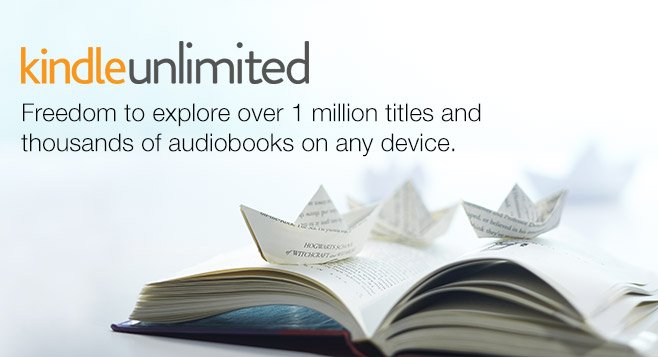
Kindle unlimited review
Here's the scoop:
Then, it's just $9.99 per month after the trial.
You can use your membership on multiple devices, so your kids or spouse can use it, too.
Membership includes unlimited reading from over 1 million ebooks and unlimited listening to thousands of audiobooks.
Here's how much I love Kindle Unlimited
Yes, this is a sponsored post, but I don't do reviews like this unless I LOVE the product. :) I love Unlimited so much that I added my book The Fluff-Free Freelance Writing Master Course to the program. Yup. You can read my book for free if you sign up for Unlimited!
Here's more on the membership details from Kindle Unlimited
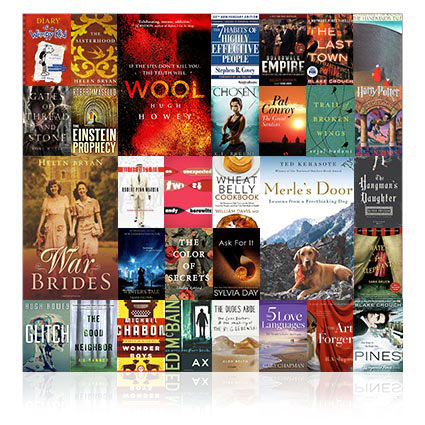
Unlimited Reading
Kindle Unlimited gives you the freedom to explore. Try new genres, discover new authors, and dive into new adventures with unlimited access to our wide and varied selection of books. From business to romance, or comedy to tragedy, you will find unlimited stories waiting to be discovered. Relive the classics you grew up with, start on that best seller you’ve been wanting to read or try one of the hundreds of thousands of books you won’t find anywhere. Find your next great read today.
Unlimited Listening
Thousands of Kindle books come with the free professionally narrated Audible audiobook. With Whispersync for Voice, whenever you see "Kindle Unlimited with Narration," you can switch seamlessly between reading and listening without ever losing your place. Just pop in your headphones, tap the play button, and keep the story going - in the car, in the gym, in the kitchen - wherever your day takes you.

Any Device
You don't need to own a Kindle device to enjoy Kindle Unlimited. With free Kindle Reading apps, you can read on any device with the Kindle app installed. And of course, you can always read on your Kindle. With Kindle Unlimited, you can take every word, every sentence, every story, everywhere you go.

Do You Write Weak Words? Find out!
Make your writing stronger with these tweaks!
How strong are the words you write? Weak words can leave your articles, blogs, social media posts, and more, insubstantial. Here's how to find your wilty words and plump them up with interesting alternatives thanks to this illuminating infographic.
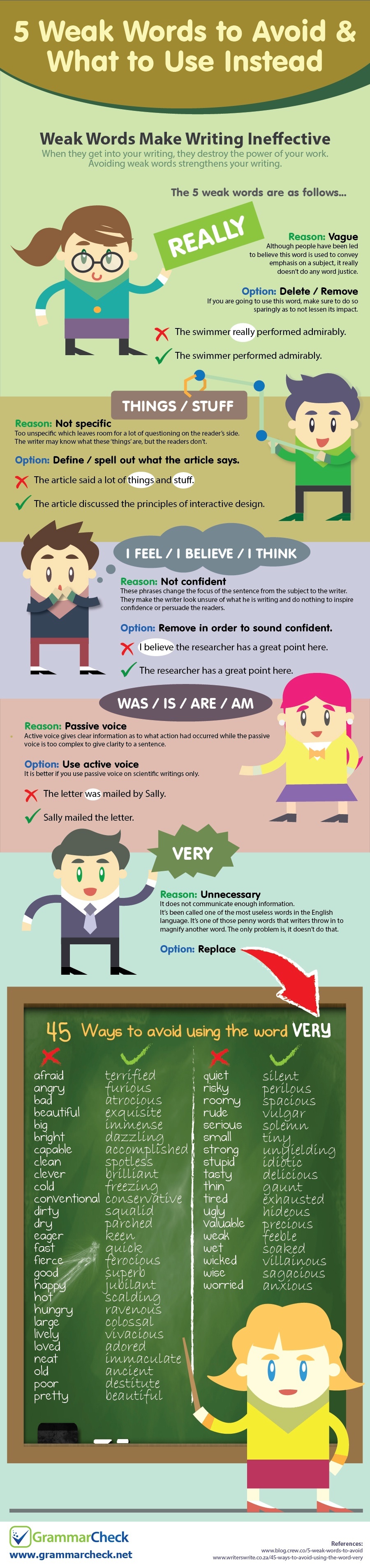
Source: www.grammarcheck.net

140+ Keyboard shortcuts to make writing faster
Here’s a huge list of shortcuts and why you need them in your life.
I’ve been seeing a post going around Facebook about keyboard shortcuts that can save you time while writing. It’s information that’s well known to people who have been writing (or just typing!) for a long time, so I thought I would share a big long list with you, just in case you didn’t know all of the PC keyboard shortcuts. Here’s the shortcuts and why you need them in your life.
What are keyboard shortcuts?
What are keyboard shortcuts? The are keys you press to signal to your computer that you want a certain function. For example, the most common shortcut is pressing the CTRL button and the C button to copy highlighted text on the screen. There are around dozens of combinations.
Benefits of memorizing keyboard shortcuts
Just by memorizing the shortcuts you’ll use most, you can shave massive amounts of time off your writing sessions over a day, a month, and a year. I know, I used to be stubborn, too, and wouldn’t learn them. I mean, how long does it really take to use your mouse to click on the Bold or Italic option in WordPress or Microsoft Word?
Over time, I realized that taking my hands off the keyboard to reach for my mouse halted my thought process and it took a bit to get back on track once my hands were back on the keyboard. So, keyboard shortcuts let me process my thoughts much faster, saving a lot of time.
How to memorize keyboard shortcuts
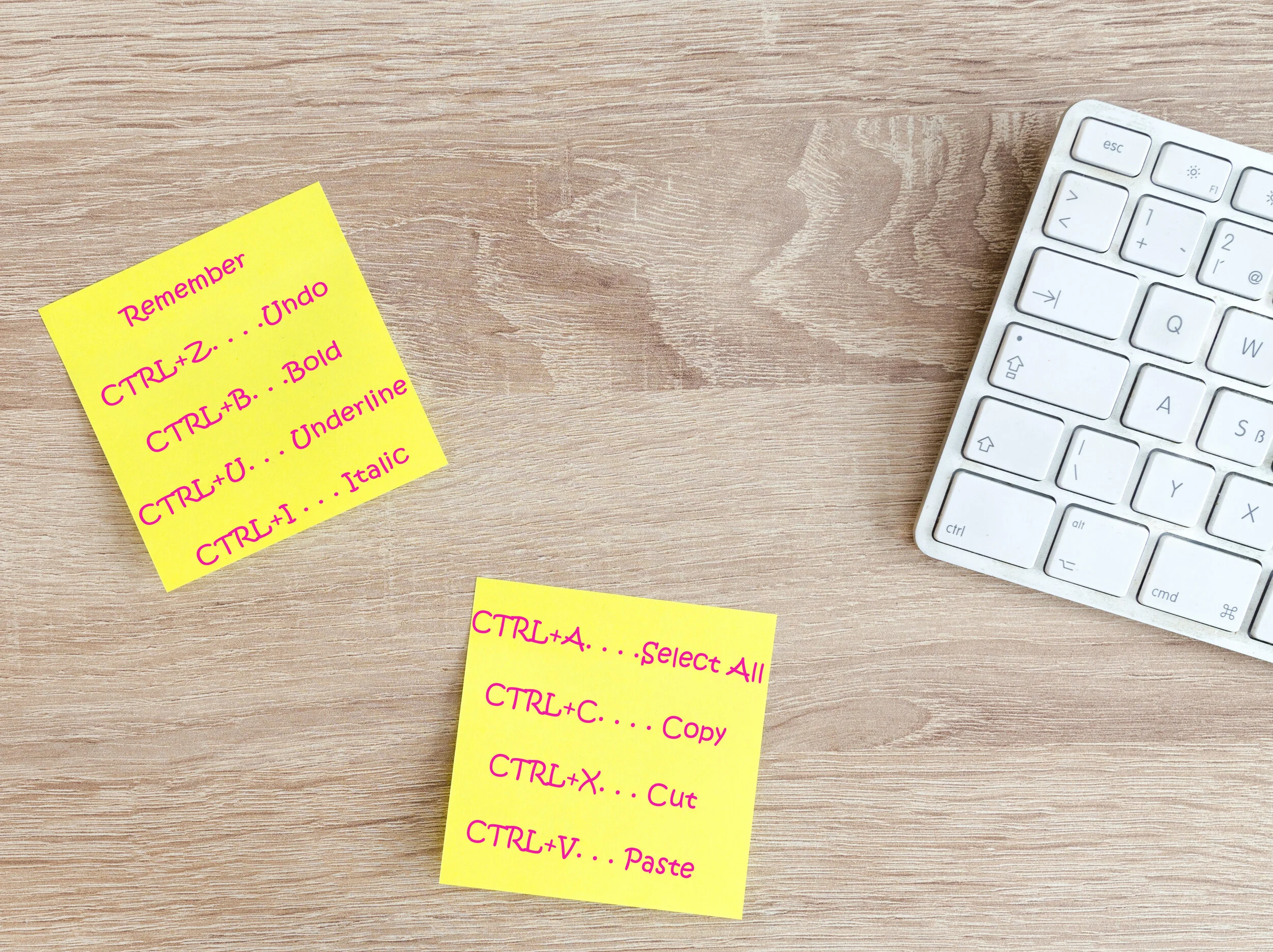
Be sure to print these out and keep them by your computer so that you can glance at them while your writing and start using them. Even better, write a few down on a sticky note and post them somewhere near your screen until you have them memorized. Then, post some more. Before you know it, you’ll have them all memorized!
Keyboard shortcuts to make writing faster
Okay, No-Fluff writer. Without further ado, I present to you the list of keyboard shortcuts that will make your typing faster, and a few that will help with flipping back and forth while researching, reading emails, and other tasks:
GENERAL SHORTCUTS (the first 8 generally work on most programs or content management system, like Wordpress for example)
CTRL+A. . . . . . . . . . . . . . . . . Select All
CTRL+C. . . . . . . . . . . . . . . . . Copy
CTRL+X. . . . . . . . . . . . . . . . . Cut
CTRL+V. . . . . . . . . . . . . . . . . Paste
CTRL+Z. . . . . . . . . . . . . . . . . Undo
CTRL+B. . . . . . . . . . . . . . . . . Bold
CTRL+U. . . . . . . . . . . . . . . . . Underline
CTRL+I . . . . . . . . . . . . . . . . . Italic
F1 . . . . . . . . . . . . . . . . . . . . . . Help
F2 . . . . . . . . . . . . . . . . . . . . . Rename selected object
F3 . . . . . . . . . . . . . . . . . . . . . Find all files
F4 . . . . . . . . . . . . . . . . . . . . . Opens file list drop-down in dialogs
F5 . . . . . . . . . . . . . . . . . . . . . Refresh current window
F6 . . . . . . . . . . . . . . . . . . . . . Shifts focus in Windows Explorer
F10 . . . . . . . . . . . . . . . . . . . . Activates menu bar options
ALT+TAB . . . . . . . . . . . . . . . . Cycles between open applications
ALT+F4 . . . . . . . . . . . . . . . . . Quit program, close current window
ALT+F6 . . . . . . . . . . . . . . . . . Switch between current program windows
ALT+ENTER. . . . . . . . . . . . . . Opens properties dialog
ALT+SPACE . . . . . . . . . . . . . . System menu for current window
ALT+¢ . . . . . . . . . . . . . . . . . . opens drop-down lists in dialog boxes
BACKSPACE . . . . . . . . . . . . . Switch to parent folder
CTRL+ESC . . . . . . . . . . . . . . Opens Start menu
CTRL+ALT+DEL . . . . . . . . . . Opens task manager, reboots the computer
CTRL+TAB . . . . . . . . . . . . . . Move through property tabs
CTRL+SHIFT+DRAG . . . . . . . Create shortcut (also right-click, drag)
CTRL+DRAG . . . . . . . . . . . . . Copy File
ESC . . . . . . . . . . . . . . . . . . . Cancel last function
SHIFT . . . . . . . . . . . . . . . . . . Press/hold SHIFT, insert CD-ROM to bypass auto-play
SHIFT+DRAG . . . . . . . . . . . . Move file
SHIFT+F10. . . . . . . . . . . . . . . Opens context menu (same as right-click)
SHIFT+DELETE . . . . . . . . . . . Full wipe delete (bypasses Recycle Bin)
ALT+ underlined letter . . . . Opens the corresponding menu
Document Cursor Controls
HOME . . . . . . . . . . . . . . to beginning of line or far left of field or screen
END . . . . . . . . . . . . . . . . to end of line, or far right of field or screen
CTRL+HOME . . . . . . . . to the top
CTRL+END . . . . . . . . . . to the bottom
PAGE UP . . . . . . . . . . . . moves document or dialog box up one page
PAGE DOWN . . . . . . . . moves document or dialog down one page
ARROW KEYS . . . . . . . move focus in documents, dialogs, etc.
CTRL+ > . . . . . . . . . . . . next word
CTRL+SHIFT+ > . . . . . . selects word
SPECIAL CHARACTERS
Alt 0145 . . . ‘ Opening single quote
Alt 0146. . . . ‘ Closing single quote
Alt 0147. . . “ Opening double quote
Alt 0148. . . “ Closing double quote
Alt 0150… – En dash
Alt 0151… — Em dash
Alt 0133… Ellipsis
Alt 0149… • Bullet
Alt 0174… ® Registration Mark
Alt 0169… © Copyright
Alt 0153… ™ Trademark
Alt 0176… ° Degree symbol
Alt 0162… ¢ Cent sig
Alt 0188… 1⁄4
Alt 0189… 1⁄2
Alt 0190… 3⁄4
Alt 0233… é
Alt 0201… É
Alt 0241… ñ
Alt 0247… ÷
FILE MENU OPTIONS IN A CURENT PROGRAM
Alt + E… Edit options in current program
F1… Universal help (for all programs)
Ctrl + A… Select all text
Ctrl + X… Cut selected item
Shift + Del… Cut selected item
Ctrl + C… Copy selected item
Ctrl + Ins… Copy selected item
Ctrl + V… Paste
Shift + Ins… Paste
Home… Go to beginning of current line
Ctrl + Home… Go to beginning of document
End… Go to end of current line
Ctrl + End… Go to end of document
Shift + Home… Highlight from current position to beginning of line
Shift + End… Highlight from current position to end of line
Ctrl + f… Move one word to the left at a time
Ctrl + g… Move one word to the right at a time
MICROSOFT WINDOWS SHORTCUT KEYS
Alt + Tab… Switch between open applications
Alt + Shift + Tab… Switch backwards between open applications
Alt + Print Screen… Create screen shot for current program
Ctrl + Alt + Del Reboot/Windows®… task manager
Ctrl + Esc… Bring up start menu
Alt + Esc… Switch between applications on taskbar
F2.. Rename selected icon
F3… Start find from desktop
F4… Open the drive selection when browsing
F5… Refresh contents
Alt + F4… Close current open program
Ctrl + F4… Close window in program
Ctrl + Plus Key… Automatically adjust widths of all columns in Windows Explorer
Alt + Enter… Open properties window of selected icon or program
Shift + F10… Simulate right-click on selected item
Shift + Del… Delete programs/files permanently
Holding Shift During Bootup… Boot safe mode or bypass system files
Holding Shift During Bootup when putting in an audio CD, will prevent CD Player from playing
WINKEY SHORTCUTS
WINKEY + D… Bring desktop to the top of other windows
WINKEY + M… Minimize all windows
WINKEY + SHIFT + M… Undo the minimize done by WINKEY + M and WINKEY + D
WINKEY + E… Open File Explorer
WINKEY + Tab… Cycle through open programs on taskbar
WINKEY + F… Display the Windows® Search/Find feature
WINKEY + CTRL + F… Display the search for computers window
WINKEY + F1… Display the Microsoft® Windows® help
WINKEY + R… Open the run window
WINKEY + Pause /Break… Open the system properties window
WINKEY + U… Open utility manager
WINKEY + L… Lock the computer (Windows XP® & later)
OUTLOOK SHORTCUT KEYS
Alt + S… Send the email
Ctrl + C… Copy selected text
Ctrl + X… Cut selected text
Ctrl + P… Open print dialog box
Ctrl + K… Complete name/email typed in address bar
Ctrl + B… Bold highlighted selection
Ctrl + I… Italicize highlighted selection
Ctrl + U… Underline highlighted selection
Ctrl + R… Reply to an email
Ctrl + F… Forward an email
Ctrl + N… Create a new email
Ctrl + Shift + A… Create a new appointment to your calendar
Ctrl + Shift + O… Open the outbox
Ctrl + Shift + I… Open the inbox
Ctrl + Shift + K… Add a new task
Ctrl + Shift + C… Create a new contact
Ctrl + Shift+ J… Create a new journal entry
WORD SHORTCUT KEYS
Ctrl + A… Select all contents of the page
Ctrl + B… Bold highlighted selection
Ctrl + C… Copy selected text
Ctrl + X… Cut selected text
Ctrl + N… Open new/blank document
Ctrl + O… Open options
Ctrl + P… Open the print window
Ctrl + F… Open find box
Ctrl + I… Italicize highlighted selection
Ctrl + K… Insert link
Ctrl + U… Underline highlighted selection
Ctrl + V… Paste
Ctrl + Y… Redo the last action performed
Ctrl + Z… Undo last action
Ctrl + G… Find and replace options
Ctrl + H… Find and replace options
Ctrl + J… Justify paragraph alignment
Ctrl + L… Align selected text or line to the left
Ctrl + Q… Align selected paragraph to the left
Ctrl + E… Align selected

Freelance writing jobs of the week mega list: November 4, 2020
There are some great remote freelance writing gigs for those of us that are members of fandoms this week. There are also gigs for copywriters, marketing writers, science writers, and much more.
Hey No-Fluffers! There are some great remote freelance writing gigs for those of us that are members of fandoms this week. There are also gigs for copywriters, marketing writers, science writers, and much more. Enjoy!
Also, it's my birthday month, so I'm putting the No-Fluff Freelance Writer Starter Pack on sale! 20% off!
When I was starting out as a freelance writer, the online writing industry was brand new. There were no experts to teach me. I had to grind, and fail, and try again.
After becoming successful, I wanted to save other writers from as much of the struggle as I could. So, I created The Pack.
It is a masterclass in freelance writing and includes everything I wish I had known about getting ahead when I was starting out.
Hi guys. If you’re interested in writing for the fashion section @RyersonFolio, please dm! We’re always looking for new contributors who want to write + pitch their own ideas. We’re super nice I promise 🥺💓 pic.twitter.com/qXsDLCLVrk
— samreen (@xo_samreen) November 3, 2020
I wrote submission guidelines to my tiny Medium publication called Preoccupy Negative Thoughts. I'm seeking other Medium writers, like those that write about psychology, research, etc. https://t.co/zjkVIjjXI9
— Synthia 🇨🇦 (@SynthiaStark) November 1, 2020
I wrote submission guidelines to my tiny Medium publication called Preoccupy Negative Thoughts. I'm seeking other Medium writers, like those that write about psychology, research, etc. https://t.co/zjkVIjjXI9
— Synthia 🇨🇦 (@SynthiaStark) November 1, 2020
Freelance Star Trek Writer
Freelance Video Game Feature Writer
Freelance Star Wars Writer
Long-Term Blogger Wanted (Topic: Mobile Network Technology)
Beauty Writer/Contributor for Black Hair Website (Remote)
Online Video Game News Journalist
Statistics Question Writer
Freelance Ghostwriter with Experience in the Home Niche
CALL FOR SUBMISSIONS: Co-editors @MissStaceyMay and @JenSookfongLee are looking for pitches or complete essays for the forthcoming anthology, Good Mom on Paper. The deadline for pitches is December 15, 2020.
— Book*hug Press (@bookhugpress) November 2, 2020
For complete submission guidelines, visit https://t.co/6Qtacd9TTj pic.twitter.com/xLKAILxZNX
If you've been following my work for @capilanou, you might be aware I've been working on
— Taehoon Kim (@tkimphoto) November 2, 2020
Capsule, our new digital magazine. I'm excited to announce we are officially looking for pitches! If you have a CapU related story, email me: taehoonkim2@capilanou.ca.
We are looking for Liverpool fans who would love to write about their club
— LWOF Liverpool (@lwofliverpool) October 31, 2020
WRITE FOR US AT @LastWordFC
Earn £££
No experience required
Check out the link and slides belowhttps://t.co/cWK18jiIYT#LFC #liverpoolfc #EPL #lwos #YNWA #LFCFamily #journojobs #LIVWHU #epl pic.twitter.com/NWcvJG24al
Hello, new followers! I'm always looking for pitches. Send them to: erica.lenti@xtramagazine.com https://t.co/QvF8XXBw8q
— Erica Lenti (@ericalenti) November 2, 2020
We're always looking for new writers, to publish fresh perspectives and elevate marginalized voices. Here's how to pitch us political stories and more: https://t.co/nRjoxhIhYb https://t.co/e3swdPDpUd
— Xtra (@XtraMagazine) November 2, 2020
Calling all freelance writers! @inputmag is growing and REVIEWS is a big part 📈. Do you love gadgets and can write about them in a succinct, opinionated, and creative way? (Photos/light video skills are a MUST.) Send your pitches: 📨 ray@inputmag.com
— Raymond Wong📱💾📼 (@raywongy) October 29, 2020
Online Magazine seeking creative writers, Marketing strategist
SEO Writer (Freelance)
Scientific Writer
Content Writer
Blog Content Writer
Diversity Content Writer
Content Writer, Marketing
Amazon Product Copywriter
Digital Content Marketing Writer
Freelance TV/Movie Feature Writer
Freelance Writer for MakeUseOf.com
Vaping web site (ecommerce) looking for content writer
We're looking for professional journalist to cover homelessness and related topics. If you're currently or formerly homeless, we'd love to hear from you. Please send a writing sample along with a few pitches and what you require for compensation to writers@invisiblepeople.tv pic.twitter.com/lwosVSSfdv
— Invisible People (@invisiblepeople) November 2, 2020
@honeydropz999 FEMME MAG is looking for female writers for accounts about #EndSARS #ENDSARSNOW (pitch to fmag@femmeafrica.com)
— charity Prather (@chedinthesky) November 2, 2020

Punctuation You Should Know: Apostrophes, Colons, and Semicolons
Get your punctuation right with these tips.
I don’t know how many times an editor has told me, “Oh, I love editing your work. There’s not much to change!” A big part of this is that I know how and when to use punctuation. As a writer, you should, too. Here is how to write with some of the trickier punctuation.
Apostrophes
Ugg. From my close observation and research, this punctuation mark ranks among the most abused in the English language. Just check posters, billboards, and various ads in your neighborhood and you will see what I mean. Even though we encounter the use of the apostrophe in our daily lives, many people tend to mess it up. This punctuation mark serves only two purposes:
Show possession
The addition of an apostrophe at the end of a proper noun indicates the noun owns a particular object. Basically, we use an apostrophe to reduce the number of words in a particular piece of writing. For instance, we can say ‘Party of Peter.’ To make it nicer to the eyes and ear, we write 'Peter’s party’ by adding an apostrophe and an S to the noun.
Some words end with an S. No problem. In this case, you can put an apostrophe at the end of the word after the S. For example: "The classes' (multiple classes, so it's plural) book was very long." "Go pick up the cats' (multiple cats) toys."
Show omission of a word or letter
This punctuation mark can show that some letters and words have been omitted intentionally. Instead of writing, ‘I am’, for example, you can use this punctuation mark and the word will become ‘I’m.’ Pick ‘n’ mix is also the short form for ‘pick and mix.’ ’89 is the short form for 1989. It's is short for it is.
Colons
When you see two dots before a statement, the writer wants to say, ‘this is what I mean’. The colon as a punctuation mark has three primary uses which include:
Introducing a list of items
For example, "The bookstore specializes in four subjects: graphic design, architecture, art and crafts."
Punctuation between two independent clauses where the second clause illustrates or explains the first one
"He has little knowledge of the English language: he grew up in China."
Emphasis
We also use the colon to make a statement, word or phrase more powerful.
"Working 20 hours a week as a personal driver and taking care of all his family members: that was his dream job."
Semicolons
Most of us use colons and semicolons interchangeably which should not be the case. The following are some of the uses of a semicolon:
It join clauses that are independent but related
The words before the semicolon form a complete sentence or phrase while those after the semicolon also make sense as a sentence. The two statements will also share a logical connection.
"Mary went to the library; it’s open until 2."
“I hate salad; it gets stuck in my teeth.”
It's used in a serial list
When you want to list a number of things in one sentence, the semicolon comes in handy.
"I need accommodation rates for the following cities: London, Ontario; London England: Paris, Ontario; Paris; France."

The Ultimate Guide to Finding Jobs as a Freelance Writer
Professional freelance writers are always blogging about these sweet gigs they're working on that pays $100 to $2,000 per article. Where the heck do you find these fantastic jobs everyone's talking about?
Professional freelance writers are always blogging about these sweet gigs they're working on that pays $100 to $2,000 per article. Where the heck do you find these fantastic jobs everyone's talking about?
After years, I have honed a way to find great paying gigs quickly. Here are my secrets.

Hit Up Social Media
One of the easiest ways to find gig gems is to search social media. Often, businesses will post their need for a blogger, copywriter or ghostwriter on their pages. All you have to do is search for relevant hashtags.
Put these hashtags into a Facebook or Twitter search bar to find awesome gigs:
#bloggerswanted
#writerswanted
#copywriterwanted
#bloggerjob
#bloggingjobs
#writtingjobs
#publishingjobs
#journalismjobs
#freelancewriterwanted
#remotewriterwanted
#fbloggerswanted (Fashion bloggers wanted)
#healthbloggerswanted
Search Google the Smart Way
Searching for writing jobs on Google can bring up job posts from 2005 or jobs that are five states away and require on-site work. You can avoid all of the crappy job posts by searching smart.

If you want to search a certain site, put site: in front of the site name, then add keywords in quotation marks. For example, I've had a lot of luck with this search:
site:craigslist.org "remote writer "
Some other sites other than craigslist you can try are:
site:problogger
site:freelancewritinggigs.com
Some other terms you can try are:
"content writing companies"
"freelance writing companies"
To get newer job posts, add the date:
site:craigslist.org "remote writer " November 15th 2020
Now the secret to finding high paying jobs: add the type of payment you're looking for.
site:craigslist.org "remote writer " December 15th 2020 pays $220
site:craigslist.org "remote writer " November 15th 2018 $50 per hour
site:craigslist.org "remote writer " November 15th 2018 .50 per word
Successful writer Jennifer Mattern recommends this combination:
writer and "compensation: * per article" site:craigslist.org (Replace the * with the monetary amount you want to be paid.)
If you want to search everywhere, just leave off the site and type in the rest of the search. This will bring up high-paying gigs from company job boards that most people never look at.
Use LinkedIn
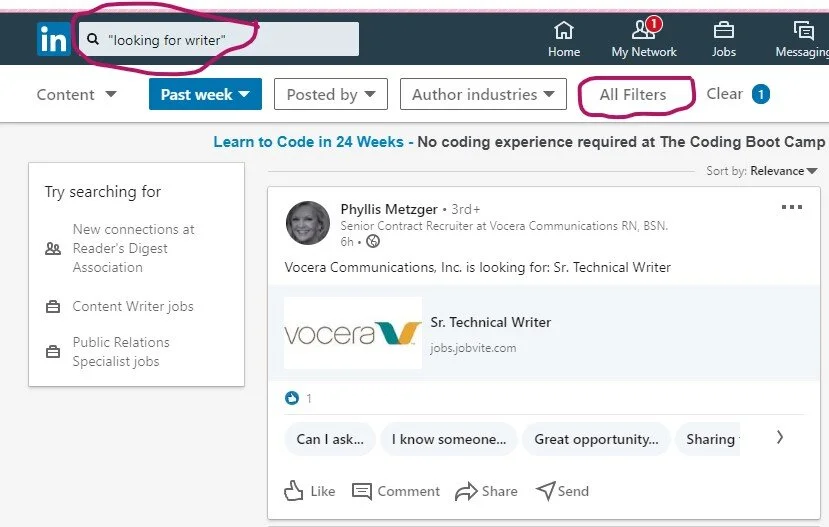
Another great way to find jobs is by searching LinkedIn. No, I’m not talking about the job section. Here are the details to a special way to search:
Go to the Home page
In the search bar type “looking for writer” or “looking for freelance writer”
When it takes you to the page, click on the All Filters option on the left side
Choose Past Week
Click Apply
Posts by companies and individuals looking for writers will pop up.
Get jobs delivered to your inbox
Now that you know the search criteria, set up Google alerts so you can get these great jobs delivered right to your inbox every day.
To set up a Google Alert follow these directions:
Go to https://www.google.com/alerts
Figure out what term you want alerts for (“writer wanted,” “food writer wanted,” “tech writer needed”)
Type your search term into the box at the top of the screen
Click on the "Show Options" dropdown menu
Set it up to send you an email every day and to send you "all results"
Click "Create Alert"
Sign Up to Get Daily Job News Letters

There are some great sites out there that scour the web for freelance writing jobs, then bundles them up into daily emails. I’ve rounded up a selection that provides links to gigs that pay well. Here are my favorite daily and weekly newsletters you need to sign up for:
Never stop searching
The key to finding gigs is volume. Apply for 20 solid gigs per week until you start bringing in the clients you need to pay the bills. Once you’ve got your clients, don’t stop. You’re never done searching when you’re a freelance writer. Simply trim your search down to 12 gigs a week. Remember, a dozen in play keeps the bills paid.

Start searching for clients that pay more to replace your current clients when the gigs end. Eventually, your name will get around and clients will search you out. That’s how you know you’ve made it to the big time. Even then, don’t stop searching. Just be super picky about who you take on as a client.
If you would like more great tips like these, order your copy of No-Fluff Freelance Writer Starter Pack today!

Can You Make $500 a Week by Publishing Articles on Vocal?
It’s like Medium, but with a twist. Here’s what you need to know about this publishing website.
I’ve been running across a lot of ads from a website called Vocal that are targeted at freelance writers. You know I was curious and had to check it out! Vocal says that you can make up to $500 publishing your articles on their site. Another Medium wannabe, maybe? Here’s what I found out and my Vocal review.
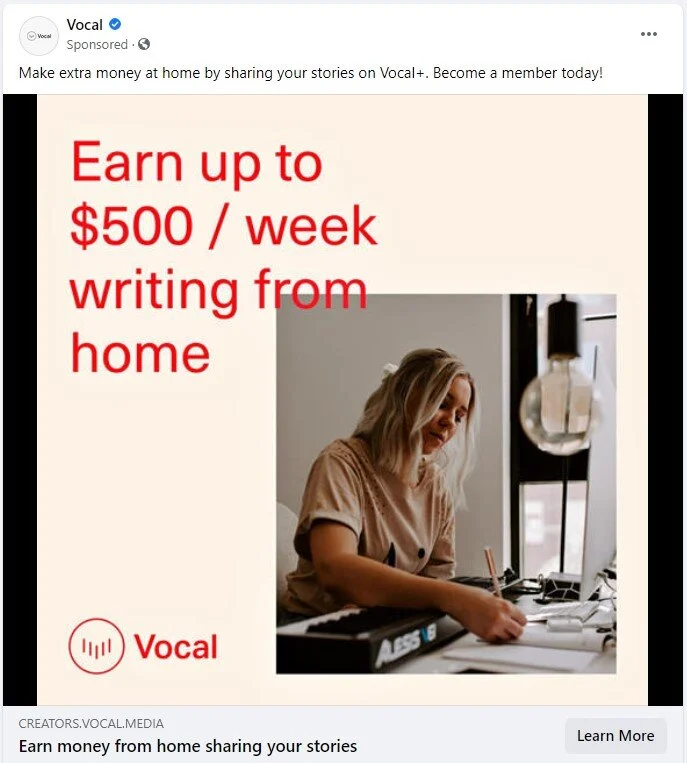
One of Vocal’s Facebook ads.
What is Vocal?
Vocal is a site where you can post your articles and get paid. That sounds pretty good until you realize that you may put up 100 articles and never earn a cent. Unlike many sites, Vocal doesn’t pay a flat rate for articles. Your article, instead, earns money over time depending on different factors. We’ll get into that in a minute.
There are a few quality requirements that Vocal wants in an article. First, it shouldn’t have spelling and grammar errors (duh) and there are word limits. An article can’t be less than 600 words and poems can’t be less than 100 words. They also don’t like erotica, nudity, and some other topics. Here’s Vocal’s full guidelines.
Another one of Vocal’s ads.
How much does Vocal pay writers?
Your article can earn money from how many times your article is read, weekly contests, and tips given to you from readers. Let’s start by looking at the pay-per-read setup.
According to Vocal, writers earn $3.80 per 1,000 reads. If you subscribe to Vocal + (which is $10 per month with a 30-free trial), you’ll earn $6 per 1,000 reads. So, say you subscribe to Vocal+ and your article goes viral, snagging 1 million reads. That’s an earnings of $6,000. Not too shabby. I wonder if that’s ever happened on their platform, though.
Also, what constitutes a read? Do people have to scroll through the whole article before you get a “read” or do they have to stay on the page for a certain amount of time? I dug around their site until I found their FAQ. Here’s what they say about reads on their FAQ:
How are my reads calculated?
Reads are calculated by Vocal’s read algorithm, which takes into account things like time spent on the page, as well as how far down the page is scrolled. This is to make sure that your readers are actually reading your story, so that you’re earning on real engagement from your fans.

Screenshot from Vocal’s payment information page.
Vocal also has weekly contests. Some pay in cash, while others have different types of prizes. I had to laugh when I saw that some contests pay in “experience.” Freelancers just love that word! You also can’t enter the contests if you’re not a Vocal+ member.

Like I mentioned before, your readers can also give you tips if they like your article. This reminds me of the flash websites of the 90s and early 2000s with their gyrating tip jars. Fond memories. Tips are a great idea until you see that Vocal takes a 7% processing fee, unless you have Vocal+, and then it only takes a 2.9% processing fee. This site grabs money every way it can think of it seems.
For some insight, I took a look at the comments on one of their Facebook ads. Here’s what one writer had to say:
Leticia S. Diamond
You don't have to pay to publish. I've been a subscribing member for 3 months. The first month I only did the free part. I'm positive this company makes their money from the memberships, and the bonus of the membership for the members is the extra writing contests. Winning a contest can get you from $75-5000 depending on the award amount and if you place in the top 3. Beyond that, you get, like, a cent per read. So, if you've got a supportive family or fan base, you could make some cash on the clicks. If you do it, just write a LOT to increase how much you may be seen and clicked on.
Oh, people can tip you too, but I haven't had that happen for me yet. Good luck and blessings to you, whatever you do.
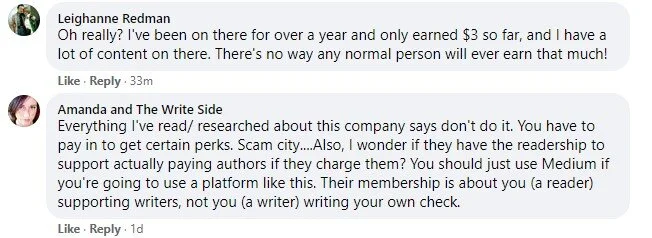
Here’s another interesting conversation:
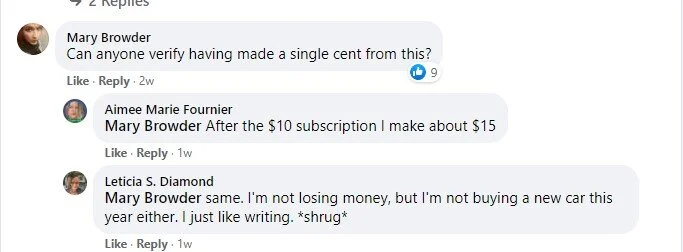
And another…
Where the money comes from
There’s no ads on Vocal, so how do they make their money and how do they pay you? Here’s the answer from their website:
How does Vocal make money and pay creators if there are no ads?
We believe that creators like you are our partners, and that the stories you share should be free of distractions like annoying ads and popups. In order to create a sustainable ecosystem for everyone on Vocal, we earn money in the following ways:
1. We earn money when creators upgrade to Vocal+
2. We receive a small platform processing fee on Tips (7% for Vocal / 2.9% for Vocal+)
3. Our in-house content studio, Vocal for Brands, partners brands that share our values of quality and creativity with Vocal creators to produce branded content.
The catch
Besides charging membership fees and skimming tips, Vocal also has a payout threshold. You can only cash out if you make $35 or more or $20 or more with Vocal+. So, if your articles don’t make many tips or get many reads, you may not be able to cash out your earnings for a long time.
Does Vocal take your rights?
One good thing about Vocal is that they don’t get you to sign away your copyright when you post an article. They just use a limited license, which means you’re free to post your articles wherever you like since you still own them.
Vocal review: My thoughts
Okay, so Vocal seems like an interesting idea, but I’m not sure if most writers would ever make enough money to hit the payout. Since you get to keep your rights, I would say give it a try if you’re curious. If you get the Vocal+ 30-day free subscription, just make sure to cancel if you don’t make enough to cover the subscription plan in that first month. Here’s is their full intake process and how the site works, in detail.

Freelance writing jobs of the week mega list: October 29, 2020
Pitch these writing jobs before they’re taken.
How do you get jobs as a freelance writer? You pitch and you keep pitching until you start getting better at it and getting replies. Here is everything you need to know about pitching. Once you’re in-the-know, be sure to check back each week for our freelance writing job mega list. Speaking of, here’s this week’s list. Let’s get to it!

Proofreader/Copy Editor
Content writer
Finance, Trading, FinTech, Impact / Sustainable Investing Professional Writers Needed
Interactive Writer
Freelance Grant Writer
Freelance Comic Book News Writer
Long Term Writer For Home and Garden Tips Website (US/CAN only)
Freelance Global Creative Copywriter for Corporate Events Website
Weekend Car News Writer
Make Money Online Niche Writer Needed For Established Financial Blog
Hey, religion reporters! If your focus is Islam in America, we are looking for article pitches @RNS! Send me a DM if that's you! Share with your network. Or tag someone here if you think they might be interested.
— Roxanne Stone (@roxyleestone) October 27, 2020
Haven't posted this in a while on twitter, but @readfenix is looking for pitches! Currently commissioning long-form, deeply reported stories to start reporting right away. Obvi, it's paid! DM for more deets
— Mariana Heredia (@mariana1heredia) October 27, 2020
#journalists #writers #journojobs I'm looking for brilliant pitches (1st person essays, strong opinions, new angles, or original features) on the #USElection2020 for @StylistMagazine - to land this week and next. If you have great ideas, HMU soon. Commissioning this week.
— Katy I’m on deadline Harrington (@KatyHWrites) October 27, 2020
Looking for freelancers *living* in the West with education reporting experience.
— Lillian Mongeau (@lrmongeau) October 27, 2020
Nevada, Arizona, New Mexico are especially of interest.
We believe diversity is crucial to our success.
We pay fairly.
Please email me mongeau@hechingerreport.org for more info.
Estate agency The Modern House seeks a freelance writer to contribute articles on arts, design and culture to its content channels https://t.co/y2biGioufV #freelancejournojobs
— Journalism.co.uk freelancers (@freelance_hacks) October 26, 2020
Call for pitches! 📢 @weareliberally are looking for creatives to get involved with the 2nd issue of Liberally Quarterly by responding to the below themes. Email hello@weareliberally.com with a short pitch and CV by 12 Nov to find out more about this paid opp #Opportunity pic.twitter.com/cKfuZrDnfG
— Spread the Word (@STWevents) October 26, 2020
Here's a great opportunity for a woman writer: The Star is looking to commission writers for a new sports project. They want new voices to write features and columns that merge sports and culture with a local or national angle. Send pitches and inquiries to bholmyard@thestar.ca
— Spoopy Pumpkinmarko (@sofipapamarko) October 21, 2020
As part of my new role at @couriermedia I’m looking for writers around the world who can tell local stories about emerging brands. Looking for ppl outside of the UK/US who know what it’s like to live/work in vibrant business hubs 🌍 Please RT, tag ppl you know 🤙🏼 #journojobs
— benjaminchiou (@benjaminchiou) October 20, 2020
Ever wanted to write for Epi? (Great! We want you to!) Here's how to pitch us. https://t.co/cPyrshvA2D
— epicurious (@epicurious) October 18, 2020
Looking for freelance cryptocurrency writer to cover breaking news for @crypto_vantage PAID POSITION approx. 15-20 hours/weekly. pic.twitter.com/dEay2wdNHA
— Elisabeth Galina (@RefinedJerky) October 21, 2020


How to Manage Your Finances as a Freelance Writer
Get your finances in order with these tips.
It’s often said that freelancers don’t like doing the boring stuff. While it may be true, unfortunately, for the freelance writer, putting off the task of money management is not an option if you want to keep bringing in the cash and stay on top of your financial game. Managing your finances can be daunting at the best of times. Still, don’t let these stresses keep you from achieving your freelancing goals! Here are some tips to help you get your finances in order, from creating a savings account to saving on your taxes.

Identify your regular expenses
To stay financially fit, you need to know what most of your money is being spent on every month and trim the fat.
The most common expenses are:
Rent or mortgage costs
Phone bill
Car note
Insurance
Utilities
Don’t forget to figure out your business expenses! These include:
Internet
Office supplies
Website hosting
Domain costs
Now that you know what you’re spending, trim the fat. The less you pay in bills each month, the less you will be stressed during lean times in your business. Compare the prices of utility companies, website hosting, insurance, and internet services to see if you can find a lower-cost provider. Then, consider refinancing your cars and mortgages to find a better interest rate to save even more in the long-term.
Once that’s done, look into additional expenses, such as eating out, going to the movies, or going out to get a coffee every morning. Are there things that could be limited or done at home to save money?
Set goals for your finances
Any successful business will need to set and meet financial goals. The same goes for freelance writers, too. To start out, figure out these three numbers:
How much money is needed to pay all the bills
How much money is needed to pay the bills and have a little extra to play with
How much money is needed to live the dream life
Once all of these numbers have been identified, you can plan on how much work you’ll need to get to achieve your financial goals.
How do you determine your rates? Here’s a good guide to help you figure it all out.
Save smart
When squirrels hunt for acorns and such during the fall, they will take the nuts and bury them away to come back to later when food runs out. This is what we should be doing with our finances. Having enough money stashed away to cover any incidentals, or as an ‘emergency fund’ is just smart, especially if you are a freelance writer.

Freelance writing is unpredictable. The ‘feast and famine’ nature of the freelancing world could mean several months of drought where you can’t quite meet your financial goal for that month. With an emergency fund, you won’t need to worry about how you’re going to pay your bills and keep food on the table.
For example, on average, you make around $3,000 per month, but in August you only made $2,500, you can loan yourself $500 from your savings to cover the cost of those extra expenses. You have to keep track of what you borrow, though, and then pay yourself back when you make any money over your financial goals.
Here’s some ways to maximize your freelance profits.
Work on improving your credit score

Many personal loan calculators and banks will ask for your monthly income as part of the application process and, for us, income can be unpredictable. I’ve found that when I’m getting car loans, a good credit score can mean the difference between getting a loan and going home without a car because the banks recognize the unsabilitity of freelancing as a negative. Can’t really blame them on that one, but it means that we need to keep our credit score strong.
These are some simple ways that you can work to improve your credit score over time:
Set up an auto payment for your credit cards, so you never miss a payment- missed, or late payments will lower your credit score.
The more available credit you have, the better. Don’t be afraid to ask your credit card companies to increase your limit. An increased limit that isn’t used will make your score increase.
Pay off debt. Paying off car loans, paying your student loans, paying your mortgage, and paying down on your credit cards all make your score go up.
Pay some regular payments through your credit card, such as your phone bill and pay them back within a few days of paying your bill to bring your available balance back up.
Limit spending because you see the money is there. Credit card money is not your money to be spent but is a backup option. Budgeting properly is essential, so you don’t use your credit card as additional spending money!
Over time, you will begin to see your credit score creeping up. Here are some more tips for bettering your credit from Experian.
Work out deductions
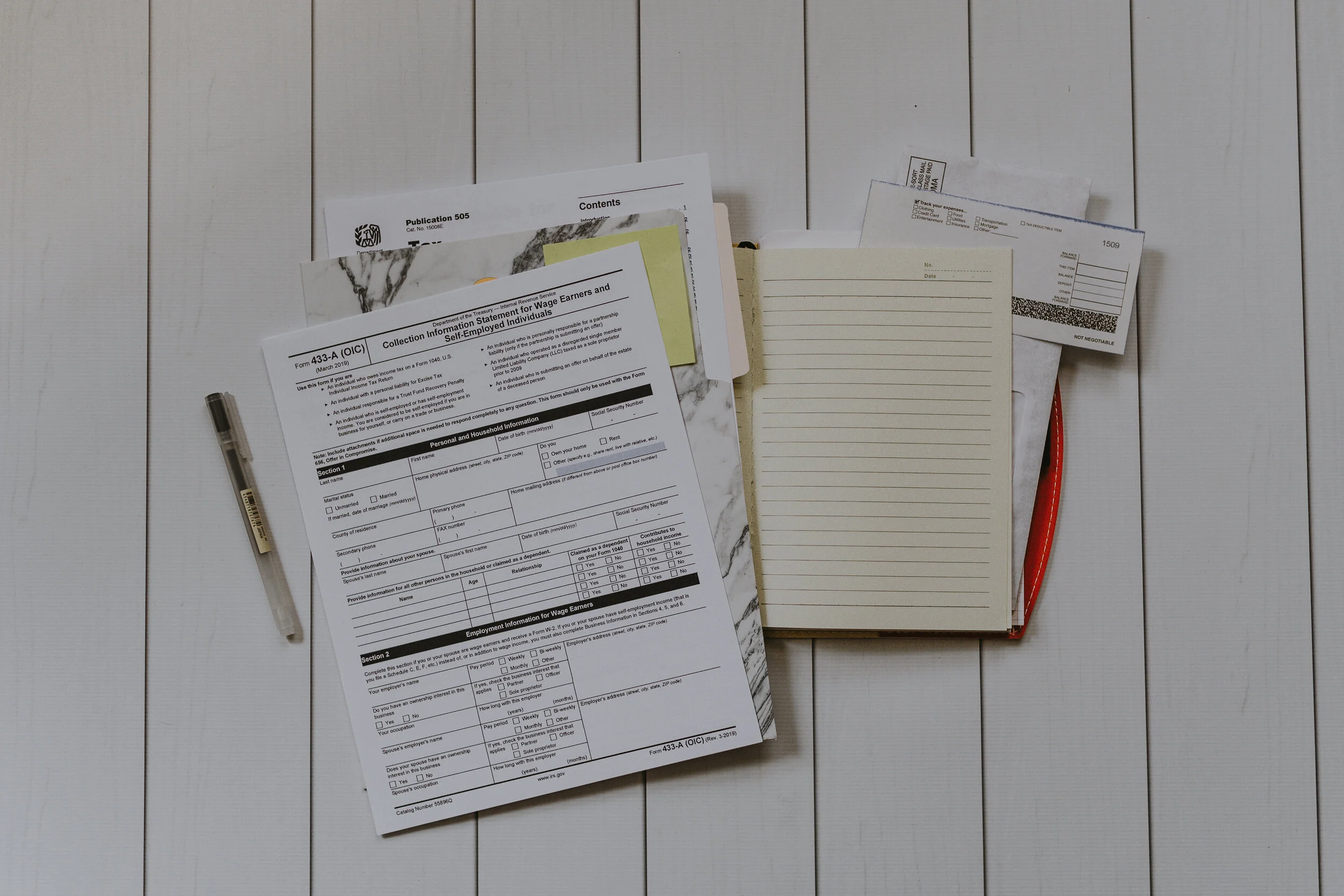
Working for yourself will often mean getting the lovely surprise of being hit with that extra tax rate due to your self-employment. Stay on top of your business expenses and use them as deductions to avoid paying more in taxes than your should.
First, use a business expense tracking app, like BizXpenseTracker, Smart Receipts, or Expensify, to store pictures of your receipts, and then work with an accountant who will help you to sift through to see which purchases could be claimed as a business expenses.
You’d be surprised at how much of your spending is for legitimate business reasons! Many freelancers don’t take advantage of the fact that their mileage, internet usage, and office equipment even though all count towards tax savings!
Here are some potential deductions:
Office supplies
Clothes you buy to wear at meetings with clients
Part of your mortgage to account for your home office
Desks, office chairs, filing cabinets, and other office furniture
External hard drives, mice, keyboards, routers, and other computer equipment
Computer or laptop
Internet service
Magazines, books, and courses you use to learn about freelance writing or to manage your business
Mileage on your car used to meet with clients or to go to seminars
Website and domain hosting costs
PayPal or other money service fees
Bank fees

How to Lose Daylight Without Losing Your Writing Mojo
Daylight Savings time is coming to an end and winter is coming. That means a lot more dark in the Northern Hemisphere. For many writers (and others!), this loss of daylight leads to a loss of energy, an uptick in short temper, and even bouts of depression. So how can we ease into the rapidly approaching winter months? Dr. Sanam Hafeez, an NYC based licenses clinical psychologist and faculty member at the prestigious Columbia University Teachers College, has offered our No-Fluff family some practical tips to prepare writers for the clock change.
How clock change messes with the body
Before we get into the tips, though, it’s important to understand the clock change’s impact on our brains and therefore our bodies, so we understand what is actually going on. Dr. Sanam Hafeez explains that “a cell in the retinas of our eyes called a ganglion cell contains the photopigment melanopsin. When we are exposed to sunlight, melanopsin signals a pathway to cells in the hypothalamus specifically responsible for regulating our bodies biological functions. This process then triggers the pineal gland which is in charge of melatonin secretion which peaks at night and wears off during the day. In simpler terms, the less light exposure we get, more out of whack we feel.”
According to Dr. Hafeez, the following simple adjustments leading up to the clock falling back during end of Daylight Savings Time can make a significant difference for those who don’t struggle with more severe depression or bipolar disorder.
Here are some tips to make the change go more smoothly.
1. Avoid alcohol
When the clocks are turned back in the fall, many bars stay open an additional hour. This is typically celebrated by people in their 20’s and 30’s who only pay for it the next day opting to sleep away their Sunday. Drinking alcohol before turning back the clocks can add more sluggishness the next morning. “Even with just a one-hour clock change, our body’s circadian rhythm is thrown off making our brains a bit confused. Alcohol only heightens these effects,” explains Dr. Hafeez. Imagine the double whammy of a hangover after the fall back clock change?
2. Enjoy physical activity during the daytime
The more time spent outside in the daylight doing physical activity, the less sluggish you will feel once the clocks fall back. Fall is a great time to powerwalk or go for a run. If you’re an early riser then you will love the earlier sunrise at least for the next few weeks. “A lot of people shift their exercise routines to include more high energy group workouts in the evenings to give themselves something to look forward to as a way to shake off the workday. You really want to pay attention to when you feel most energized and align your exercise to that,” suggests Dr. Hafeez.
3. Don’t sleep in. Go to bed earlier instead
In the days leading up to the clock change, add extra “wind-down” time before bed and get to bed an hour earlier. On the Sunday morning of the clock change, people mistakenly opt to sleep in. You really want to stick to the same wake-up time while getting to bed earlier. That’s the key according to Dr. Hafeez. “People think they are gaining an hour of sleep, they’re not because at bedtime they’re losing it. When you keep the wake-up time and get to bed earlier that extra hour isn’t felt as much the next day,” explains Dr. Hafeez.
4. Avoid watching the news before bed
People think that getting to bed an hour earlier means it’s ok to watch TV in bed before sleep. TV or any kind stimulates the brain. Your favorite show causes you to focus when you’re trying to shut down stimulation. The news is even worse. You get wrapped up in the doom and gloom watching the news. “If you want to really make sure you still wake up refreshed, opt for tranquil music or guided meditations available on YouTube or an app, recommends Dr. Hafeez.”
5. Plan ahead! Consider taking Monday off!
For those who find their mood is negatively impacted after the fall clock change, consider taking Monday off and make it about self-care. Waking up early, taking advantage of the early light, enjoying a healthy breakfast, getting a massage or catching up on reading, tidying and whatever you feel necessary to feel good, do it. “People can feel the effects of the clock change for up to 3 weeks. Taking a day off to focus on your own well-being can become a nice post clock change ritual,” she says.
About the Doctor:
Dr. Sanam Hafeez PsyD is an NYC based licensed clinical psychologist, teaching faculty member at the prestigious Columbia University Teacher’s College and the founder and Clinical Director of Comprehensive Consultation Psychological Services, P.C. a neuropsychological, developmental and educational center in Manhattan and Queens. Dr. Hafeez masterfully applies her years of experience connecting psychological implications to address some of today’s common issues such as body image, social media addiction, relationships, workplace stress, parenting and psychopathology (bipolar, schizophrenia, depression, anxiety, etc…). In addition, Dr. Hafeez works with individuals who suffer from post-traumatic stress disorder (PTSD), learning disabilities, attention and memory problems, and abuse. Dr. Hafeez often shares her credible expertise to various news outlets in New York City and frequently appears on CNN and Dr.Oz.

ContentFly Review: Fly place to write for or not so much?
Here’s all about ContentFly and some considerations before you apply.
I recently came across an ad for ContentFly. This is a site that pays writers for content and then sells the content to businesses and online magazines. Some of their clients include Medium, Inc., and the Wall Street Journal. I hadn’t head of them, so I looked them up.

The basics
In a nut shell, ContentFly works like most “content mills.” They get content requests from businesses, and then they put the request on their dashboard for writers to claim. First come, first served, but we’ll get more into that later. ContentFly does send out email notifications when there is new work on the dashboard, so there’s that.
Applying
Here is the application form. To get accepted, you have to write a 750 word blog post. They don’t pay you for the sample, but they also say they won’t use it and you retain the rights to the article. If you get accepted, they give you an assignment. If they don’t like your work they terminate your contract and you don’t get paid for the article, according to their guidelines posted here.
Here is a copy of their contractor’s agreement.
Ratings
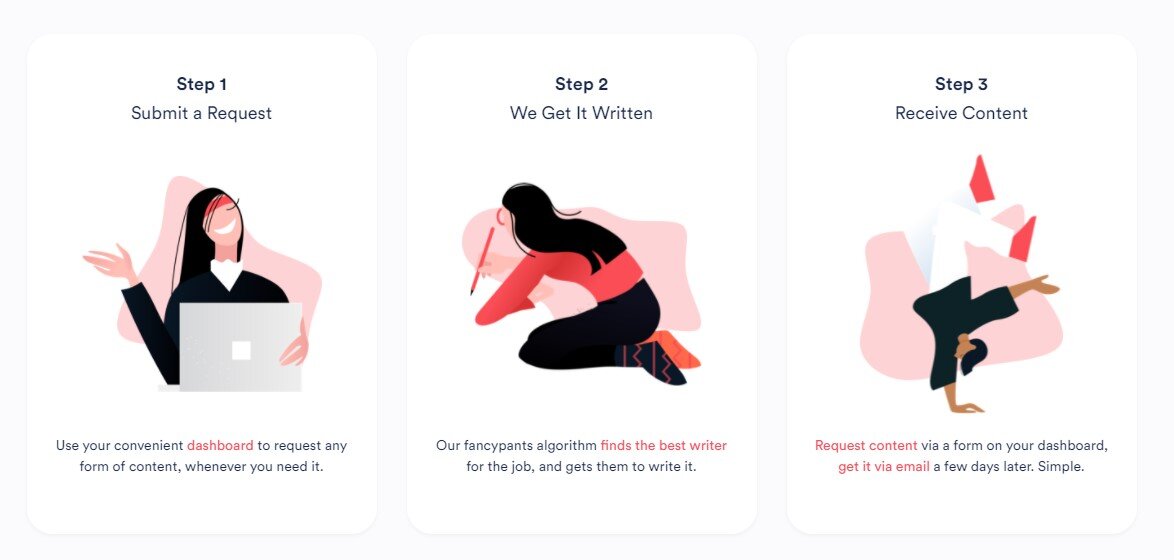
Once you complete your work and submit it, you are given a rating. There are three writer’s ratings.
Tier 1- A writer with a 9 or 10 rating.
Tier 2- A writer with a 7 or 8 rating.
Tier 3- A writer with a 5 or 6 rating.
Here’s how ContentFly says they come up with their rating system:
Content Rating = Customer Rating - Deadline Rating - Spelling/Grammar Rating.
Customer Rating: The customer provides a rating from 1 to 10 for your finished piece. 10 means they love it, 1 means they were very disappointed.
Deadline Rating: If you miss the specified deadline for a job you’ve claimed, you’re docked 4 points from the rating assigned by the customer (Customer Rating).
Spelling/Grammar Rating: When the internal ContentFly team does a check on your submission, if we notice blatant spelling/grammatical errors or wrong use of language (e.g. US vs. UK as directed by the original brief), you’re docked 2 points from the Customer Rating.
Your rating determines how much work you are able to get. Tier 1 allows you to have first pick of any available job. After an hour, if none of the Tier 1 writers pick up the assignment, Tier 2 gets to take jobs Tier 1 writers didn’t want. After another hour, Tier 3 has access to the crumbs the Tier 1 and Tier 2 writers didn’t want, basically. You can learn more about their rating system here.
The pay
Apparently, they already have more than 100 writers in their systems. Their top writers write around 15 to 20 pieces of content per week and make around $700 (their ad says $1,000, but they contradict themselves elsewhere). ContentFly says that compensation averages around $0.05 per word.
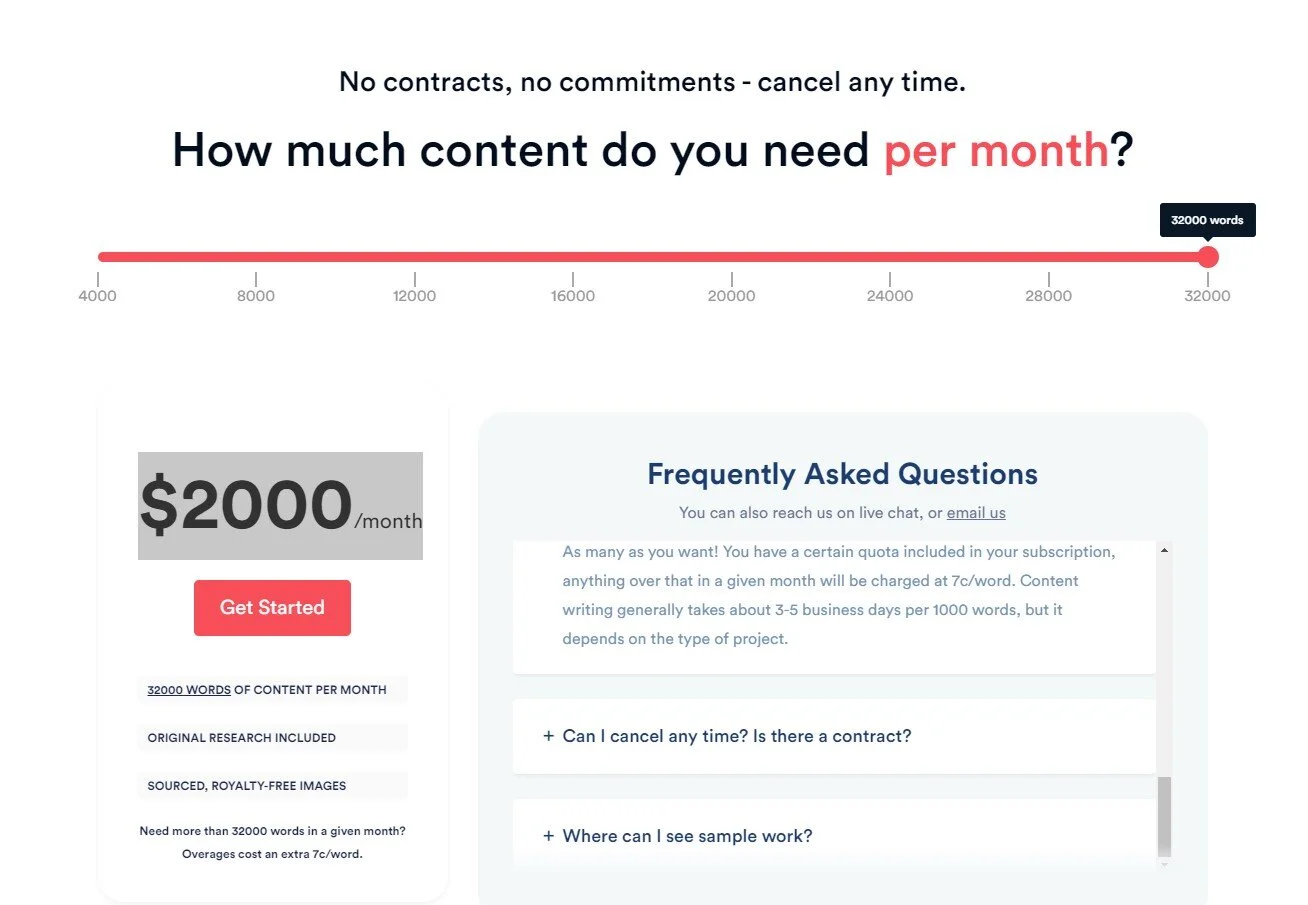
Each ContentFly client pays $250 per month for 4,000 words of content. That’s their base package. So, the writers get paid around $200 for the 4,000 words and ContentFly takes a $50 cut. Clients can get bigger packages where they can get more content. The biggest package is 32,000 words for $2,000 per month. So, if my math is right, ContentFly is taking a $400 profit from the biggest package.
The pay system isn’t automated, though. You’ll need to submit an invoice at the end of the week to get your payment. They only pay through PayPal.
Here’s the full ad they posted on ProBlogger:
Hey there! We're ContentFly, a start-up that matches small businesses looking for content help with writers.
We're looking for an eager freelance Content Writer to join our team. Your role, in a nutshell, will be helping us write articles, blogs, social copy, etc. for our growing customer base.
How does it work? If you're accepted into our writer base, whenever a new content request (job) comes from one of our customers it's automatically pushed to you and available on a dashboard.
The job will include a brief, required length, compensation details, and the deadline for submission.
If everything sounds great, you can claim the job and have it completed by the deadline. You invoice us weekly and get paid via PayPal.
Some FAQs:
1) Generally, most of our content is Website articles, Blogs, and Social Media posts.
2) Average project duration is usually around five days (~1000 words). You can take on as many projects at once as you want.
3) Compensation averages at $0.05/word. Note! Most of our writers earn an average of $1000 per month!
4) This is a contractor position and is freelance, you're compensated based on the number of words you write.
5) You only deal with us, never the actual client. So it's hassle-free and a seamless way to make some extra money!
What's the catch? There is none.
You get the listed compensation details; no hidden fees or payment required from you. But we do have very high standards, and one or two poor rankings or missed deadlines will get you moved out of the roster.
Next steps in the application process are submitting your application details and including a portfolio of your best work at http://writers.contentfly.com
Important: If you need an idea of the style of writing and quality we are looking for, you can check out our blog here before submitting your application: https://contentfly.com/blog
My No-Fluff Freelance Writing Starter Pack teaches you how I make a living at home as a freelance writer. It includes my two books, a social media marketing guide for writers, invoice template, contract template and more. Just $29.97!

Freelance writing jobs of the week mega list: October 14, 2020
Pitch these gigs while they’re fresh!
Hi there! I hope your week is going great. As always, here is this week’s freelance writing gigs list. Also, we have a new mini course. Check it out!
looking for pitches for the late-november issue and into december. hit me with those holiday-themed stories! https://t.co/PFrK6PaDd4
— Hexter McVillain 🧟♂️👻 (@dexmcmillan) October 19, 2020
Tell us a Seattle story we haven't heard before. $450 for original essays. $200 for previously shared stories. @KUOW @WritersofColor https://t.co/50Zrw32LWK
— @KUOWengage (@kuowengage) October 19, 2020
Call for pitches! 📢 @weareliberally are looking for creatives to get involved with the 2nd issue of Liberally Quarterly by responding to the below themes. Email hello@weareliberally.com with a short pitch and CV by 12 Nov to find out more about this paid opp
— National Centre for Writing (@WritersCentre) October 19, 2020
CALL FOR SUBMISSION FOR CULTURE SECTION : https://t.co/YepGtl6TH4
— decentermag (@decentermag) October 18, 2020
Send:
1. Pitches - no more than 500 words,
and/or,
2. Submissions
At editor@decentermag.com with ‘Culture- pitch/submission’ as the subject of your email. pic.twitter.com/2QnvFo34sX
The Call for Submissions for Issues 2 & 3 is printed in the first issue. Send pitches or pieces to submissions@theradicalnotion.org
— Daisy Gudmunsen (@DaisyGudmunsen) October 19, 2020
MattWallaert is looking is looking for a Remote Freelance Writer | pay: $15 per hour https://t.co/xP66bC7CFB
— Write Jobs (@write_jobs) October 20, 2020
⚡ NEW: #Freelance writers, GINX wants your stories! 😄
— Hitmarker (@HitmarkerJobs) October 15, 2020
💼 News Writer
🏢 GINX Esports TV | @GinxTV
🌎 Remote (Anywhere)
📃 Freelance
🎚 Junior
🏷 Editorial & Writing#VALORANT, #RocketLeague, and #Fortnite are just some of the games they need covered! https://t.co/5wX7qsPXXW
🤸♀️ New Freelance Job! Coffee Master: Coffee Writer Wanted (Long-Term Freelance & Consistent Work) https://t.co/lehSUhH7NC #freelance #jobs
— lancer.to (@lancerjobs) October 15, 2020
Northern writers, reveal yourselves... Looking for pitches in lively and incisive prose to pitches@theface.com. Previous experience is not essential.
— MATTHEW WHITEHOUSE (@m_j_whitehouse) October 19, 2020
FYI freelance journos, @tbij is looking for pitches on algorithms stories for our Decision Machines reporting project. Payment on a day rate/per word basis: https://t.co/xCWPTwOnPv #journojobs
— Matthew Chapman (@MattChapmanUK) October 19, 2020
Get your cold emails on point!
Learn more here.

Can You Make Money Writing for the Medium Partner Program?
Here’s what you need to know about the Medium Partner Program, no matter if you are a new freelance writer or a seasoned one.
When you’re first starting out as a freelance writer, you don’t have clips to show clients. I always tell new writers that if they want a good place to publish their work where it will look professional, Medium is a choice. Post your best stuff there and you’ll have instant clips you can show off to potential clients. (BTW, LinkedIn is another good option.)
You can even get paid for posting on Medium, if you join the Medium Partner Program. All you have to do is sign up, then tick on the distribution and earnings setting before you publish the piece. Here’s what you need to know, no matter if you are a new freelance writer or a seasoned one.

Will you really make anything?
How realistic is it that you’ll earn money from a site you’re primarily using as a portfolio for your work until you get published by paying clients? Well, every month Medium releases stats about who’s earning what.
According to Medium, in October 2018:
59.1% of authors or publications who wrote at least one story for members earned money.
9.1% of active authors earned over $100.
$8,745.25 was the most earned by an author, and $2,203.91 was the most earned for a single story.
Fast forward to March 2019:
55% of writers or publications who wrote at least one story for members earned money.
7.5% of active writers earned over $100.
$9,707.36 was the most earned by a writer, and $3,702.39 was the most earned for a single story.
And in September 2020:
68.7% of writers or publications who wrote at least one story for members earned money.
6.4% of active writers earned over $100.
$49,705.40 was the most earned by a writer, and $16,685.5 was the most earned for a single story.
That’s better than a lot of pay-per-view or -click sites, at least in my experience.
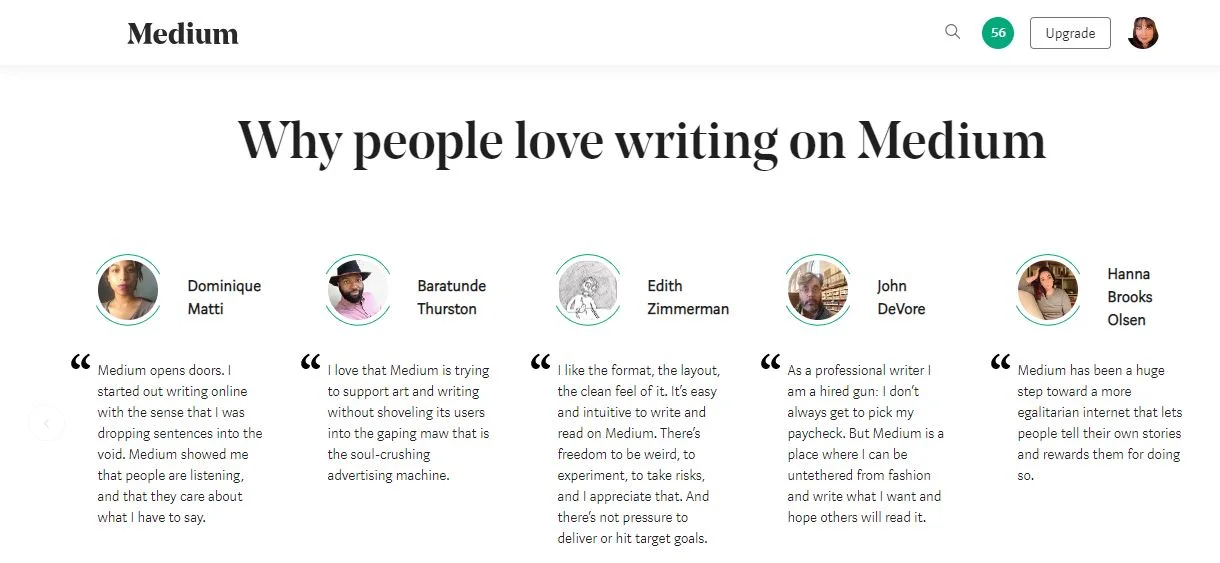
Testimonials on Medium from the site.
How to use the Medium Partner Program if you are an established writer
For seasoned writers, you probably have plenty of clips to show clients. For you, Medium is a good place to post articles that were rejected by clients or that you just can’t seem to find a home for. Having the chance of earning is better than them rotting away in a folder on your hard drive., after all. This is what I use the site for and I really like having a fall-back for on-spec articles.
Get published by Medium magazines
There are also magazines owned by Medium that pays writers very high flat rates for articles. Here’s a list of the top 19 high-paying Medium magazines.
Need help getting your freelance writing career off the ground? Grab my No-Fluff Freelance Writing Starter Pack. It teaches you how I make $100 to $200 an hour at home as a freelance writer. The pack includes gig finding secrets, my two books, a social media marketing guide for writers, invoice template, contract template and more.

Minimizing The Stress And Strain Of Being A Writer
Let’s look at a few tips to ensure you stay safe and sane when writing in your den.
Oh, woe, being a writer is truly the toughest job of them. Okay, so that might not be true. Compared to the majority of workers, we might have things fairly cushy. However, that doesn’t mean that the stresses writers face on the job shouldn’t be taken seriously. They can get in the way of your productivity, affecting your ability to make a living and, even more crucially, can cause real injury if you’re not careful. Let’s look at a few tips to ensure you stay safe and sane when writing in your den.
Ensure that you have a comfy office
Writing involves spending a lot of time sitting in one place with your hands at a keyboard, type, type, typing away. If that’s not a recipe for repetitive strain injury, then nothing else is.
The first tip is to make sure that your office supports and comforts you, reducing the physical strain that tends to build up in your shoulders and lower back when you work for a long time. A comfortable chair, one that supports these parts of your body, and allows you to adjust the height to make sure that you’re adopting good sitting posture is a must. Here’s what I use. Otherwise, you might actually want to get a standing desk to avoid the issues of sitting too much in the first place.
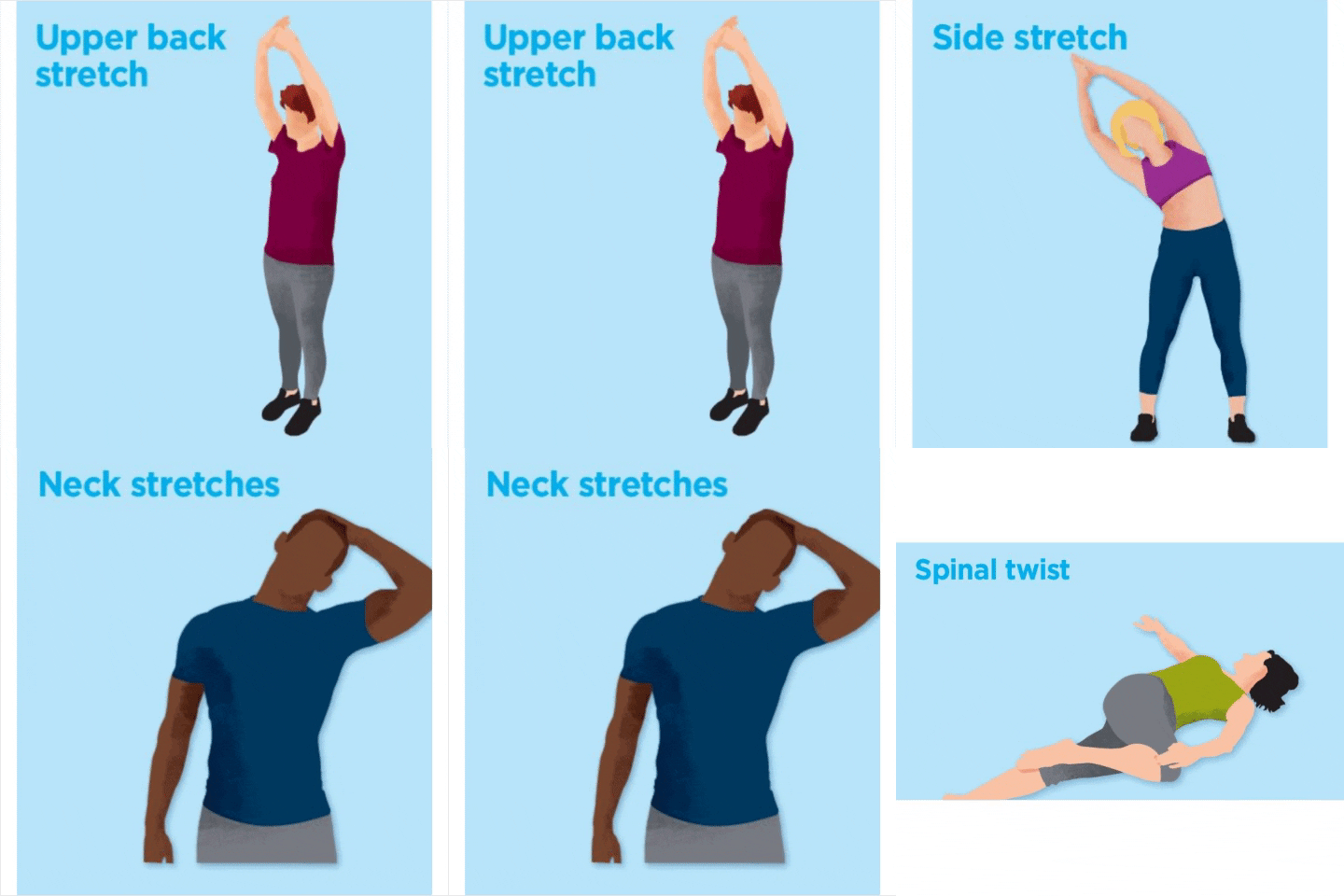
Get up and stretch
Even if you do have a great ergonomic chair, you should take the time to get up and stretch your legs every hour. Even if you have a standing desk, you should shake out your body and move around a little.
For writers, it’s particularly important to do wrist stretches to make sure that you’re taking care of the parts of your body that are most likely to suffer from RSIs in the first place. One good stretch is to slowly raise your palms to the air with your arms held directly upwards for ten seconds, before slowly lowering them. Then you hold your arms by your side, holding your hands so that the back of them points to the ground for ten minutes, repeating this until you do ten of each stretch. Here are some ideas:
Work in good lighting
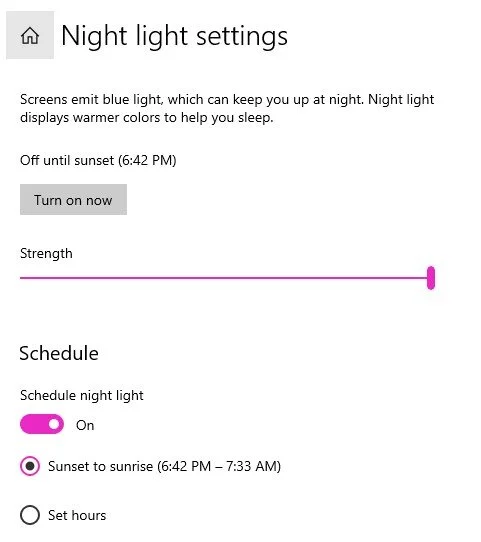
Aside from spending their day sitting in front of a keyboard, writers also spend a lot of time with their eyes glued to a computer monitor. Direct contact with blue light can affect you in a range of ways. For one, it can cause eyestrain, which can be stinging and annoying. It can also affect your sleep if you’re working at night. Windows allows you to switch from blue to yellow light on your monitor. Just go into Settings > Display > Night Light. Toggle on the Night Light setting and schedule when the blue light will turn off. I have mine set so that the blue light turns off at sunset.
You can also use glasses that have blue light filters, and you might want to choose a shop that offers free shipping as you might want to get more than one pair for safety. You need your eyes to see what you’re writing, so they’re 98worth protecting.
Know how to position your wrists
Enough keyboarding and mousing can lead to some pretty nasty injuries and conditions, with carpal tunnel able to effectively end your writing career if it gets bad enough. However, computer use doesn’t have to lead to such nasty injuries if you take care of yourself.
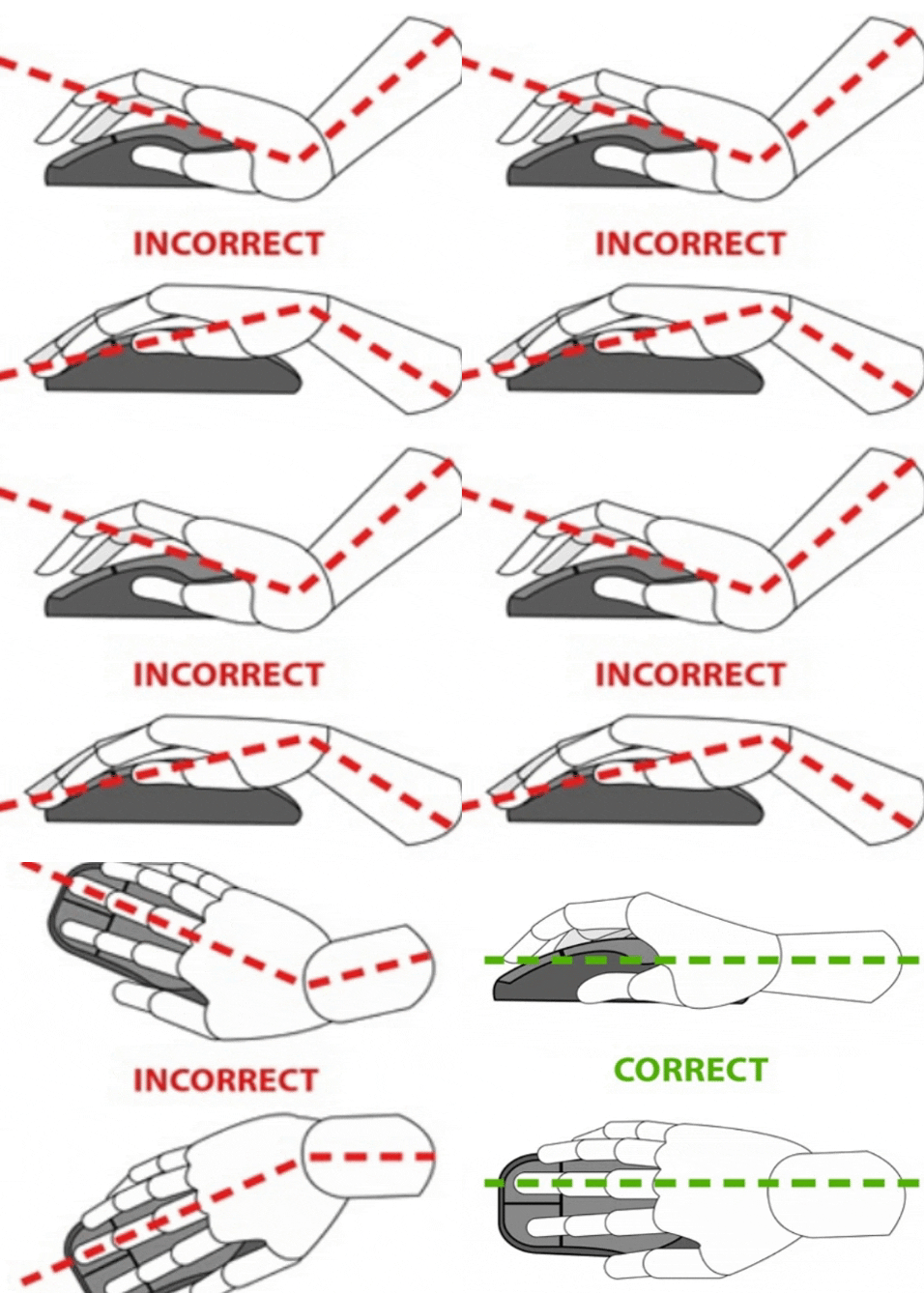
Make sure your chair is positioned so that your hands are raised just above the level of the keyboard but below the level of your elbows. You shouldn’t be reaching up to type at the keyboard, nor should you be typing at any angle other than straight, if you can help it. Also, keep your wrist straight when using your mouse.
Know your limits
Because of the intensive nature of the work, writers can get into some pretty unhealthy patterns (like skipping meals) in order to get those 5,000 words a day (or however many it is) out there. For one, it’s important to set realistic expectations for how much you can reasonably write in one workday, make sure that your getting paid a decent rate per word, and try not to push your limits. Burnout is a very real risk. If a writing piece involves a lot of research, then be sure to include that time in your calculations, as it counts as work all the same, even if it doesn’t involve any typing.
Choose a time that best fits you
A lot of writers end up being night owls, for some reason. There’s not necessarily anything wrong with this if it is truly when you’re at your most productive. Just make sure you’re negating the risk of eyestrain and sleep disruption and it can work fine. However, if you end up working late due to procrastination more than anything, you should make an effort to try scheduling out different writing times to see what works best for you.
Having a pre-work preparation ritual, such as getting dressed, eating breakfast, and taking a walk might be able to help you better switch on your “work mode” at any time of the day. Stick to your most productive time once you find it.
Know when to take breaks
Due to the intensive nature of professional writing, it’s easy for stress to build up, especially if you’re writing to a deadline. Burnout is a real risk that you should stay keenly aware of. You should make sure to schedule breaks to allow yourself to breathe, be it at certain times or whenever you hit a certain word count. Be willing to take impromptu breaks, as well. If you start to feel yourself getting distracted or you feel like your head is starting to get too fussy, then you should take a break, get away from the computer, and take a moment to breathe or even to chat to someone.
With the tips above, you can ensure that you’re able to fire off thousands of words without worry of getting burnt out or of doing real injury to yourself.

Writer's Block? How To Find Inspiration Fast
So what should you do when you run out of ideas? Here are some tips.
The worst part of running a writing business is when you run out of ideas. Writer’s block! It's that oh s**t moment. No matter what sort of writer you are, you’ll get blocked sometimes. Freelance writers are sometimes stuck for ideas, novelists get blocked halfway through. Luckily there are a few things you can do to get yourself through writer’s block and back into the artistic frame of mind…
help with writing
Image source
Get Away from the Desk
If your writer’s block is just a momentary thing and you haven’t been suffering for months, the best thing to do is to get up from your desk and go for a walk. Whether you get a cup of tea and go to sit outside for half an hour, or you strap on your walking boots and get down and dirty with nature for an afternoon, is up to you - but it’s important to change your environment.

You could even move your laptop to a different place in the house for a slightly different perspective. I like to sit at my patio table in my yard.
Image source
Try Free Writing
Pick up a pen and paper and write for fifteen minutes without stopping, even if your hand starts to cramp up. If you have an obliging friend, ask them to read out words to you for inspiration.
Although a lot of what you write won’t be useful in the slightest, chances are there will be a few phrases in there that will be interesting simply because you didn’t have a chance to think about them before you wrote them down. Free writing can show you what’s really in your head by lowering your inhibitions.

Experience Other Stories
If you’re suffering from an ability to structure your fiction writing, why not take in other people’s stories? Watch a great season of TV or a movie in a similar genre. For example, if you're writing a gangster novel, watch the likes of The Godfather and The Sopranos.
Do a Throwback
For bloggers, sometimes, to create great content you don't need to create new content. One look at your former posts can supply you with a plethora of awesome future posts.
For example, do a roundup of your most popular posts. Go to your site stats and take a look at the posts that got the most views, the most comments, or the most shares. Choose the top ten and create a post that links to each with a brief description of why each post rocks. Better yet, add your favorite line or tip from each post to the description.
Another idea for repurposing old posts is by expanding on them. Do an update or flesh out the old post with new or more complex information. For example, on one of my sites (I sold the site in 2014) I wrote a post on how to draw people. Then I broke that general information post down into more in-depth posts, such as How to Draw a Child, How to Draw a Nose, How to Draw a Mouth, and a dozen other posts.
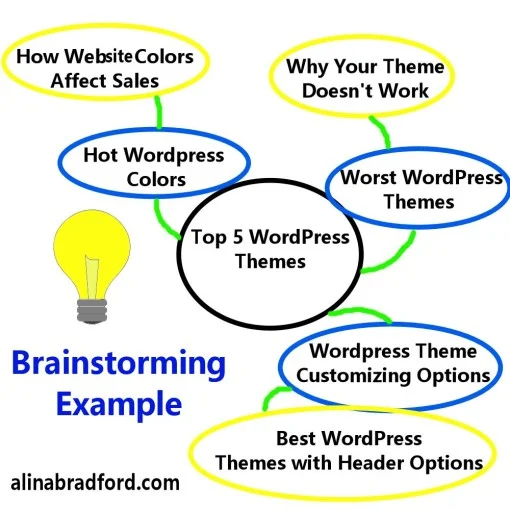
how to brainstorm blog posts
To find ideas from old articles (yours or someone else’s), do a brainstorming session. Draw a circle on a piece of paper and write the name of the post in the circle. Now draw some smaller circles around the large one. Fill these circles with topics that stem from the main topic in the main post. Branch out from these ideas with circles with even more detailed ideas. Here is an example:
Do a Survey
take a survey
If you want 100% new ideas for your blog or articles, then mine your readers, family, friends, or social media followers. Set up a survey (SurveyMonkey is a good app to use) and ask them about what their biggest concerns are. Then, craft posts that answer their questions or concerns. This one tactic can give you a lot of great topics to work with and the best part is your readers will really care about your posts.
Read
Another super helpful tactic is reading the posts of other people in your industry. You may find that you have such a strong reaction to something you read that you simply must write a rebuttal.

Here is an example, Neal Frankle says that going to college can be a waste of time and money. While in some cases I would agree, my own experience has shown me that even half a degree can be worth your while. I took the one post by Neal Frankle and used it to spur ideas for another post for one of my clients.
Read Poetry
One of the great things about poetry is that each one is like a short story - a poem is a representation of a thought on the page instead of a long, labored plot structure. If you’re having problems writing and you’re feeling jealous of other writers, you could read some poetry instead, from the older Romantic poets like Wordsworth to more recent poets like the spoken word poet Andrea Gibson.

Reading poetry will help you appreciate the beauty and importance of carefully choosing each word and it will help you write sentence by sentence instead of thinking of your novel or article as an enormous task that you will inevitably fail at.
Start Something New

Finally, you might be blocked simply because part of you knows that what you’re writing simply isn’t going well. Give it a break and start something else. You’ll be able to come back to your original work once you’ve gained some space and distance from it so you can edit it more easily.
Here’s Some More Ideas
Need Creativity? Brainstorm by Sleeping
22 Ways to Create Fresh Blog and Article Ideas
Try one, or all of these ideas, and I guarantee your writer's block will be gone and you will be typing away once again. After 18 years as a writer, I've done all of the above!

Freelance writing jobs of the week mega list: October 14, 2020
Huge list of remote freelance writing gigs!
Hey you! Are you ready for a gig blast? Check out these remote freelance writing gigs and get to pitching!
Also, don’t miss:
High Paying Magazines Looking For Pitches: 19 Magazines on Medium that Pay

Adding another exceptional Content Writer to our creative team
SEO Content Writer
Business Book Summary Writer
Looking for Legal Blog Writers
Technical Writer
Accident Law Attorneys Wanted - Blog Writers
Technical Writer
Needed Writer For An Archery Blog
Content writer with passion for learning about new and emerging technologies
Immigration Law Attorneys Wanted - Blog Writers
We're still accepting pitches for our mag!
— The Strand (@strandpaper) October 13, 2020
We're looking for writers, photographers, and artists to discuss what "EXPORE" means to them.
Personal essays, interviews, poetry, prose, art, videos and photo essays are encouraged.
Pitch to magazine@thestrand.ca by FRI, OCT 16th! pic.twitter.com/s96cHN51UV
We're still accepting pitches for our mag!
— The Strand (@strandpaper) October 13, 2020
We're looking for writers, photographers, and artists to discuss what "EXPORE" means to them.
Personal essays, interviews, poetry, prose, art, videos and photo essays are encouraged.
Pitch to magazine@thestrand.ca by FRI, OCT 16th! pic.twitter.com/s96cHN51UV
Calling all writers! We're looking for new blog posts and want to hear from you.
— UX Writers Collective (@uxwritersc) October 13, 2020
Pitch us at blog@uxwriterscollective.com if you've got something to say about...
✍️ UX writing
✍️ Content strategy
✍️ Industry trends
✍️ Processes & systems
✍️ Chatbots & AI
Philly publication Root Quarterly is looking for essays, fiction, and cultural criticism that explore new awakenings, movements, & reinvention of all kinds for their spring issue, themed Renaissance. Pitches & submissions are due on Nov 13 - submit here:https://t.co/32xkQK8IqU
— millie phanatic (@camille_mola) October 13, 2020
SoCal journalists: Get $2500 for a reporting project on systemic racism thru this LA Press Club grant. Deadline is 10/22 #journojobs https://t.co/dx5Xal3mk6
— Brittany Levine Beckman (@brittanylevine) October 13, 2020
SPECIAL COVERAGE: Calling journalists, writers, analysts!
— African Arguments (@africaarguments) October 12, 2020
Do you have a story idea per #ENDSARS #SarsMustGo protests against #PoliceBrutalityInNigeria? PITCH US! We want analysis, reportage, photo essays, feature stories, listicles.
PITCH here: a.rotinwa@africanarguments.org
Also interested in writers based in Australia, Canada and the States. Again with credible scriptwriting experience - or at least writing for reputable media
— Speechy (@Speechyspeeches) October 14, 2020
We work with a select handful of fantastic, trusted writers on a freelance basis... 2/3
We are accepting pitches for the January/February issue of Water Canada. We are especially looking for stories related to providing safe drinking water and/or wastewater treatment for Indigenous communities across Canada. Have an idea? Send an email to andrew@actualmedia.ca pic.twitter.com/sux9h7z5zl
— Water Canada (@CanadianWater) October 13, 2020
🖋️ Hiring: Freelance Writer
— Wind Chimes Games [Reanimation Scheme] (@WindChimesGames) October 14, 2020
We're looking for a #writer for short side stories of our #otome, Reanimation Scheme, as Patreon content. ~1k words for each.
Deadlines and duration are negotiable.
DM me your samples, portfolio and rates!#vndev #commission pic.twitter.com/zyrByPuqJW
💥The UP & GO Grant returns!💥
— _underpinned (@_UnderPinned) September 24, 2020
Judged by the wonderful @SianySianySiany we'll be giving a grant of £500 to a UK based freelance writer!
Check out this article for how to apply👇https://t.co/MP8bgGi6p0#WritingCommunity #writers #grants #WritingLife #journalism #GrantContest
A reminder: we’re always looking for article pitches!! Tell us what your idea is at midwestsocialist@gmail.com. Here’s what we’re looking for: pic.twitter.com/MWxbHE4na2
— Midwest Socialist (@MWSocialist) October 13, 2020

My No-Fluff Freelance Writing Starter Pack teaches you how I make a living at home as a freelance writer. It includes my two books, a social media marketing guide for writers, invoice template, contract template and more. Just $29.97!