

140+ Keyboard shortcuts to make writing faster
Here’s a huge list of shortcuts and why you need them in your life.
I’ve been seeing a post going around Facebook about keyboard shortcuts that can save you time while writing. It’s information that’s well known to people who have been writing (or just typing!) for a long time, so I thought I would share a big long list with you, just in case you didn’t know all of the PC keyboard shortcuts. Here’s the shortcuts and why you need them in your life.

What are keyboard shortcuts?
What are keyboard shortcuts? The are keys you press to signal to your computer that you want a certain function. For example, the most common shortcut is pressing the CTRL button and the C button to copy highlighted text on the screen. There are around dozens of combinations.
Benefits of memorizing keyboard shortcuts
Just by memorizing the shortcuts you’ll use most, you can shave massive amounts of time off your writing sessions over a day, a month, and a year. I know, I used to be stubborn, too, and wouldn’t learn them. I mean, how long does it really take to use your mouse to click on the Bold or Italic option in WordPress or Microsoft Word?
Over time, I realized that taking my hands off the keyboard to reach for my mouse halted my thought process and it took a bit to get back on track once my hands were back on the keyboard. So, keyboard shortcuts let me process my thoughts much faster, saving a lot of time.
How to memorize keyboard shortcuts
Be sure to print these out and keep them by your computer so that you can glance at them while your writing and start using them. Even better, write a few down on a sticky note and post them somewhere near your screen until you have them memorized. Then, post some more. Before you know it, you’ll have them all memorized!
Keyboard shortcuts to make writing faster
Okay, No-Fluff writer. Without further ado, I present to you the list of keyboard shortcuts that will make your typing faster, and a few that will help with flipping back and forth while researching, reading emails, and other tasks:
GENERAL SHORTCUTS (the first 8 generally work on most programs or content management system, like Wordpress for example)
CTRL+A. . . . . . . . . . . . . . . . . Select All
CTRL+C. . . . . . . . . . . . . . . . . Copy
CTRL+X. . . . . . . . . . . . . . . . . Cut
CTRL+V. . . . . . . . . . . . . . . . . Paste
CTRL+Z. . . . . . . . . . . . . . . . . Undo
CTRL+B. . . . . . . . . . . . . . . . . Bold
CTRL+U. . . . . . . . . . . . . . . . . Underline
CTRL+I . . . . . . . . . . . . . . . . . Italic
F1 . . . . . . . . . . . . . . . . . . . . . . Help
F2 . . . . . . . . . . . . . . . . . . . . . Rename selected object
F3 . . . . . . . . . . . . . . . . . . . . . Find all files
F4 . . . . . . . . . . . . . . . . . . . . . Opens file list drop-down in dialogs
F5 . . . . . . . . . . . . . . . . . . . . . Refresh current window
F6 . . . . . . . . . . . . . . . . . . . . . Shifts focus in Windows Explorer
F10 . . . . . . . . . . . . . . . . . . . . Activates menu bar options
ALT+TAB . . . . . . . . . . . . . . . . Cycles between open applications
ALT+F4 . . . . . . . . . . . . . . . . . Quit program, close current window
ALT+F6 . . . . . . . . . . . . . . . . . Switch between current program windows
ALT+ENTER. . . . . . . . . . . . . . Opens properties dialog
ALT+SPACE . . . . . . . . . . . . . . System menu for current window
ALT+¢ . . . . . . . . . . . . . . . . . . opens drop-down lists in dialog boxes
BACKSPACE . . . . . . . . . . . . . Switch to parent folder
CTRL+ESC . . . . . . . . . . . . . . Opens Start menu
CTRL+ALT+DEL . . . . . . . . . . Opens task manager, reboots the computer
CTRL+TAB . . . . . . . . . . . . . . Move through property tabs
CTRL+SHIFT+DRAG . . . . . . . Create shortcut (also right-click, drag)
CTRL+DRAG . . . . . . . . . . . . . Copy File
ESC . . . . . . . . . . . . . . . . . . . Cancel last function
SHIFT . . . . . . . . . . . . . . . . . . Press/hold SHIFT, insert CD-ROM to bypass auto-play
SHIFT+DRAG . . . . . . . . . . . . Move file
SHIFT+F10. . . . . . . . . . . . . . . Opens context menu (same as right-click)
SHIFT+DELETE . . . . . . . . . . . Full wipe delete (bypasses Recycle Bin)
ALT+ underlined letter . . . . Opens the corresponding menu
Document Cursor Controls
HOME . . . . . . . . . . . . . . to beginning of line or far left of field or screen
END . . . . . . . . . . . . . . . . to end of line, or far right of field or screen
CTRL+HOME . . . . . . . . to the top
CTRL+END . . . . . . . . . . to the bottom
PAGE UP . . . . . . . . . . . . moves document or dialog box up one page
PAGE DOWN . . . . . . . . moves document or dialog down one page
ARROW KEYS . . . . . . . move focus in documents, dialogs, etc.
CTRL+ > . . . . . . . . . . . . next word
CTRL+SHIFT+ > . . . . . . selects word
SPECIAL CHARACTERS
Alt 0145 . . . ‘ Opening single quote
Alt 0146. . . . ‘ Closing single quote
Alt 0147. . . “ Opening double quote
Alt 0148. . . “ Closing double quote
Alt 0150… – En dash
Alt 0151… — Em dash
Alt 0133… Ellipsis
Alt 0149… • Bullet
Alt 0174… ® Registration Mark
Alt 0169… © Copyright
Alt 0153… ™ Trademark
Alt 0176… ° Degree symbol
Alt 0162… ¢ Cent sig
Alt 0188… 1⁄4
Alt 0189… 1⁄2
Alt 0190… 3⁄4
Alt 0233… é
Alt 0201… É
Alt 0241… ñ
Alt 0247… ÷
FILE MENU OPTIONS IN A CURENT PROGRAM
Alt + E… Edit options in current program
F1… Universal help (for all programs)
Ctrl + A… Select all text
Ctrl + X… Cut selected item
Shift + Del… Cut selected item
Ctrl + C… Copy selected item
Ctrl + Ins… Copy selected item
Ctrl + V… Paste
Shift + Ins… Paste
Home… Go to beginning of current line
Ctrl + Home… Go to beginning of document
End… Go to end of current line
Ctrl + End… Go to end of document
Shift + Home… Highlight from current position to beginning of line
Shift + End… Highlight from current position to end of line
Ctrl + f… Move one word to the left at a time
Ctrl + g… Move one word to the right at a time
MICROSOFT WINDOWS SHORTCUT KEYS
Alt + Tab… Switch between open applications
Alt + Shift + Tab… Switch backwards between open applications
Alt + Print Screen… Create screen shot for current program
Ctrl + Alt + Del Reboot/Windows®… task manager
Ctrl + Esc… Bring up start menu
Alt + Esc… Switch between applications on taskbar
F2.. Rename selected icon
F3… Start find from desktop
F4… Open the drive selection when browsing
F5… Refresh contents
Alt + F4… Close current open program
Ctrl + F4… Close window in program
Ctrl + Plus Key… Automatically adjust widths of all columns in Windows Explorer
Alt + Enter… Open properties window of selected icon or program
Shift + F10… Simulate right-click on selected item
Shift + Del… Delete programs/files permanently
Holding Shift During Bootup… Boot safe mode or bypass system files
Holding Shift During Bootup when putting in an audio CD, will prevent CD Player from playing
WINKEY SHORTCUTS
WINKEY + D… Bring desktop to the top of other windows
WINKEY + M… Minimize all windows
WINKEY + SHIFT + M… Undo the minimize done by WINKEY + M and WINKEY + D
WINKEY + E… Open File Explorer
WINKEY + Tab… Cycle through open programs on taskbar
WINKEY + F… Display the Windows® Search/Find feature
WINKEY + CTRL + F… Display the search for computers window
WINKEY + F1… Display the Microsoft® Windows® help
WINKEY + R… Open the run window
WINKEY + Pause /Break… Open the system properties window
WINKEY + U… Open utility manager
WINKEY + L… Lock the computer (Windows XP® & later)
OUTLOOK SHORTCUT KEYS
Alt + S… Send the email
Ctrl + C… Copy selected text
Ctrl + X… Cut selected text
Ctrl + P… Open print dialog box
Ctrl + K… Complete name/email typed in address bar
Ctrl + B… Bold highlighted selection
Ctrl + I… Italicize highlighted selection
Ctrl + U… Underline highlighted selection
Ctrl + R… Reply to an email
Ctrl + F… Forward an email
Ctrl + N… Create a new email
Ctrl + Shift + A… Create a new appointment to your calendar
Ctrl + Shift + O… Open the outbox
Ctrl + Shift + I… Open the inbox
Ctrl + Shift + K… Add a new task
Ctrl + Shift + C… Create a new contact
Ctrl + Shift+ J… Create a new journal entry
WORD SHORTCUT KEYS
Ctrl + A… Select all contents of the page
Ctrl + B… Bold highlighted selection
Ctrl + C… Copy selected text
Ctrl + X… Cut selected text
Ctrl + N… Open new/blank document
Ctrl + O… Open options
Ctrl + P… Open the print window
Ctrl + F… Open find box
Ctrl + I… Italicize highlighted selection
Ctrl + K… Insert link
Ctrl + U… Underline highlighted selection
Ctrl + V… Paste
Ctrl + Y… Redo the last action performed
Ctrl + Z… Undo last action
Ctrl + G… Find and replace options
Ctrl + H… Find and replace options
Ctrl + J… Justify paragraph alignment
Ctrl + L… Align selected text or line to the left
Ctrl + Q… Align selected paragraph to the left
Ctrl + E… Align selected

Punctuation You Should Know: Apostrophes, Colons, and Semicolons
Get your punctuation right with these tips.
I don’t know how many times an editor has told me, “Oh, I love editing your work. There’s not much to change!” A big part of this is that I know how and when to use punctuation. As a writer, you should, too. Here is how to write with some of the trickier punctuation.
Apostrophes
Ugg. From my close observation and research, this punctuation mark ranks among the most abused in the English language. Just check posters, billboards, and various ads in your neighborhood and you will see what I mean. Even though we encounter the use of the apostrophe in our daily lives, many people tend to mess it up. This punctuation mark serves only two purposes:
Show possession
The addition of an apostrophe at the end of a proper noun indicates the noun owns a particular object. Basically, we use an apostrophe to reduce the number of words in a particular piece of writing. For instance, we can say ‘Party of Peter.’ To make it nicer to the eyes and ear, we write 'Peter’s party’ by adding an apostrophe and an S to the noun.
Some words end with an S. No problem. In this case, you can put an apostrophe at the end of the word after the S. For example: "The classes' (multiple classes, so it's plural) book was very long." "Go pick up the cats' (multiple cats) toys."
Show omission of a word or letter
This punctuation mark can show that some letters and words have been omitted intentionally. Instead of writing, ‘I am’, for example, you can use this punctuation mark and the word will become ‘I’m.’ Pick ‘n’ mix is also the short form for ‘pick and mix.’ ’89 is the short form for 1989. It's is short for it is.
Colons
When you see two dots before a statement, the writer wants to say, ‘this is what I mean’. The colon as a punctuation mark has three primary uses which include:
Introducing a list of items
For example, "The bookstore specializes in four subjects: graphic design, architecture, art and crafts."
Punctuation between two independent clauses where the second clause illustrates or explains the first one
"He has little knowledge of the English language: he grew up in China."
Emphasis
We also use the colon to make a statement, word or phrase more powerful.
"Working 20 hours a week as a personal driver and taking care of all his family members: that was his dream job."
Semicolons
Most of us use colons and semicolons interchangeably which should not be the case. The following are some of the uses of a semicolon:
It join clauses that are independent but related
The words before the semicolon form a complete sentence or phrase while those after the semicolon also make sense as a sentence. The two statements will also share a logical connection.
"Mary went to the library; it’s open until 2."
“I hate salad; it gets stuck in my teeth.”
It's used in a serial list
When you want to list a number of things in one sentence, the semicolon comes in handy.
"I need accommodation rates for the following cities: London, Ontario; London England: Paris, Ontario; Paris; France."

The Ultimate Guide to Finding Jobs as a Freelance Writer
Professional freelance writers are always blogging about these sweet gigs they're working on that pays $100 to $2,000 per article. Where the heck do you find these fantastic jobs everyone's talking about?
Professional freelance writers are always blogging about these sweet gigs they're working on that pays $100 to $2,000 per article. Where the heck do you find these fantastic jobs everyone's talking about?
After years, I have honed a way to find great paying gigs quickly. Here are my secrets.

Hit Up Social Media
One of the easiest ways to find gig gems is to search social media. Often, businesses will post their need for a blogger, copywriter or ghostwriter on their pages. All you have to do is search for relevant hashtags.
Put these hashtags into a Facebook or Twitter search bar to find awesome gigs:
#bloggerswanted
#writerswanted
#copywriterwanted
#bloggerjob
#bloggingjobs
#writtingjobs
#publishingjobs
#journalismjobs
#freelancewriterwanted
#remotewriterwanted
#fbloggerswanted (Fashion bloggers wanted)
#healthbloggerswanted
Search Google the Smart Way
Searching for writing jobs on Google can bring up job posts from 2005 or jobs that are five states away and require on-site work. You can avoid all of the crappy job posts by searching smart.

If you want to search a certain site, put site: in front of the site name, then add keywords in quotation marks. For example, I've had a lot of luck with this search:
site:craigslist.org "remote writer "
Some other sites other than craigslist you can try are:
site:problogger
site:freelancewritinggigs.com
Some other terms you can try are:
"content writing companies"
"freelance writing companies"
To get newer job posts, add the date:
site:craigslist.org "remote writer " November 15th 2020
Now the secret to finding high paying jobs: add the type of payment you're looking for.
site:craigslist.org "remote writer " December 15th 2020 pays $220
site:craigslist.org "remote writer " November 15th 2018 $50 per hour
site:craigslist.org "remote writer " November 15th 2018 .50 per word
Successful writer Jennifer Mattern recommends this combination:
writer and "compensation: * per article" site:craigslist.org (Replace the * with the monetary amount you want to be paid.)
If you want to search everywhere, just leave off the site and type in the rest of the search. This will bring up high-paying gigs from company job boards that most people never look at.
Use LinkedIn
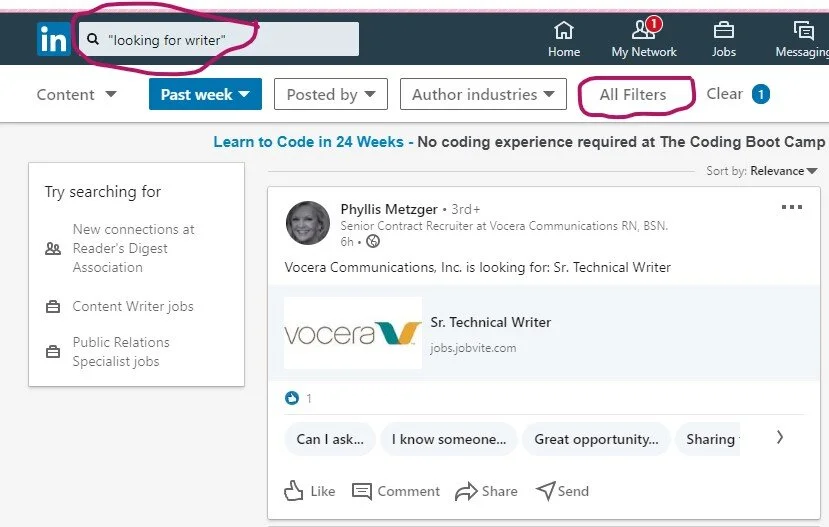
Another great way to find jobs is by searching LinkedIn. No, I’m not talking about the job section. Here are the details to a special way to search:
Go to the Home page
In the search bar type “looking for writer” or “looking for freelance writer”
When it takes you to the page, click on the All Filters option on the left side
Choose Past Week
Click Apply
Posts by companies and individuals looking for writers will pop up.
Get jobs delivered to your inbox
Now that you know the search criteria, set up Google alerts so you can get these great jobs delivered right to your inbox every day.
To set up a Google Alert follow these directions:
Go to https://www.google.com/alerts
Figure out what term you want alerts for (“writer wanted,” “food writer wanted,” “tech writer needed”)
Type your search term into the box at the top of the screen
Click on the "Show Options" dropdown menu
Set it up to send you an email every day and to send you "all results"
Click "Create Alert"
Sign Up to Get Daily Job News Letters

There are some great sites out there that scour the web for freelance writing jobs, then bundles them up into daily emails. I’ve rounded up a selection that provides links to gigs that pay well. Here are my favorite daily and weekly newsletters you need to sign up for:
Never stop searching
The key to finding gigs is volume. Apply for 20 solid gigs per week until you start bringing in the clients you need to pay the bills. Once you’ve got your clients, don’t stop. You’re never done searching when you’re a freelance writer. Simply trim your search down to 12 gigs a week. Remember, a dozen in play keeps the bills paid.

Start searching for clients that pay more to replace your current clients when the gigs end. Eventually, your name will get around and clients will search you out. That’s how you know you’ve made it to the big time. Even then, don’t stop searching. Just be super picky about who you take on as a client.
If you would like more great tips like these, order your copy of No-Fluff Freelance Writer Starter Pack today!

Writer's Block? How To Find Inspiration Fast
So what should you do when you run out of ideas? Here are some tips.
The worst part of running a writing business is when you run out of ideas. Writer’s block! It's that oh s**t moment. No matter what sort of writer you are, you’ll get blocked sometimes. Freelance writers are sometimes stuck for ideas, novelists get blocked halfway through. Luckily there are a few things you can do to get yourself through writer’s block and back into the artistic frame of mind…

help with writing
Image source
Get Away from the Desk
If your writer’s block is just a momentary thing and you haven’t been suffering for months, the best thing to do is to get up from your desk and go for a walk. Whether you get a cup of tea and go to sit outside for half an hour, or you strap on your walking boots and get down and dirty with nature for an afternoon, is up to you - but it’s important to change your environment.

You could even move your laptop to a different place in the house for a slightly different perspective. I like to sit at my patio table in my yard.
Image source
Try Free Writing
Pick up a pen and paper and write for fifteen minutes without stopping, even if your hand starts to cramp up. If you have an obliging friend, ask them to read out words to you for inspiration.
Although a lot of what you write won’t be useful in the slightest, chances are there will be a few phrases in there that will be interesting simply because you didn’t have a chance to think about them before you wrote them down. Free writing can show you what’s really in your head by lowering your inhibitions.

Experience Other Stories
If you’re suffering from an ability to structure your fiction writing, why not take in other people’s stories? Watch a great season of TV or a movie in a similar genre. For example, if you're writing a gangster novel, watch the likes of The Godfather and The Sopranos.
Do a Throwback
For bloggers, sometimes, to create great content you don't need to create new content. One look at your former posts can supply you with a plethora of awesome future posts.
For example, do a roundup of your most popular posts. Go to your site stats and take a look at the posts that got the most views, the most comments, or the most shares. Choose the top ten and create a post that links to each with a brief description of why each post rocks. Better yet, add your favorite line or tip from each post to the description.
Another idea for repurposing old posts is by expanding on them. Do an update or flesh out the old post with new or more complex information. For example, on one of my sites (I sold the site in 2014) I wrote a post on how to draw people. Then I broke that general information post down into more in-depth posts, such as How to Draw a Child, How to Draw a Nose, How to Draw a Mouth, and a dozen other posts.
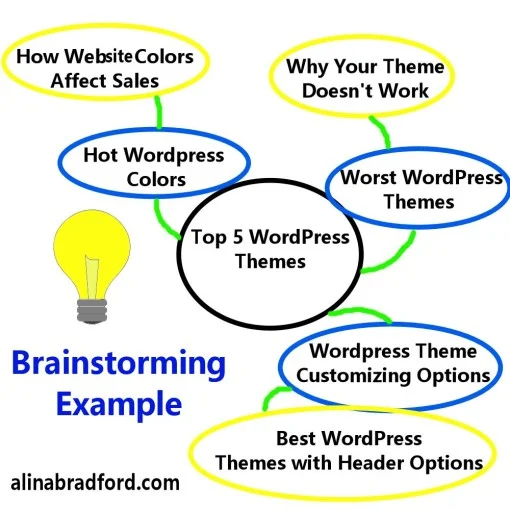
how to brainstorm blog posts
To find ideas from old articles (yours or someone else’s), do a brainstorming session. Draw a circle on a piece of paper and write the name of the post in the circle. Now draw some smaller circles around the large one. Fill these circles with topics that stem from the main topic in the main post. Branch out from these ideas with circles with even more detailed ideas. Here is an example:
Do a Survey
take a survey
If you want 100% new ideas for your blog or articles, then mine your readers, family, friends, or social media followers. Set up a survey (SurveyMonkey is a good app to use) and ask them about what their biggest concerns are. Then, craft posts that answer their questions or concerns. This one tactic can give you a lot of great topics to work with and the best part is your readers will really care about your posts.
Read
Another super helpful tactic is reading the posts of other people in your industry. You may find that you have such a strong reaction to something you read that you simply must write a rebuttal.

Here is an example, Neal Frankle says that going to college can be a waste of time and money. While in some cases I would agree, my own experience has shown me that even half a degree can be worth your while. I took the one post by Neal Frankle and used it to spur ideas for another post for one of my clients.
Read Poetry
One of the great things about poetry is that each one is like a short story - a poem is a representation of a thought on the page instead of a long, labored plot structure. If you’re having problems writing and you’re feeling jealous of other writers, you could read some poetry instead, from the older Romantic poets like Wordsworth to more recent poets like the spoken word poet Andrea Gibson.

Reading poetry will help you appreciate the beauty and importance of carefully choosing each word and it will help you write sentence by sentence instead of thinking of your novel or article as an enormous task that you will inevitably fail at.
Start Something New

Finally, you might be blocked simply because part of you knows that what you’re writing simply isn’t going well. Give it a break and start something else. You’ll be able to come back to your original work once you’ve gained some space and distance from it so you can edit it more easily.
Here’s Some More Ideas
Need Creativity? Brainstorm by Sleeping
22 Ways to Create Fresh Blog and Article Ideas
Try one, or all of these ideas, and I guarantee your writer's block will be gone and you will be typing away once again. After 18 years as a writer, I've done all of the above!

Tip for New Writers: Successful Writers Don’t Burn Bridges
Don’t burn bridges with clients, new writers. Here’s why.
Should you fight the system? Here’s my thoughts.

I frequent many writers’ forums. I like to lurk, absorbing the knowledge that my peers type about companies and publishers. I remember that a few years ago I stumbled upon a thread full of angry writers. The writers all freelanced for a publication that I wrote for, as well.
The publication had decided to essentially put all freelance projects on hold while they sorted out financial issues. I understood and was patiently waiting to hear if I would get to work with them again. The group of writers in this thread didn’t feel the same. Many threatened the company with a smear campaign. Others posted hateful diatribes directed at the editors of the publishing company. Many declared that they would never write for the company again.

This company had been good to their writers. They always paid on time and offered extra incentives for hard work. I had to wonder if these angry writers were shooting themselves in the foot with this public display of angst. You see, as a freelance writer of more then 20 years, I have learned to take everything in stride. I know the value of holding my temper and not burning bridges.

When I first started my writing career I went to work for a small company as a freelance article writer. This company was bought out only months after I started writing for them. They told their writers that they would be handing out work again within a month’s time.
I didn't hear from them (other than a "wait and see" letter) for more than a year. Instead of sending them a hateful I’m-Tired-of-Waiting email or ranting about them on forums, I took work with other companies. Then, one day they emailed me out of the blue and offered me a fantastic opportunity. The job took me about thirty minutes and I got paid $100.
Maybe the problem is you
Since then, I have worked for them consistently for two years and have made thousands of dollars. Another time that I could have burned bridges was when a publication wouldn’t answer my emails. I had worked with this publication for around a year and they paid well. Plus, I loved the work.
Suddenly, though, I stopped receiving emails from my editor. Did I send a heated email? No, I gave them the benefit of the doubt. Turns out, my email system was blocking their emails even though I had them on my safe list. After the problem was solved I continued writing articles for them and made a lot of money. I’m just glad I didn’t try to jump to conclusions!

Things change
Even though that editor wasn’t the problem, many are. I’ve dealt with some real jerks in my time.
One of my first editors, for example, was a piece of work. She’d rarely answer her emails and when she did she would give me one sentence answers that didn’t even address what I had asked in the first place. Then, when I emailed her again, she would give me very snotty responses.

I remained civil and, though I was tempted, I didn’t tell her off. Many writers will tell you this is a mistake. My theory is that no editor stays at a publication for very long.
You don’t need to waste your writing time fighting the system, it will change soon enough. Sure enough, a few months later a new editor took her place and that publication is still one of my best sources of income. Moral of the story? Getting work as a writer is hard. Making connections is hard. Don’t make your life harder by burning bridges.
Be nice 24/7?
So, you’re probably wondering if I’m telling you to just roll over and take bad behavior. No way! If you are experiencing sexism, racism, or abuse, go over the editor’s head or terminate your contract with the client. Some behavior just can’t stand. Just make sure to act professionally. Don’t rant, don’t rave. State your problem clearly and back it up with screenshots.
Need help? Here’s everything you need to start a successful freelance writing career.

46 Expert Tips for Creating Fantastic, Addictive Content
Upgrade your content with these tips.
I was featured in Venngage's ebook 46 Expert Tips for Creating Addictive Content. You can find my tip, and 46 other great tips for creating great content for your site in this infographic:

Infographic made with Venngage

Where to Find Expert Quotes and Facts for Your Articles and Blog Posts
Here is a quick list of places I go when I need information for my articles.
Nothing makes you look more like a professional writer than using expert opinions and researched data to back up your topic. Where do you find all of these knowledgeable people? Good question! Here is a quick list of places I go when I need information for my articles.

Qwoted- This site is my new favorite. It’s super easy to use and you can easily sort through replies to your query.
Profnet- I use this site the most. You type up a note about what type of person you need and Profnet sends it out to people that may be interested.
HARO- Help a Reporter Out is a lot like Profnet. When you use this one, be ready for a flood of replies to your query.
ExpertClick- You can find press releases, experts and news stories at this site.
TravMedia- Do you write travel pieces? Then this is the site you need to join.
NewsWise- NewsWise can send you the latest press releases and list of expert contacts to your email address. They specialize in health, science and life news.
Game Press- This is the go-to site for video game information. You can get contact information for gaming experts here, as well as news and press releases.
Association of Food Journalists- Foodie writers can find leads and information for food trend articles on this site.
Reporter Connection- I haven't used this site, but it looks like it works like Profnet.
MyBlogU- This is a collaboration site for bloggers.
Businesswire- Business writers will love this site. You can find press releases, market information and more.
Kiti- This site, formally Media Kitty, helps you “find unique story angles, news releases, connect with brands and network with media and influencers.”
Want to make $100 to $200 per hour from home like I do? My No-Fluff Freelance Writing Starter Pack teaches you how to make a living as a writer from home.
You'll learn:
☆How to gather and create clips for your portfolio
☆Everything you need to know about SEO
☆How to create amazing articles
☆Information on invoicing
☆How to get high-paying clients and keep them
The pack includes my guide for writing content, freelance writing course, a social media marketing guide for writers, invoice template, contract template and more. Now $29.97. Get yours now!

How to Write a Paragraph the Right Way
No matter if you're just starting out as a writer, or have some experience under your belt, this little guide will get your work read and published. Sit back and take notes.
No doubt you can write a sentence. That's easy. The problem comes when you try to lace those sentences together to make a paragraph, and then go on to write another paragraph.

No matter if you're just starting out as a writer, or have some experience under your belt, this little guide will get your work read and published. Sit back and take notes.
How to Write the First Line
There are several types of paragraphs. The type of paragraph you’re writing determines what your opening sentence will be. Types of paragraphs include:
An introduction paragraph- These are found at the beginning of a blog or article and are meant to draw the reader in while giving them a pretty firm idea of what the rest of the paragraphs are about. Think of it as a hey-I’ve-got-something-awesome-for-you-so-here’s-a-little-summary paragraph. Hit them with an interesting fact or statistic. Try to get this done in three to four sentences. Be sure to use your keyword as soon as possible, too.
Example:
“40 percent of writers don’t know how to write a paragraph correctly, according to Writing XYZ Magazine. That’s a shocking statistic, but you may be in that percentage and not even know it. Here’s what you need to know so that you’re not part of the clueless masses.”
Standard paragraph- The first line of a standard paragraph is meant to either introduce the reader to a topic or to continue a thought from the last paragraph.
Closing paragraph- A closing paragraph sums up what your post was about and tells the reader what to do next. This can be encouraging the reader to click on a link to an article, book, item you’re selling, whatever. No matter what you guide your reader to next, this bit is called a Call to Action (CTA).
Inside the Paragraph

Once you have the opening sentence down, there are a few rules you need to follow.
First, don’t repeat the main word in every line. For example:
Wrong: “40 percent of writers don’t know how to write a paragraph correctly, according to Writing XYZ Magazine. That’s a shocking statistic about writers, but you may be in that percentage and not even know it. Here’s what you need to know so that you’re not part of the clueless writer’s club.”
Notice I used the word “writers” in every sentence. That’s bad. Not only does it make the paragraph boring, writing the same word over and over again will hurt the article’s SEO (I talk more about SEO here).
Next, be sure that each sentence is different. Using sentences that are the same length and construction is boring. Mix it up.
Use:
A short sentence
A compound sentence (a sentence that uses ‘and,’ ‘or,’ ‘but,’ ‘though,’ a semicolon or a colon, etc.)
A sentence that uses a comma
Quotes
Statistics
You get the idea. Sentence salad. Just make sure that each sentence makes sense in how to connects to the sentence before it. Using different lengths of sentences, but not making them stream together in a harmonious stream of thought isn’t going to work.
Check out the difference between these two paragraphs:
Writing is fun. It takes work. Keep being creative. Use variety. Keep readers entertained.
Writing is fun, but it takes work. Keep being creative. Use variety to keep readers entertained.
Thought the first paragraph is perfectly fine, it’s boring and choppy because it only used super short sentences. Mixing up the sentence structures made the paragraph more interesting.

Finally, be sure to always transition from one paragraph to the next. You can do this by using transitional words in the first sentence. These words continue the thought from the last paragraph.
Some transitional words and phrases include:
‘First,’ ‘second,’ and ‘third’
Next
Finally
Again
Also
Then
Though
Additionally
On the other hand
Remember
Don’t forget
Conversely
Even though
Not only
Actually
Besides
Likewise
Hence
Thus
Later
Immediately
Meanwhile
Therefore
Consequently
For instance
For example
Of course
Otherwise
Still
Yet
In contrast
Take a look back at my previous paragraphs in this article and you’ll see I use transitional words a lot. They help your reader follow your thought process and they are particularly useful for guiding readers through how-to instructions.

How Much Can You Make as a Freelance Writer?
Indeed has released information they have collected on this very topic. Here’s a look at what they shared and some other insights.
I’m asked a lot about how much income someone can expect as a freelance writer. I always say it depends on how much time you put in, your skill and niche. I know that answer doesn't satisfy most people. Interestingly enough, Indeed has gathered some information on this very topic. Here’s a look at what they shared and some other insights.

How much does a Writer make in United States?
Here’s what Indeed had to say about writer pay in the US:
The average salary for a Writer is $23.38 per hour in United States. Salary estimates are based on 1,159 salaries submitted anonymously to Indeed by Writer employees, users, and collected from past and present job advertisements on Indeed in the past 36 months. The typical tenure for a Writer is less than 1 year.
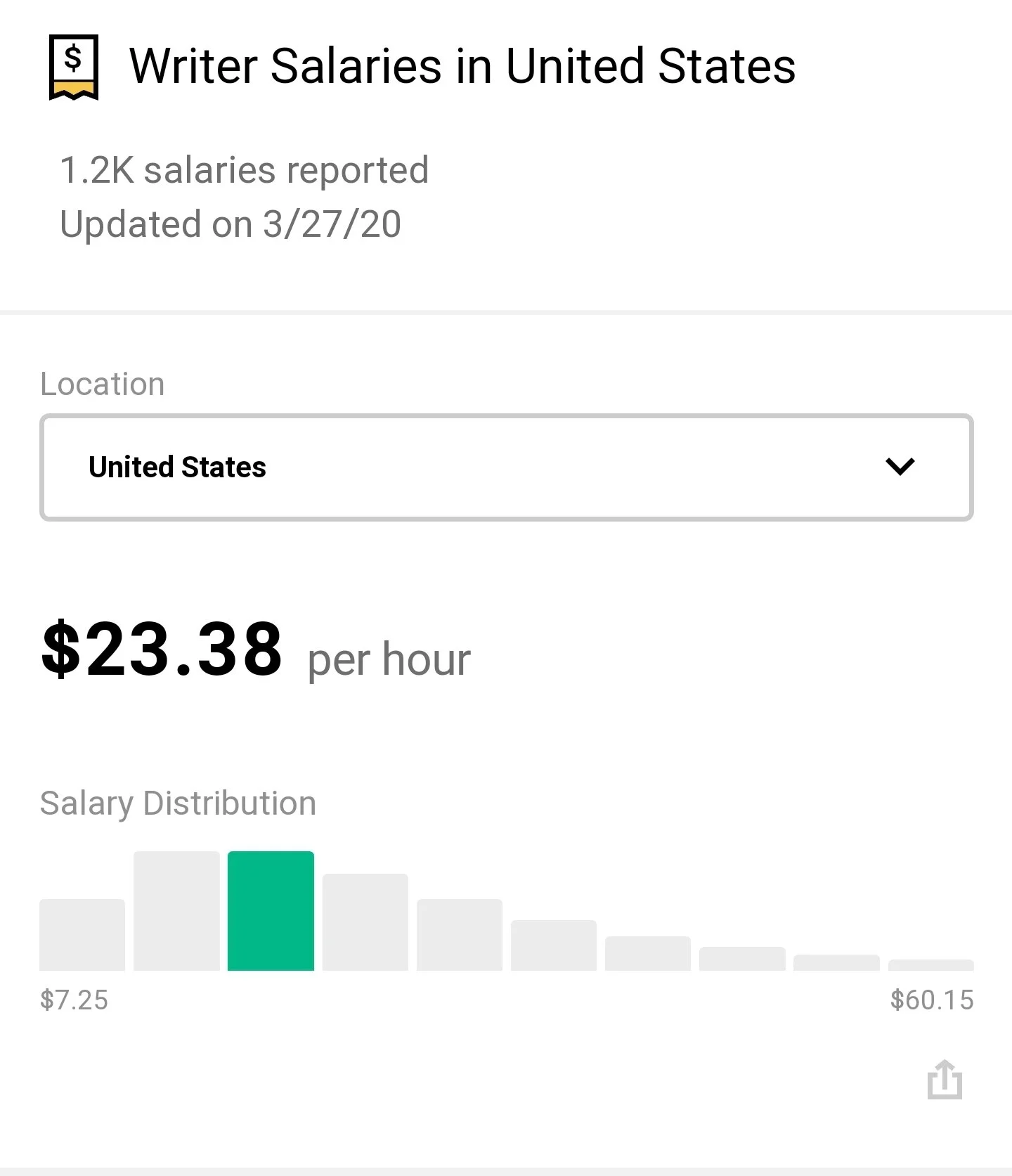
I think this is pretty accurate for beginners. Many writers (including myself) make much more. I tend to make $100 to $200 an hour. Also, what type of writing you do plays a role. For example, Indeed found that content writers (people who write articles or blogs) tend to make $16.97 per hour. Copywriters make around $57,152 per year on average and technical writers tend to make $33.24 per hour.
How to raise your rates
Overall, Indeed says that writers in the United States generally earn between $10.50 – $56.05 per hour based on 5,014 salaries shared by writers and employers in the United States. How much I earn is 311.84% above the United States's average. So how did I get here? Glad you asked. Here’s some tips:
Read articles, blogs, whitepapers, or whatever in your niche and take notes.
Write, write, write! You can’t improve without consistently working on your craft.
Apply for high-paying gigs and be confident!
My No-Fluff Freelance Writing Pack lays out all of the steps for you. Get it for just $29.97.

How to Organize Your Ideas for Better Web Content Writing
Here’s how to organize your website content ideas.
Guest post by Emily Lamp
Given that nearly all content begins with written words, it won’t matter what kind of web content you generate. But the truth is that you can benefit from observing how professional writers go about their work. The biggest struggle for many content marketers is finding a way to create enough content while at the same time ensuring its high-quality content.

This is something that all professional writers have to deal with on a day-to-day basis. The following is a look at how to organize your website content ideas.
Begin with the Sitemap
We have already established that content writing isn’t a piece of cake. It’s the reason why you need to be organized. Failure to organize your writing will cause the writing task to feel overwhelming. For this reason, you need to take a step by step approach when writing content for your website.
You can start by opening a Word or Google document featuring an outline. Then take a step back and inhale deeply. You can simplify the whole process by using readily available tools. Look for tools that will enable you to set up a map as you continue to supplement the content that you will eventually want to display.
Create an Outline for Each Page
A good sitemap ought to have an outline for all the content to appear on the website. Garner a general idea of the kind of structure that you need. Start by organizing this first. You can use an excel spreadsheet to help you organize all the ideas that you have generated so far, and will continue to generate.
Go back to the sitemap created above and start jotting down the main points, which will include the top-level navigation for the website. Using a programming language like C# to read excel spreadsheet will make it easier for you to continue drilling down all the individual pages. For instance, in the Services section, you will need to have numerous pages about each service.
Ensure that the outline gets to capture all the key components of the pages you intend to write. This kind of organization enables you to not only organize words, but also determine the images that you have to start collecting, the CTAs to use, and any other items you may want to capture.
Start Writing the Copies
Having developed an outline, you can now start writing content for your website. Now put your thinking cap on, grab your thesaurus and start crafting your copies.
If you always find it hard for you to tackle the writing aspect, you are in luck, as the work that was done earlier will help smoothen things for you.
At this juncture, you have already done most of the work, and you can always opt to let another team member handle the creative aspect. All you need to do is hand them the notes you prepared in the second step.
Polish and Refine the Content Created for the Website
At this point, you have already created the content for the site, and all that is left is to refine it. Refining will involve checking the spacing, font size, adding images, and using a spell checker to look for grammar and spelling errors. Ensure that the work looks perfect before publishing it for the world to read and view.
Conclusion
It becomes easier to create content for your website when you are properly organized. The good news is that there are tools such as excel that have been designed specifically for this purpose. You need to utilize these tools whenever you’re writing new website content to ensure that you don’t get stuck midway. And always remember to proofread your work before publishing it.
About the Author
Emily Lamp is a professional writer, working closely with many aspiring thinkers and entrepreneurs from various companies. She is also interested in technology, business growth and self-improvement.

How To Choose the Keywords That Appeal to Your Target Audience
Finding keywords that will appeal to your target readership and answer their queries can be a challenge, which is why we’ve put together some tips to help beginners.
Guest post by Rosana Beechum
Creating a popular WordPress blog takes hard work and dedication, but this will pay off in the long run when you’re able to reach your target audience and develop a relationship with them. One of the main ways you can attract readers to your blog, and keep them coming back for more, is to use relevant keywords.

Finding keywords that will appeal to your target readership and answer their queries can be a challenge, which is why we’ve put together some tips to help beginners.
Choose Hot Topics
Creating relevant, inspiring content takes a lot of thought and market knowledge. You also need to know the most popular topics that readers want to know about. Check out this list of the most searched keyword topics on Google to get some inspiration and find a topic that will entice readers to your blog.
Use Google To Your Advantage
When you’re looking for relevant keywords, you might think that you need expensive SEO tools and an expert to help you use them, but there are many free techniques that a budding blogger can employ. One of them is to use Google to find the keywords, phrases and questions that readers are searching for. Simply type your topic, and some phrases related to it, into the Google search bar, then see what the search engine suggests. You can also use the ‘People also ask’ and ‘Searches related to’ sections to see what people are searching for in this subject area.
Read Existing Content On Your Chosen Topic
It might sound like an obvious step, but it’s surprising how many content creators neglect to read existing content on their topic when they’re searching for keywords. You should read the top-ranking content and explore the keywords it uses frequently, how it uses subheadings and the questions it answers for readers. Once you’ve read a few pieces, you’ll begin to see patterns in the way they use keywords, which you can replicate in your own content.
Check Out Keyword Research Tools
As well as Google, you can also use SEO keyword research tools to find out the keywords your readers want to know about. Many SEO reporting solutions, including Moz, SEMrush and AHrefs have keyword research tools. If you’re not paying to use these solutions already, then consider using free tools such as Answer The Public to find keywords that are related to your chosen topic.
Add A WordPress Plugin To Help You Research Keywords
If you want to integrate your keyword research into your blog writing process, you can use a WordPress plugin to quickly find relevant keywords. This solution will allow you to quickly find long-tail keywords that your readers want and add them to your content. As it’s already integrated into WordPress, you can use it as part of your blog writing process easily and efficiently.
Learn How To Use Keywords Correctly
Once you’ve gathered your keywords together, you need to learn how to distribute them throughout your content. You want to avoid ‘keyword stuffing’; an outdated practice involving repeated use of the same keywords to achieve a good ranking in search engines. Instead, you should try to distribute your keywords naturally throughout your content, so that they are noticeable but don’t look like they’ve been forced into your writing. This will help you to ensure that your blog posts reach and appeal to your target audience.
Finding trending keywords might seem like a laborious and time-consuming task, but it will be worth the effort when your blog is popular with readers. This list of tips isn’t exhaustive, but it should give you a good place to start in your journey to creating great content that’s relevant and engaging.

6 Secrets for Becoming Professional SEO Content Writers
If you are looking forward to being the best SEO blog content writer, take a look at the following secrets.
Guest post by Emily Lamp
In the era of search engine optimizations, getting the right content is critical, whether you are writing blog posts, articles, or web pages. Ensure that the content is connected to the target audience's interests for search engine optimization. If you are looking forward to being the best SEO blog content writer, take a look at the following secrets.

1. Utilize your Keywords
Start by identifying a central keyword for your page that is highly relevant to your customers' interests. It would be best if you find a long-tail keyword, which helps to keep your posts concise and focused.
For any SEO content writing, the aim is to have your work show up in the search engine results. You, therefore, have to make a strategic essential word use, which should appear two to five times on a page. Try and use them naturally; avoid forcing them to fit in.
2. Develop a Compelling Introduction
The introduction is an essential part of your posts; note that if your readers don't read past your first few sentences, they will not get to your call of action. Make your introduction sentences short, sweet, and easy to understand so that you capture the curiosity of your reader. Continue building on their interest using compelling sentences that will coax them to learn more.
3. Write Useful Content
To offer the best SEO services, you must be good at research to gather as much information as possible to create the best content of your topic. Identify your target audience and create an audience-centric post that will cater to what they want to hear. Ensure that you offer some value or solutions to your readers' problems. Your content should also engage the audience and remain relevant even after publication to be shared widely or prompted by more readers, which improves the post's SEO.
4. Get Familiar with the Technical Aspects of SEO
You can't be a great writer if you aren't familiar with the basics of SEO. For instance, you should know how Google discovers websites and other pages so that you can come up with an interlinking strategy to make your content stand out from the rest. The ideal plan includes using well-researched content for a particular topic, appropriate sentence structure, spelling check, and grammar correction.
5. Give Detailed Information
Word count is an essential aspect of SEO as Google offers a better preference to longer pages; therefore, the longer the post, the more valuable it is, and the higher it ranks. Even though the longer form is recommended, it would be best if you avoid stuffing your blog with fluff. For digital marketing, researchers advise that search engine prefers excellent content that provides in-depth information on a given topic. Be on the safe side by ensuring that you have a proper word count, with a minimum of 600 words.
6. Proofread your work
It's advisable to have someone else go through your work and ensure that it's error-free, especially where some words have different meanings as nouns or verbs. Additionally, formatting requires equal attention. Even if your article is fully optimized for search engines, any grammatical errors will turn off your readers; thus, feel free to use tools like Grammarly or Hemingway.
Summary
Nowadays, SEO writing is proving to be a crucial part of digital marketing, as it's the reason behind the fluctuating traffic in various sites. You need to create well-organized content that entices and engages readers to attract high SEO ranking. Implement the above tips, and remember to link your work appropriately and also utilize the call to actions to encourage readers to read more from you.
About the Author
Emily Lamp is a professional writer, working closely with many aspiring thinkers and entrepreneurs from various companies. She is also interested in technology, business growth and self-improvement.

5 Tips to Choose a Domain Name and Web Hosting for Startups
The search for a hosting services provider doesn’t necessarily have to be hectic or bothersome. Here are tips that will simplify the search process, help you find the best host, and ensure that you won’t regret your decision at a later date.
Guest Post by Emily Lamp
This guest post will help new writers with choosing domain names and web hosting for their new freelancing business.
The time you start choosing a web host and domain name provider is the time you realize just how many companies offer this type of service. In such instances, you soon come to realize that having too many options is not always the best thing. But the search for a hosting services provider doesn’t necessarily have to be hectic or bothersome. Below are tips that will simplify the search process, help you find the best host, and ensure that you won’t regret your decision at a later date.
On a separate note, if you ever want to get into the world of hosting, you should read this very useful article on web hosting business income.

1. Reputation
When you’re in the market for a domain name and website hosting company, you can’t afford to take any shortcuts. You have to perform due diligence which will involve checking into the reputation of all the companies that you have shortlisted, heard of, or which have been recommended to you.
Take your time to peruse web hosting review guides. This is the go-to place for website owners looking to view reviews and ratings from customers who have worked with some of the firms you could be considering. Generally, it’s best that you play it safe and opt to work with a company that has lots of expertise and prior experience. Such a company will have been well received by experts and customers.
2. Establish Your Needs
Website owners have to determine their hosting needs. If you use a WordPress website for your business, fully managed Wordpress hosting may fit your needs. If planning on hosting video content, do you intend to make it possible for your users to register on the site and start uploading their own content? Do you intend to host top-quality multimedia content such as images and infographics? Try and estimate the kind of traffic that you will receive on a daily basis before settling on a hosting company. Failure to do so could see you paying for services that don’t meet your needs or which are unnecessary.
3. Cybersecurity Requirements
Your search for the best web hosting for startups should also involve looking into the cybersecurity measures that have been put into place by your prospective host. Do a deep dive into their track record to establish whether the host has experienced any intrusions or data leaks in the past few months or years.
Confirm that the host does indeed provide its clients with encryption, distributed denial of service (DDoS) protection, as well as a web application firewall. Many firms, both new and established have in the past lost business and money due to loss of reputation and downtime occasioned by a cyber-attack.
4. Infrastructure
The infrastructure put in place by the VPS hosting company is crucial. Your research at this point will involve looking into the number of uplink carriers that are present at each and every hosting location.
Take a closer look at the network topology to confirm whether or not the host has diverse carriers. In addition, be sure to check the number of peers that the VPS host currently has. Normally, more peers translate to reduced IP transit expenses.
The presence of many peers also means that the network is bound to be more resilient. While you may want to inquire about the physical location of the data center operated by the host, this is not usually very relevant.
5. Scalability
Often, the hosting requirements will start to change as the company changes or expand its operations. As such, it will be wise of you to consider factoring in the provider’s scalability into your decision making process. You have no option but to work with a company that is in a position to accommodate growth.
Accepting that your needs are bound to change is the best way to protect yourself from unwanted headaches later. It will be better to do this from the first day, as opposed to having to make the switch at a later date. Keep in mind that switching because a provider isn’t scalable will also come with its own issues.
Summary
It’s advisable to take your time to carefully weigh all the available options when trying to choose between different hosting companies. It’s better to spend more money at this moment and save yourself a ton of trouble in the future. Place priority on reputation, pricing, scalability, and cybersecurity measures.
Guest Author Bio

Emily Lamp is a professional writer, working closely with many aspiring thinkers and entrepreneurs from various companies. She is also interested in technology, business growth and self-improvement.
How to Stay at the Top of Your Game as a Content Marketer
Here are a couple of tips that will help you step up your content marketing game.
Guest post by Michael Deane
Content still rules in the world of digital marketing.
70 million new blog posts that are published every month prove this.
However, such immense popularity of this strategy means that you should go out of your way in order to attract and build a steady readership, as well as to survive in a competitive content marketing landscape.
Here are a couple of tips that will help you step up your content marketing game.

Create Evergreen Content
Content marketers who are trying to jumpstart their careers sometimes don’t know what to focus on in order to grow their reade
And while this can be a challenging task, it’s all about laying the proper foundation.
Evergreen content is the lifeblood of your content marketing strategy.
These pieces are well-researched, packed with valuable information, optimized for search engines, and they stay fresh without losing relevance over a long period of time.
It’s like creating a capsule collection - items that never go out of fashion that can be easily updated.
There are some formats that age exceptionally well and never lose their edge, including:
How-to guides
Ultimate, comprehensive guides that cover a particular topic in detail
Best practices
Lists
Tips.
Of course, choosing to write in one of these formats won’t automatically make your content evergreen.
Some of the best ways to create evergreen content are:
Answering your target readership’s frequently asked questions and addressing their common pain points
Offering explanations of different industry concepts or useful advice in an understandable manner.
Finally, check out these do’s and don’ts and stick to them:
Use longtail keywords as they’re more likely to bring you visitors genuinely interested in the topic you’re covering
Write for beginners as experts aren’t an audience that is attracted to broad topics
Stay away from industry jargon and technical terms as your readers won’t understand what you’re trying to say
Repurpose your content - update it occasionally with the latest information or reuse your blog post, for example, to create a video.
Focus on Your Headlines
Five times as many people read the headline as read the copy.
This quote by David Ogilvy, the man who revolutionized marketing, should be taken seriously.
In order to capture your audience’s attention and get them to actually read your content, you need compelling headlines.
While it’s a good idea to make your headlines funny and catchy, there’s no need to rack your brains every time you need to come up with one.
Instead of that, you should be absolutely in the know regarding what your readers want and make a promise. Just don’t get carried away and forget to fulfill it.
Here are a couple of formulas that can come in handy when you’re crafting irresistible headlines:
[how to] [verb] your [noun] How to Grow Your Business From Scratch
[benefit] [timeframe] [primary objection] Build a Website in Two Weeks Without Knowing How to Code
[number] [power word] [topic] Top 12 Tips to Boost Your Online Presence
Make Your Content Actionable

Now that you’ve made a promise to help your readers solve a certain problem, you need to deliver. Otherwise, they will be disappointed and will bounce off your website never to come back.
When people land on your website, from the search results page, they expect that your content will be relevant and provide them with a solution to their pain points. If your blog post or video doesn’t do that, it will be flagged as deceptive and misleading.
That’s why it’s essential to make sure to provide actionable tips throughout your content, that your readers will be able to implement. Don’t drag on and discuss theory – get to the point and list concrete steps, together with an explanation about how to complete them.
In other words, the process of creating your content should boil down to:
Picking the right topic, relevant to your audience
Crafting an enticing subject line that will get them to click
Pulling your visitors in with an interesting and intriguing introduction
Building trust by providing well-researched and documented facts and tips
Producing high-quality actionable content that can be used for solving a particular pain point.
Include Visuals
According to a frequently disputed Microsoft Corp. study, our attention span dropped to just 8 seconds.
In a nutshell, your readers are more keen on visually-oriented content that can be easily consumed.
As a result of this trend, it’s crucial to:
Create infographics, which present data in a colorful and graspable way, while being easy on the eyes
Add relevant images to break large chunks of text and make them more scannable
Include videos, as this format allows people to consume your content while they’re commuting or doing something else without the need to look into their mobile device.
Such versatility will make your content more interesting and engaging and help you not only keep your audience but also expand your reach – visuals receive more shares and likes on social media than regular posts.
Follow these simple tips and take your content to the next level in no time.

Political Writing: The Power of Words in Politics
Here’s some things to watch out for when gathering information for your articles, news pieces and blogs.
Words hold a lot of power in any context, but they can be especially important when it comes to writing about politics. Words can be used to inspire people, to manipulate people, and to stir all kinds of emotions. People in politics choose their words carefully, whether they're giving a speech or creating a campaign poster. Even when it seems like they're not being deliberate with their words, they often are. We as writers need to be just as deliberate, but we also need to offer fair unbiased reporting (unless you’re writing an opinion piece, of course). Here’s some things to watch out for when gathering information for your articles, news pieces and blogs.

Key Political Words and Phrases
One interesting thing to consider is the power that certain words have in politics. Some words are generally viewed positively, and others are seen more negatively, and politicians use this to their advantage. For example, a Pew Research Center 2010 survey revealed that 89% of Americans view the phrase "family values" positively, while 59% viewed "socialism" in a negative light.
Words Shaping the Truth
Words can be used in politics to shape the truth. You're sure to have heard a lot of talk of fake news in recent years, making people doubt what is and isn't true. Words are used in politics in a similar way to how they're used in marketing, to encourage people to think certain things and respond in particular ways.
The Use of Propaganda
Propaganda has been used in politics to influence a range of social issues throughout history. A smart use of words can create propaganda that has the desired effect upon society, ranging from voting for a particular party to joining in with the war effort. Just a few words can make a big difference, especially when combined with compelling visuals.
Here’s a look at propaganda through history:


How to Post an Article to LinkedIn
I often recommend posting your articles to LinkedIn to give you a good showcase for your work that you can show to potential clients. How to post articles isn’t 100% obvious, so I’m going to run you through a quick tutorial. Here’s how to get your articles posted on LinkedIn.
I often recommend posting your articles to LinkedIn to give you a good showcase for your work that you can show to potential clients. How to post articles on LinkedIn isn’t 100% obvious, so I’m going to run you through a quick tutorial.

Go to the LinkedIn feed.
Right beneath the Start a post box you’ll see Write an article on LinkedIn. Click the link.
You’ll be taken to a page where you can write or copy>paste your text, add photos and more.
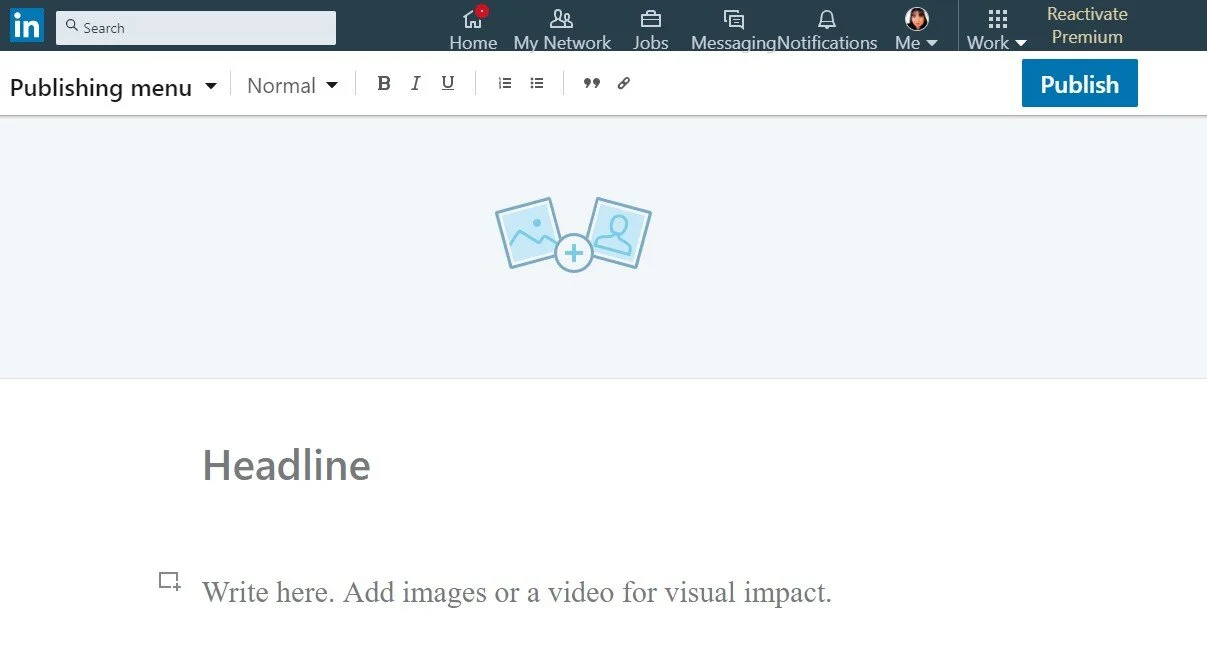
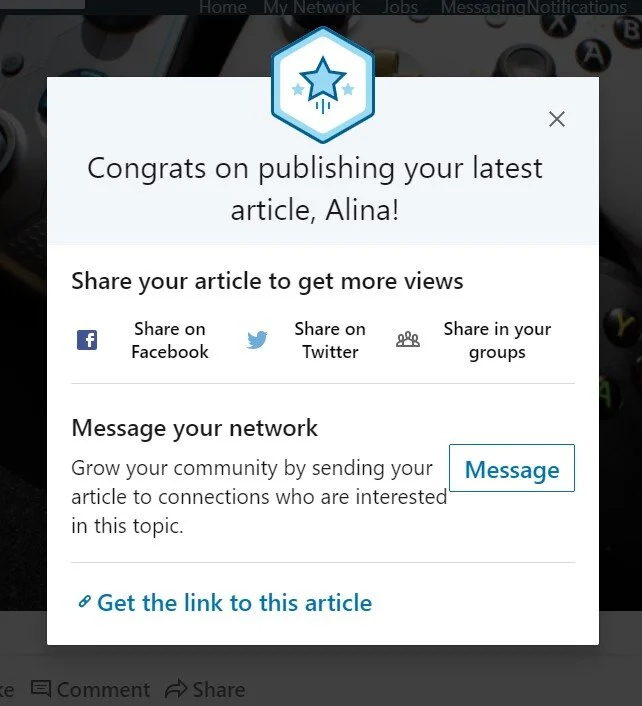
Once you’re done, hit the publish button on the upper right-hand side of the screen. Then you can share your article using LinkedIn’s built-in tools.
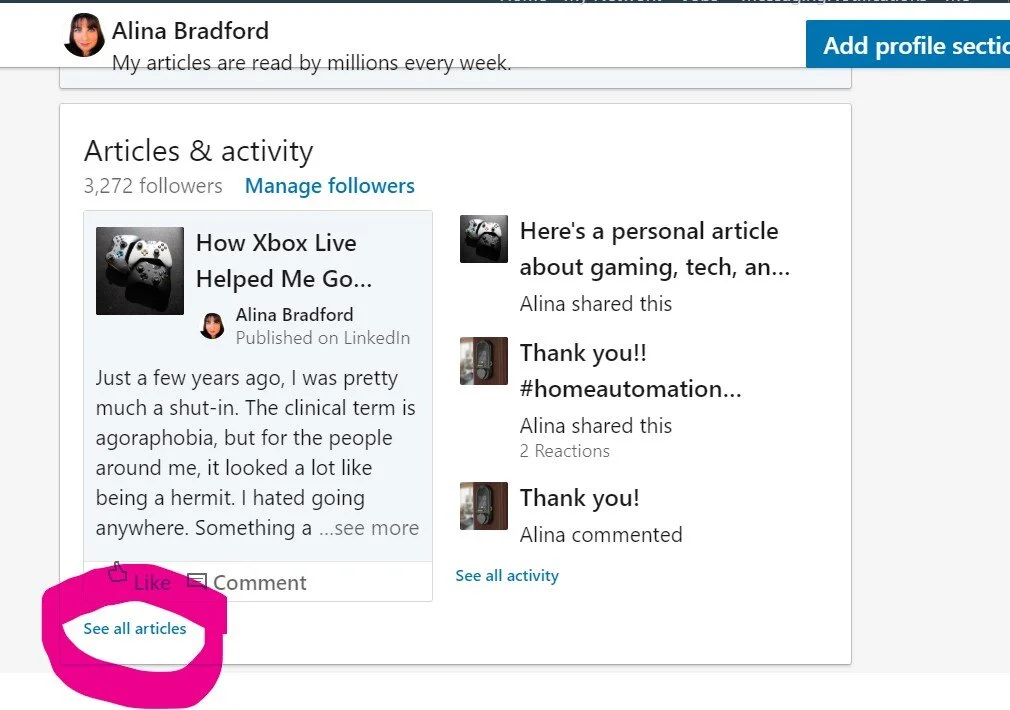
You can find your articles by going to your profile and scrolling down to Articles & activity. Then click on the See all articles link.
That’s all there is to it. Now when a potential client wants to see something you’ve written you can send them links to a couple of your articles.
Want to learn more about creating portfolios, getting clients and making a great living at freelance writing? Get the No-Fluff Freelance Writing Starter Pack.

20+ Words Every Freelance Writer Should Know
Here are 20 words every freelance writer should know so a client or editor never leaves you confused with their lingo.
In the writing game you’ll come across a lot of industry-specific words that may trip you up a little. Here are 20 words every freelance writer should know so a client or editor never leaves you confused with their lingo.
Pitch: A pitch is an email, letter or message that you send to a business or publication offering your services. When an editor says that they want you to pitch them an idea it means that they want you to outline an article idea and send it to them.
Bandwidth: You may have a client or editor ask you if you have the bandwidth to take on a project. It just means that they want to know if you have time in your schedule.
TK: This is an editing mark that means “to come.” Putting this in an article lets your editor know that you intend to add more to this section. Editors may also put TK in your article where they want you to add to a paragraph or expand on an idea.
SEO: Search Engine Optimization. It is the technique of creating an article that search engines will like and rank high in search results. Learn more about SEO here.
Keyword: Words in an article that lets a search engine know what the article is about. An important part of SEO.
Keyword phrase: Think about what you type in when you're searching for something online. That is called a keyword phrase.
Net earning: This is how much profit your freelance writing business (or any business) has made after expenses and taxes.
Gross earnings: This is the amount you earned before any deductions or taxes.
Fluff: Filler that needs to be cut from an article. It is extra words and sentences that are there to make the word count larger but doesn’t add anything to the article. Can also be used as another word for BS.
Headline: The title of a peice. Many clients will have certain length requirements and capitalization requirements for headlines, so be sure to ask.
Queue: Often a list of articles that writers can choose assignments from. It can also refer to a bunch of articles that are waiting to be edited or published.
Gaf: Shorthand for paragraph. Someone who says gaf typically picked up this term in journalism school.
Subheading: A title that is given to a set of paragraphs on the same topic. Online articles and many print articles are divided up into sections using subheadings.
H1, H2, H3: The size of a subheading. Typically, most online publications use H2 subheadings. You can choose the heading size with most article tools such as Google Docs, WordPress, etc.
Slug: This is whatever you want the web address to be. It can also mean a short name for your article.
Internal link: This is a link that goes to somewhere else on the site when you click it.
External link: These links take readers to other sites.
Do-follow, don’t-follow links: Sometimes clients will ask you to put these links in your articles. Dofollow links are your normal links. Nofollow links tell search engines to ignore the link and will have a rel=”nofollow” HTML tag. This will prevent the link from harming a site's rank on a search engine.
Lede: Basically the introduction to the article. Sometimes it refers to a snappy summary of the article in just one sentence that compliments the title.
Byline: The name of the author of the article.
Hook: The part of an article idea that will make your article catch reader’s attention or stand out.
CTA: Call to action. A sentence or two at the end of the article or copy that encourages readers to take some kind of action, like click a link, read the next article, or purchase an item or service. Here’s an example:
Like tips like these? Grab my No-Fluff Freelance Writer Starter Pack. It teaches you how I make $100 to $200 an hour as a freelance writer.
More articles you may like:
Pitchwiz is the Best (Free) Place to Find High-Paying Writing Gigs
How To Pitch Magazines: A Writer's Guide for Getting Published
Here's How to Find Out How Much Publications Pay Their Writers
5 Examples of Awful and Awesome Email Subject Lines...and Maybe a Few Shades of Grey

Warning writers! Write Right may Be a Scam
Yah, this looks like a writing gig site you should stay clear of.
So I had a super strange interaction with a person on LinkedIn. He claimed to be Bhavik Sarkhedi, an author of three books and the owner of the website Write Right. At first, he said he was a new writer and asked me to help him check his Google results. Okay, I guess. No problem.
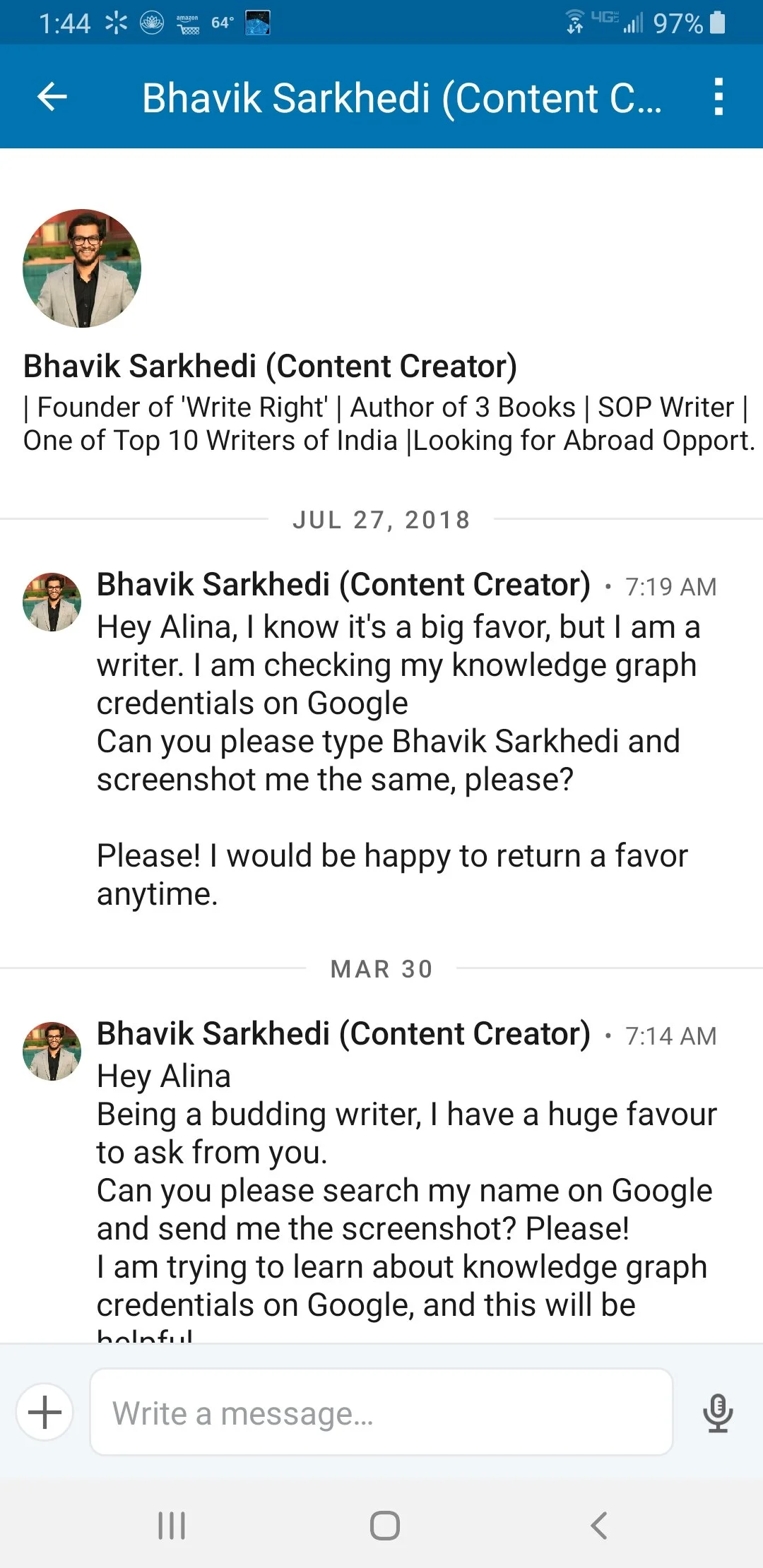
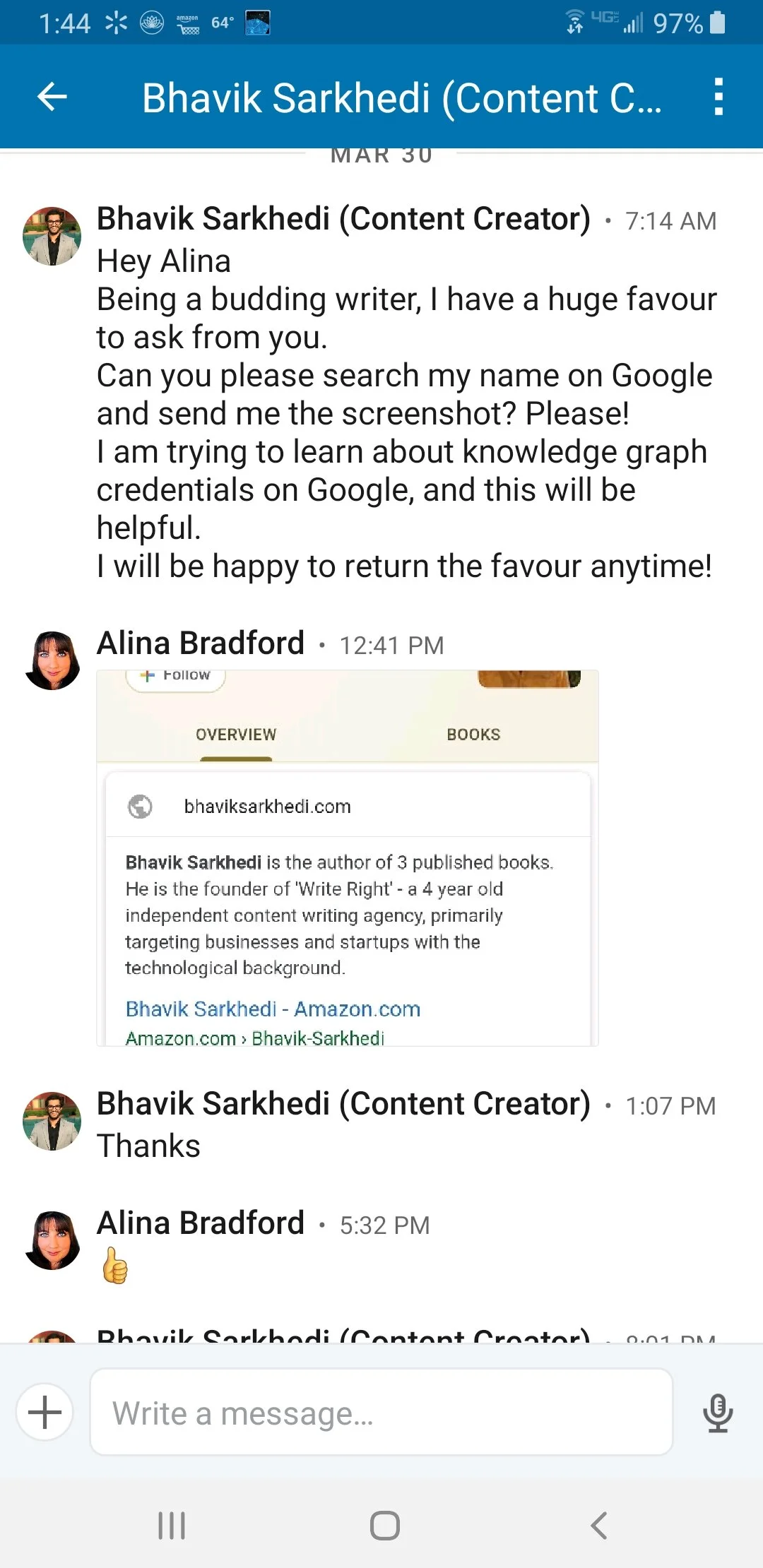
Then, a long time later, he sent me this message:
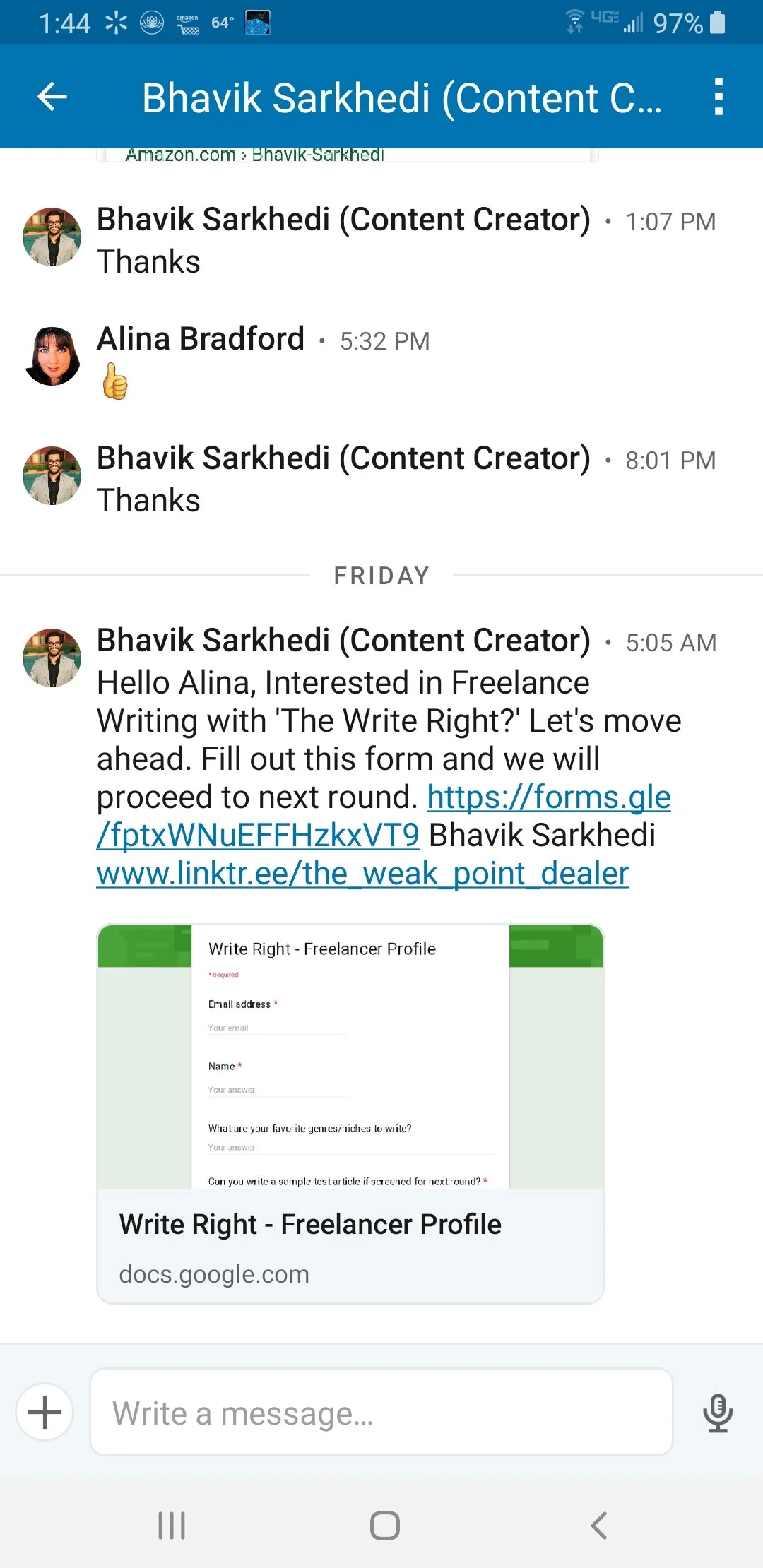
If he’s a new writer, then why is he looking to hire writers? Curious, I took a look at the application.
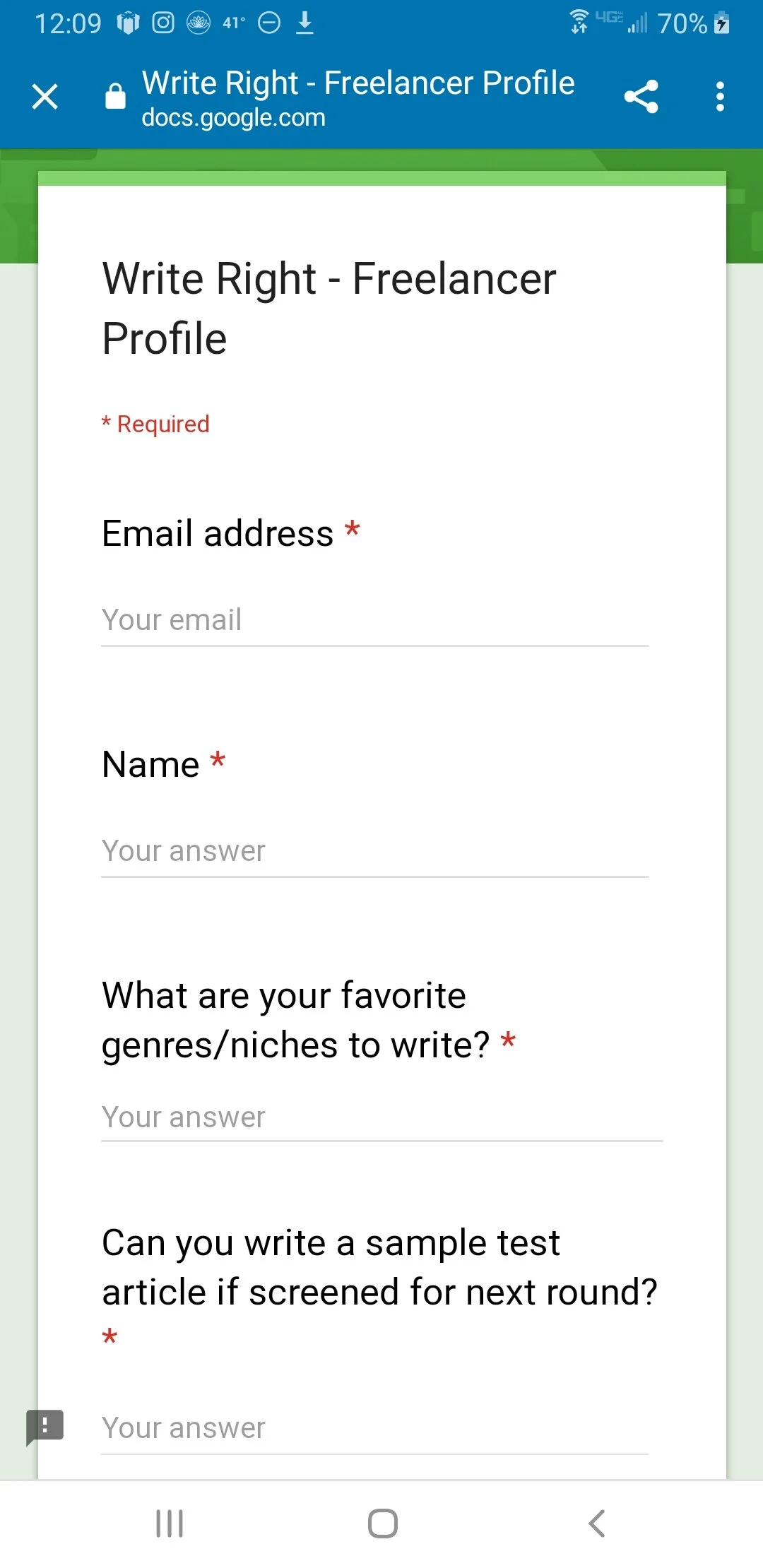
Oop. Red flag. Usually when a person wants you to write a sample article they keep it and don’t pay you.
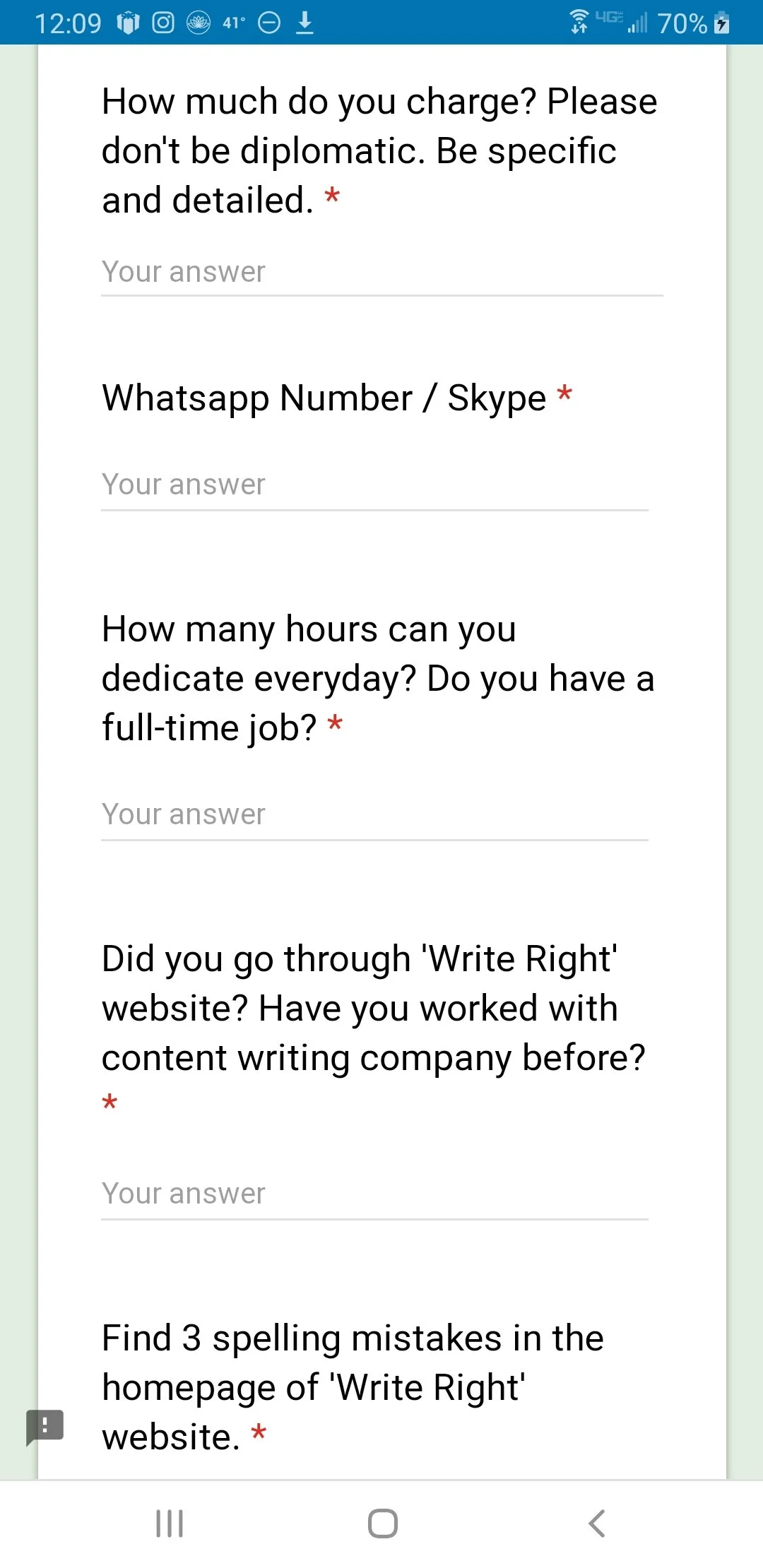
Whoa! Hold up! They want you to find spelling mistakes on their website? First, there shouldn’t be any mistakes. Second, it sounds like they’re trying to get free proofreading. Yikes!
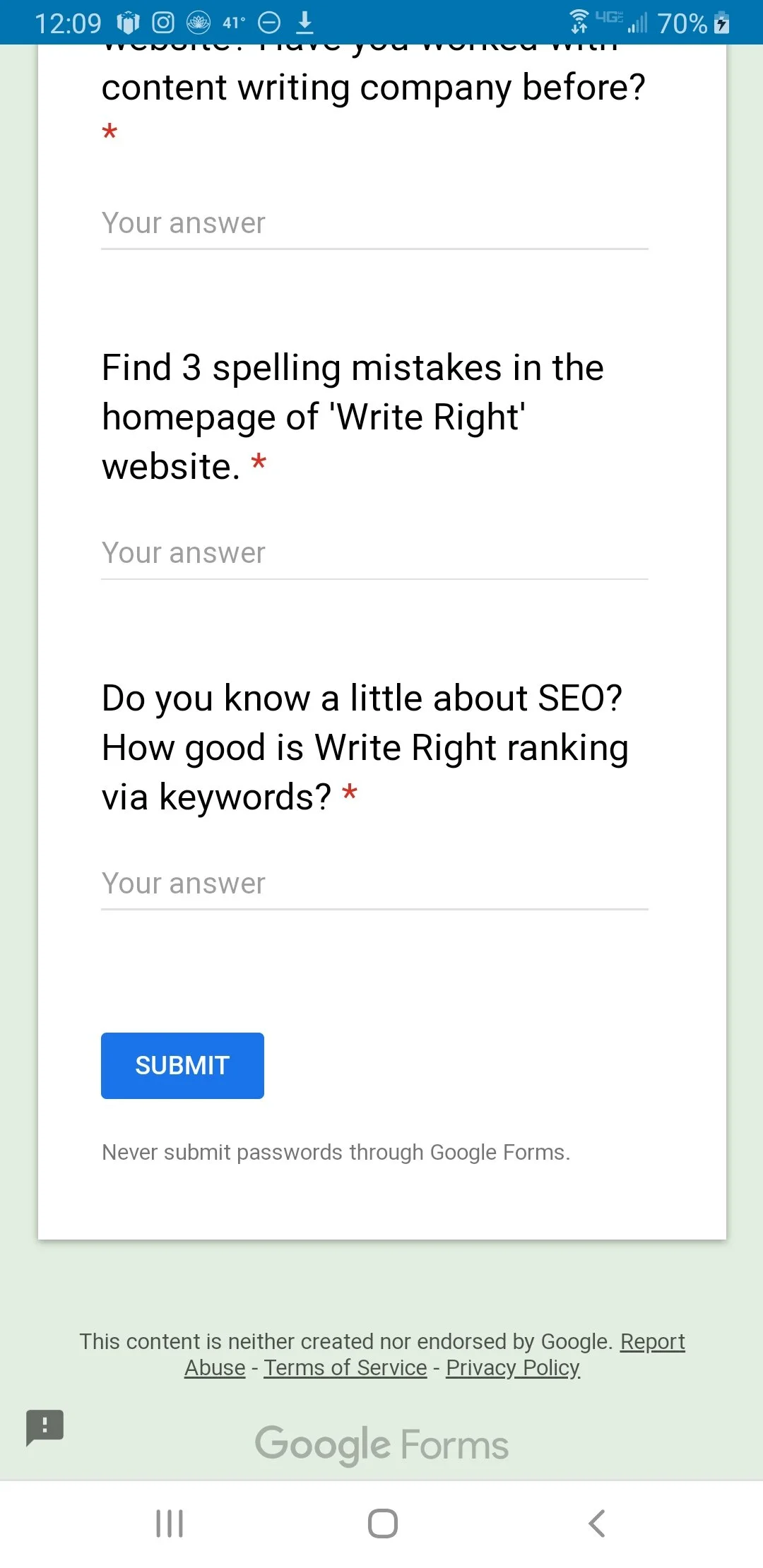
Oh, so it gets even better! They want you to help them with their SEO, too. So, essentially, they are asking for a lot of free stuff. Okay. I decided to ask this guy about Right Write and see what he had to say. His replies are just as baffling as the application.
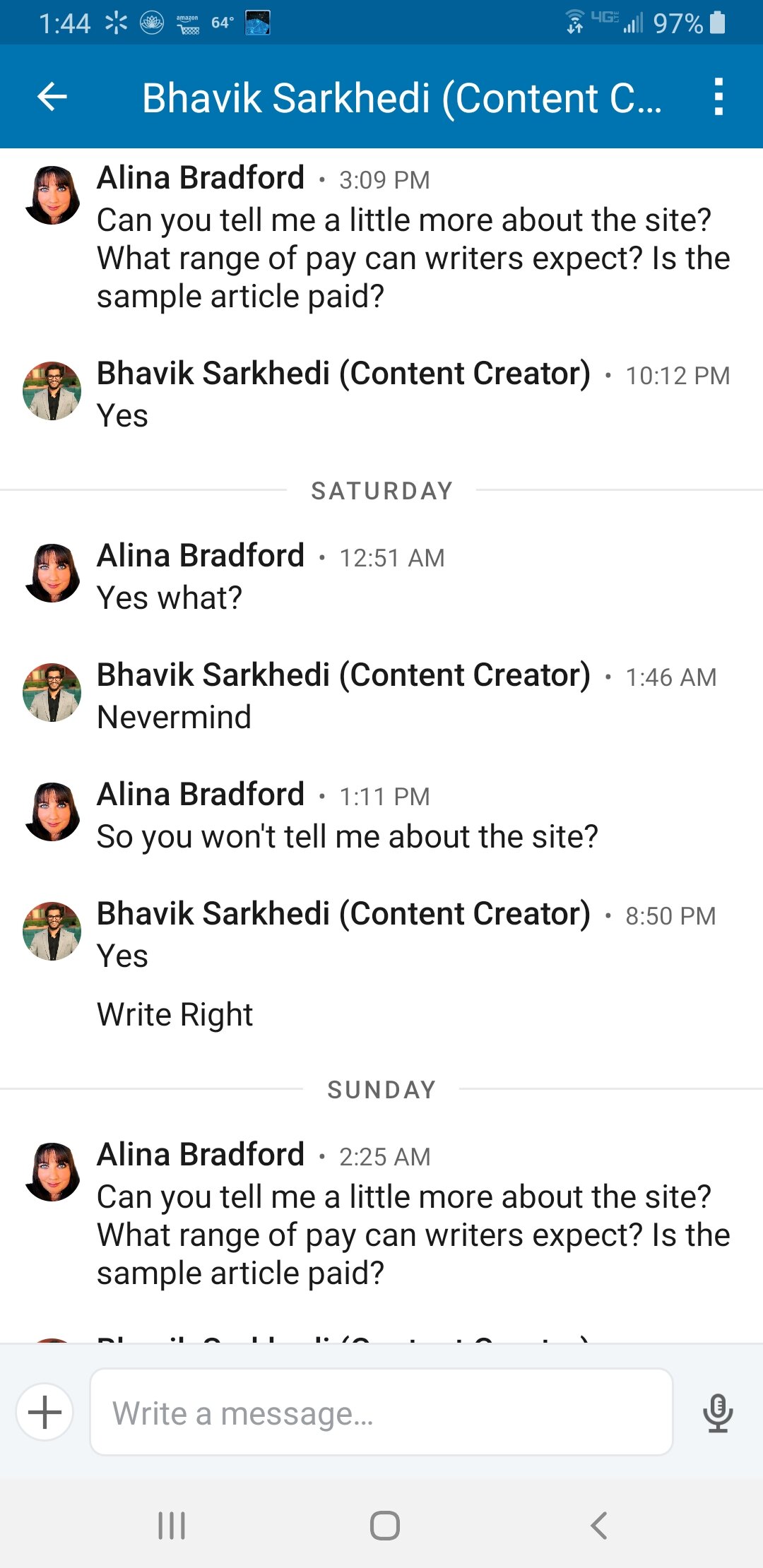
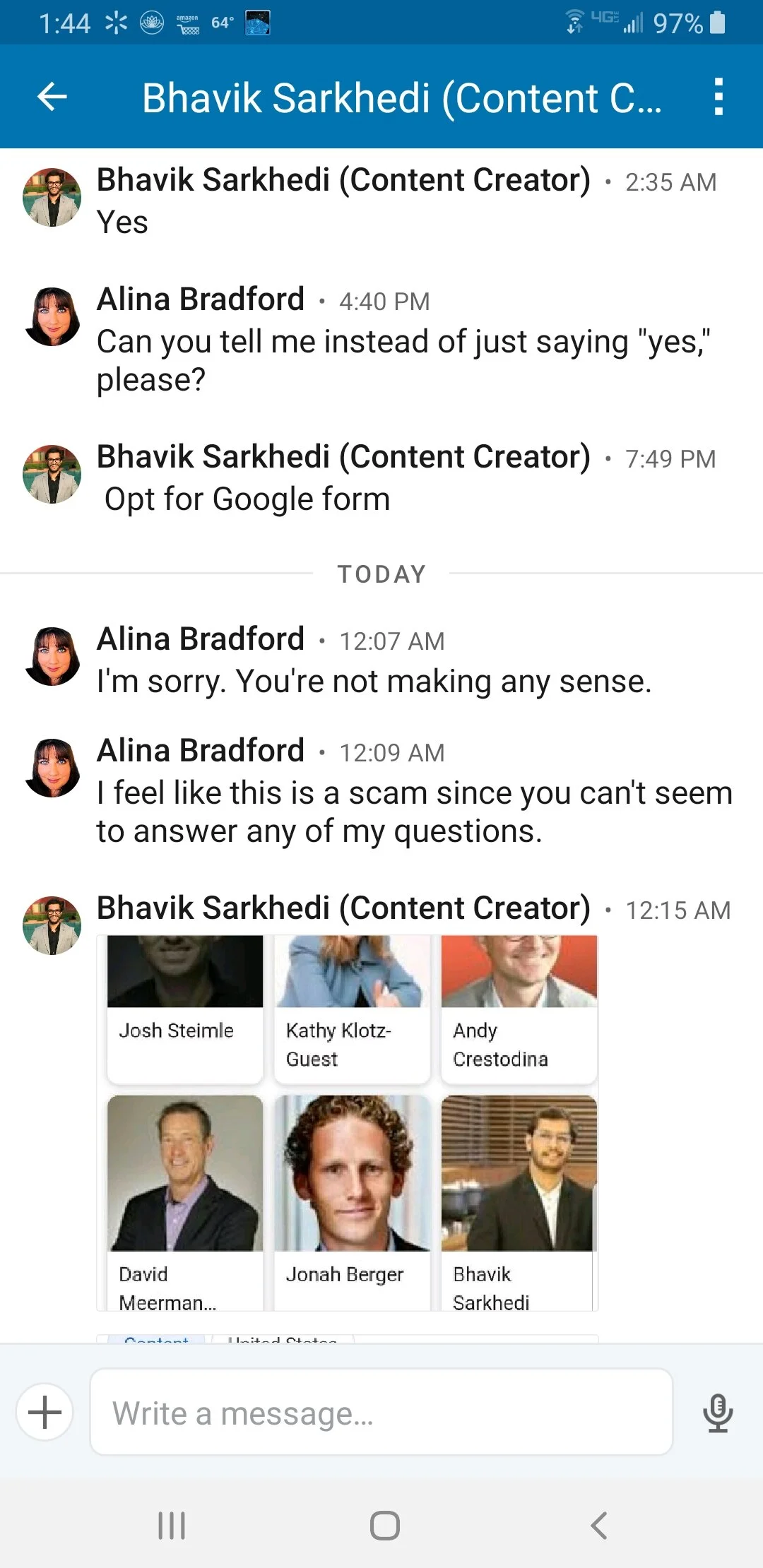
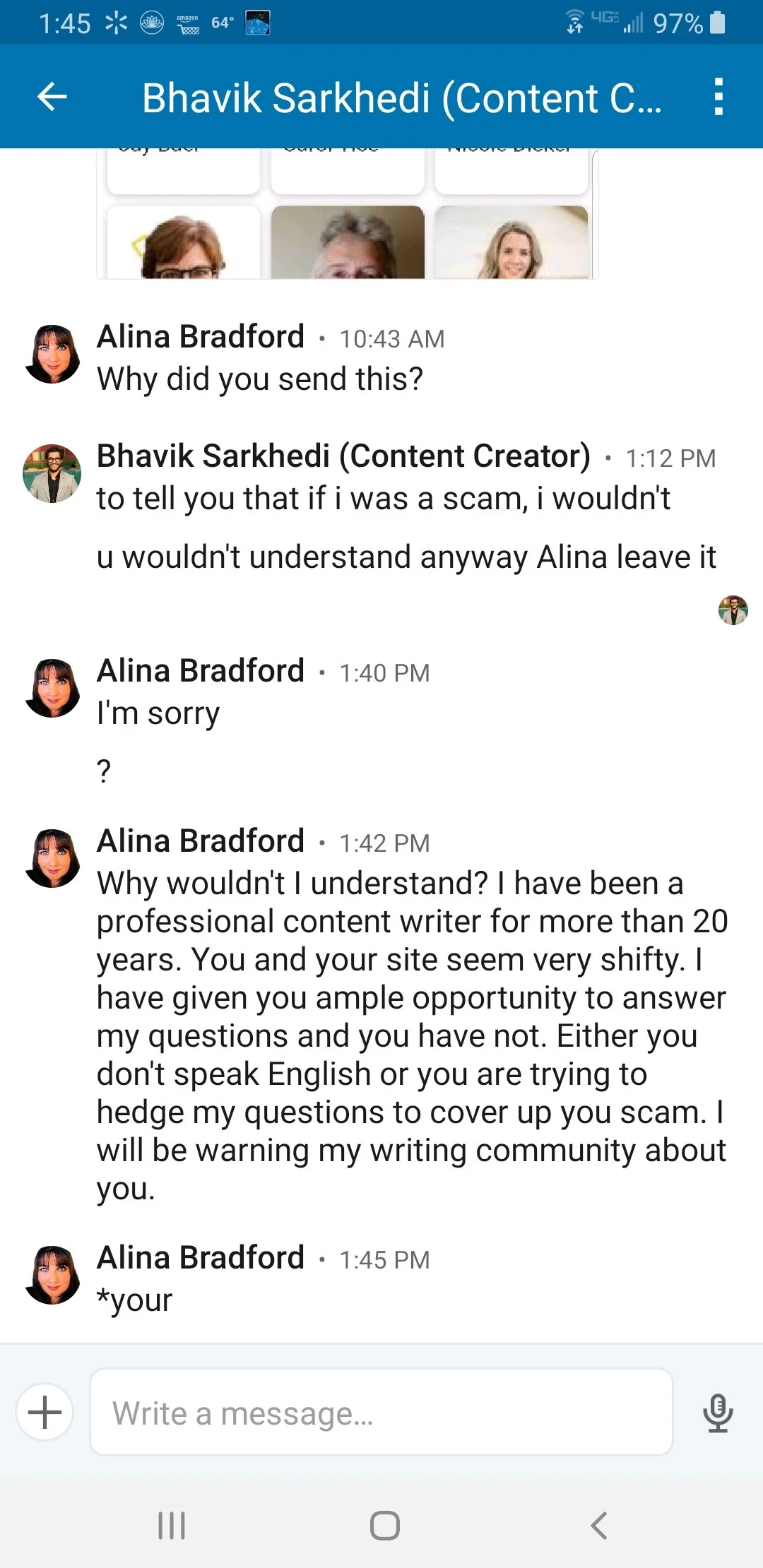
Yah, uhh, no
I ended up blocking him and reporting him to LinkedIn. If you run across this guy or a freelance writing ad for Write Right, run. By the way, I tried finding Write Right, but I didn’t come up with a site other than a essay writing service site. As you probably know, essay writing doesn’t have anything to do with SEO writing. Ironically, it’s basically writing an essay for a student so they don’t have to. It looks like Mr. Sarkhedi may have wanted writers to do his site’s content and SEO for him, but he just didn’t want to pay.
Other Articles You May Like
Here's the Legal Stuff You Need Before Becoming a Freelance Writer
How To Pitch Magazines: A Writer's Guide for Getting Published
A Freelance Writer's Guide to Dealing with Digital Contracts

How To Get Writing Jobs To Come To You
However, what if you didn’t have to go in search of jobs any longer? What if the jobs would find you instead of the other way around? It’d be great, wouldn’t it? It is great, and it’s also a realistic possibility if you use the following tips. Go on, it could completely transform your career.
As a freelancer, you know that everything isn’t always as it seems to outsiders. Writing jobs don’t come at you thick and fast and fall in a person’s lap. Anyone that wants to be successful has to work just as hard at finding the jobs than they do at completing them.
And, that can get tiring.
However, what if you didn’t have to go in search of jobs any longer? What if the freelance writing jobs would find you instead of the other way around? It’d be great, wouldn’t it? It is great, and it’s also a realistic possibility if you use the following tips. Go on, it could completely transform your career.

Sign Up To Job Sites
In the past, candidates used to find jobs by searching the classifieds in their local newspapers. Or, they asked friends that had contacts to do them a favor. This is how the industry worked until the rise of the internet.
As you know, the World Wide Web transformed society as we knew it, and job searches weren’t immune to the revolution. Instead of scrolling through papers, people scroll through online job boards. However, that would be the same as searching for the jobs rather than letting them come to you. So, you have to be different.
Firstly, sign up on as many job sites as you can, so your resume is where potential clients can see it. Don't just post any resume, though. Tailor your resume to fit the right parameters. If you’re looking for a long-term contract, for example, don’t give off a temporary vibe. Employers judge resumes within seconds of finding them, so it’s vital you make the right impression.
Some good job sites for to post your resume on are:
Use Marketing Tricks

One of the biggest marketing techniques in the industry today is SEO. You might be thinking, "What has SEO got to do with my career? I’m a writer!" Well, besides using it to get more traffic for your clients, you should use it to increasing traffic to your resume.
A search engine uses search terms to direct users to job boards. Then, once they are on the site, the site itself uses keywords to filter out the cream of the crop. So, make sure you use keywords in your profile and resume to attract search engines. Links and backlinks also give your profile SEO juice.
Here are a few keywords to get you started:
Freelance writer
Contract writer
Remote writer
Virtual writer
(Your niche) writer
Writer-for-hire
Copywriter
Any individual that doesn’t use these tricks is going to lose out massively. There is a reason the best SEO companies all dip their toes in the recruiter market. Candidates know it’s effective, and they will pay a lot of money for an expert as a result.
Hot tip:
If you really want to add juice to your resume, but don’t want to clutter it with keywords, there’s a trick. Write out all of your keywords at the bottom of your resume in a Word or Google Doc and then turn the keyword text white so it is invisible. Upload the document to the job site as usual. The search engines will still be able to see the keywords but potential clients won’t notice a thing.
Bonus, this is great for the sorting algorithms that companies use to sort resumes into interview and trash piles. The system will be able to “see" the keywords and sort your resume into the interview pile.
Provide Contact Details

Art by Olivia Huynh
When an employer moseys across a profile that they like, they will get in touch. What you can’t afford to happen is for them not to find a contact number. At the very least, your online resume should have an email address so that they can send you a quick email.
Make the details easy to spot, too. Employers are proactive, but only to a point. If they get frustrated, they won’t carry on looking. Nope, they’ll move on in a huff to another CV. A few lines at the top with necessary information are all you need to tick the right boxes.
Get LinkedIn

Social media sites play a massive role in enticing business to you, but there is one that is more effective than most. Of course, it’s LinkedIn, the platform specifically aimed at professionals, regardless of their career path.
It shouldn’t come as a surprise that companies scour LinkedIn in the hopes of finding the next best thing. Often, they come up short, but that’s only because the candidates don’t know people are watching.
So, now you know, it’s time to show off in the shop window. How do you do it? You can start by tidying up your profile. Make sure there’s a nice image that clearly shows you in a professional setting, not at a bar with your bestie.
Next, check the bio for any spelling or grammar errors because there isn’t a bigger turn-off for employers. Also, rethink your bio approach. Using vague terms might seem modest, but you want to stand out from the crowd. Toot your own horn! The best option is the elevator pitch. Imagine someone just asked what you do while sharing an elevator. What would you say? Keep it decisive, short and succinct.
Make sure you add clips to your profile page so potential clients can see your talent right away. Don’t have clips? Write up some awesome articles then upload them to LinkedIn. Boom! Instant portfolio.
Finally, make sure that you highlight the skills that employers are looking for in your chosen niche. Far too many candidates list features that have zero bearing on the contract job they're looking for.
140 Characters
Yep, this is, of course, a Twitter reference. Do you remember how I said that social media has a massive role to play? You should because it’s only a few sentences ago. Ha.
Well, it wasn’t a lie. There is no doubt that LinkedIn is at the top of the list in terms of career prospects. Still, that doesn’t mean that tweeting can’t also get you noticed.
Employers Google prospective candidates and check their social media posts. So, when they scroll through, they want to see tweets and retweets that link to the industry you claim to be an expert in. It’s a sign that you have a passion for your job and aren’t only influenced by money.
Also, it’s a sign that you’re a person that keeps up with the ever-changing trends. In the writing business, these are big, fat ticks that only make an impressive candidate more remarkable. LinkedIn sets them up, and Twitter knocks them down.
Blogging
Blogging also works in a similar vein because it lets you comment and connect with the online community. As potential clients sift through your blog, they will see examples of your writing and what you're passionate about. If they like what they see, it will reflect well and keep you at the forefront of their mind.
Having a blog also gives you another chance to pop up in Google searches for freelance writers, along with your resumes on job sites, your Twitter and your LinkedIn.
Online Endorsements
Savvy job hunters use social media, job boards and a website. A website is the perfect place to flesh out your credentials. It’s a platform that allows you to boast and brag about your achievements without being judged. More than that, it’s a place where you can validate your accomplishments.

If you plan on talking the talk, you have to walk the walk because employers can spot fakers from a mile away. To legitimize your claims, all you need are endorsements. Over the course of your career, you will get positive feedback. By posting it on your site, browsers can see that you are the real deal and not an impostor. If they are still suspicious, give them permission to call your references and confirm your claims. Anyone with nothing to fear shouldn’t have a problem with this tactic.
Network
Outside of the internet, there aren’t many ways for an employer to come across a potential candidate. However, there is one way that lasts the test of time: a recommendation. Friends in high places that have the ear of people with power can use their influence to put you in the picture. Former clients can also put in a good word. As the saying goes, it’s who you know not what you know.

Be sure that clients and friends have your business card to hand out when the opportunity arises. Also, be sure to ask the people around you to refer you. They may not even think to without a nudge.
Now, put your typing fingers down and take a break because they will come to you. The hunter is now the hunted.
Want more tips for getting high-paying clients and creating work that keeps them coming back for more? Get my No-Fluff Freelance Writing Starter Pack.

50 Writing Tips from the Experts
What better place to find writing advice than from experienced writers? Here are 50 writing tips from some of the world's best. Got a great quote that I missed? Tell me in the comments.

writing tips for freelance writers
What better place to find writing advice than from experienced writers? Here are 50 writing tips from some of the world's best. Got a great quote that I missed? Tell me in the comments.
1. The first draft of everything is shit. -Ernest Hemingway
2.Remember: when people tell you something’s wrong or doesn’t work for them, they are almost always right. When they tell you exactly what they think is wrong and how to fix it, they are almost always wrong. – Neil Gaiman
3.Write drunk, edit sober. – Ernest Hemingway
4. Interesting verbs are seldom very interesting. - Jonathan Franzen
5. The road to hell is paved with adverbs. - Stephen King
6. If it sounds like writing, I rewrite it. - Elmore Leonard 7. If you don’t have time to read, you don’t have the time — or the tools — to write. Simple as that. - Stephen King
8. Being a writer is a very peculiar sort of a job: it's always you versus a blank sheet of paper (or a blank screen) and quite often the blank piece of paper wins. - Neil Gaiman
9. You can only write regularly if you’re willing to write badly… Accept bad writing as a way of priming the pump, a warm-up exercise that allows you to write well. - Jennifer Egan
10. When you’re trying to create a career as a writer, a little delusional thinking goes a long way. -Michael Lewis
11. Perfectionism is the voice of the oppressor, the enemy of the people. It will keep you cramped and insane your whole life. -Anne Lamott
12. Work on one thing at a time until finished. - Henry Miller
13. You have to simply love writing, and you have to remind yourself often that you love it. - Susan Orlean
14. Create blog posts that answer the most interesting questions from people you engage with on social media. - Dave Larson
15. Understand your audience better than they understand themselves. It takes a lot of upfront research, and often means being a member of the very tribe you’re trying to lead – but it pays off. - Brian Clark
16. Write for yourself first & foremost. Ignore the fact that anyone else will read what you write; just focus on your thoughts, ideas, opinions and figure out how to put those into words. Write it and they will come. -Adii Pienaar

writing tips for bloggers
17. Start building your email list from day one. Even if you don’t plan on selling anything, having an email list allows you to promote your new content to your audience directly without worrying about search rankings, Facebook EdgeRank, or other online roadblocks in communications. - Kristi Hines
18. Love the readers you already have. A lot of bloggers get quite obsessed with finding new readers – to the point that they ignore the ones they already have. Yes – do try to find new readers but spend time each day showing your current readers that you value them too and you’ll find that they will help you grow your blog. - Darren Rowse
19. Consistency is one of the most important things that bloggers tend to forget. It’s much easier to lose your traffic than it is to build it up, so make sure you consistently blog. - Neil Patel
20. Stay true to yourself and your voice. People don’t care to follow sites so much as they care to follow people. - Chris Pirillo
21. No matter how great your content is, it won’t matter unless you have an amazing headline. People have a split second to decide if they should click on your post, and your headline will make them decide. The headline is also essential in making it easy and desirable for people to share your post. Keep your headlines SPUB: simple, powerful, useful and bold. - Dave Kerpen
22. Biggest lesson I learned in my past year of blogging. Keep it in the 1–2 minutes read-time length. - Derek Sivers
23. One thing I always try to keep in mind before publishing a post is would anyone want to “cite” this for any reason? Just like interesting research is great because it leaves you with a fascinating finding or an idea, I like for my posts to be the same. That doesn’t mean relying on research, but simply making sure each post has an original lesson or actionable item, making it “citable” on the web. - Gregory Ciotti
24. Be efficient, and don’t put things off that you could do right now. No more self sabotage or “next week” lists. Don’t over-prepare and never do the things you’re preparing for. Just be here, in the now, and be as productive as you can today. Write now, edit later. - Deborah Stachelski

how not to procrastinate
25. Remember, your blog is one of your first opportunities to connect with new potential clients. It’s often the first impression you make on a new person! You wouldn’t want to shake hands with a new potential client with a huge piece of spinach in your teeth and garlic breath, and having poorly written content on your website is essentially the same thing (maybe worse). - Allison Volk
26. Your path may look completely different than others, and it should. Creating your own unique blog is what you need to do in order to stand out from the others. The world does not need any more duplicates. - Gabrielle Pfeiffer
27. Vigorous writing is concise. - William Strunk Jr.
28. I try to leave out the parts that people skip. - Elmore Leonard
29. As one who writes a lot for the web, I am continually tempted by the low-hanging fruit of trending topics and morning news drivel. Restating the obvious is easy, fun, and very retweetable. But the obvious rarely seems to translate into any sort of real legacy. - Seth Simonds
30. The difference between the right word and the almost right word is the difference between lightning and a lightning bug. - Mark Twain
31. I use a moleskine to store my thoughts for later. Having thoughts and personal commentary all in one place has the added benefit of serving as a source of inspiration for later times of drought. Think of it as you would catching raindrops in a canteen. You’ll be glad for the moisture some day. - Seth Simonds
32. Every writer I know has trouble writing. - Joseph Heller
33. While having an outline can be incredibly helpful in keeping your thoughts moving and on track, you will actually write more quickly and produce higher-quality writing if you start before you know everything that you want to say. The writing process is creative and interactive, so you will develop ideas and thoughts as you write. - Christine Zosche
34. When you sit down to write your tips and tales from the road,ask yourself: what do I want the reader to learn from this? What’s the take-away? Then craft a tightly constructed piece that leads, step by step, to that lesson-point. - Don George
35. When you write a blog post, you have to create a series of mental images so colorful that your readers could see how a pan sizzles when a patty is put on or even the smell of a recently cooked carrot patty. - Emily Sidley
blogging for beginners
36. Don't think of words when you stop but to see picture better - Jack Kerouac
37. Don’t get depressed that you’re abandoning your artistry, because you’re not. On the contrary, you’re building a foundation for it. Once you become adept at freelancing, you not only have income to use for your dream project, but — surprise! You’ve vastly improved your writing skills. And people now identify with you as a professional writer. - The Write Life
38. Whichever way you get into freelancing, the absolute key to success is persistence. Chances are you'll get knocked back a fair bit but keeping going is the only way to ensure that you get noticed. - Laura Kay
39. Freelancing is probably not for people who lack self-motivation. If you don't go looking for work, spending your days shooting off emails and writing pitches, then it is very unlikely the work will come to you. - Laura Kay
40. Stop trying to figure out the one, best, fastest, lowest-cost way to launch your freelance writing career. Stop endlessly fretting over what your most ideal writing niche might be and how you will know which topics will be best for you. Stop worrying that you’re not good enough or don’t know enough. Instead, take action. - Carol Tice
41. If you are just getting started as a freelance writer, your best bet is to begin taking on small projects in order to build up a portfolio. Ask your first clients to start attributing articles to your name and ask if you can get an author biography with a picture of yourself on their website. - Katie Cline

42. Don’t pat yourself on the back in your blog posts, bragging about what you know about your industry. Let your blog visitors find the value themselves in the content you produce. - William Morrow 43. Write, write, write, and then write some more. Forget everything else and just write. - Melissa Donovan
44. Use the time of a total stranger in such a way that he or she will not feel the time was wasted. - Kurt Vonnegut
45. The only rule is work. If you work it will lead to something. It's the people who do all of the work all of the time who eventually catch on to things. - John Cage
46. Be your own editor/critic. Sympathetic but merciless! - Joyce Carol Oates
47. Don't try to anticipate an ideal reader or any reader. He/she might exist but is reading someone else. - Joyce Carol Oates
48. Protect the time and space in which you write. Keep everybody away from it, even the people who are most important to you. - Zadie Smith
49. Write for scanners. We live in a busy, distracted world. Don’t demand attention; earn it. - Jeff Goins
50. Don’t take anyone’s writing advice too seriously. – Lev Grossman