

5 Tips For A Perfect Blog Headline — One That Gets Clicks
How do you make yours more effective? What goes into writing winning blog headlines? To help answer these questions, here’s a look at five tips for creating blog headlines that work.
Whether you’re talking about building authority on your blog or crafting compelling posts for an SEO company client, you can make your it more powerful by creating strong headlines. What makes a headline strong? The perfect blog headline will communicate quickly, capture a visitor’s interest and make the post easier to find by search engines. It acts as an accurate and interesting teaser for the rest of the post.

How do you make yours more effective? What goes into writing winning blog headlines? To help answer these questions, here’s a look at five tips for creating blog headlines that work:
Be specific. The more laser-focused your headline, the better it communicates to readers what it will cover. Take this post, for example. If the headline had been, simply, “Blog Headlines,” you would have had a general idea of the subject matter — but you wouldn’t know if the post was about the history of blog headlines, examples of good headlines, examples of bad headlines, tips on writing headlines, or none or all of the above. A specific headline gives readers specific expectations — so it attracts the people who are interested in what it truly provides.
Clarify and categorize. If your blog post fits into a specific type of content, such as a new report, an interview, an infographic or a slideshow, add that clarification in brackets after your post title. If you’re writing about a new study on infant formula, for example, the headline might be: “How Infant Formula Boosts Brain Development [New Study].” Why is this worth trying? According to research from HubSpot, headlines with bracketed clarifications perform 38 percent better than those without them.
Keep it short. When it comes to blog headlines, more isn’t always better. Stuffing a headline with extraneous words only makes it easier to lose readers. What’s the sweet spot? It depends. According to research from CoSchedule, the ideal length is 11 words — but it’s not a hard-and-fast rule. Other research, from Content Marketing Institute, says to stick to no more than 10 words. In different industries or for different audiences, shorter or longer headlines may perform best. So, whether you’re writing for your site or a client’s, test different headline lengths with different posts, and observe click-through rates.
Include relevant keywords. To optimize a blog post for search engines, you want to include relevant keywords in both the headline and body copy. What keywords are best? Think about words or phrases your audience is likely to be searching for, as these will be the keywords that bring them to your post. For best results, put keywords at the beginning of your headline to catch the attention of search engines.
Use numbers. The human brain likes numbers, which organize information into a logical order. When you want a headline to grab the attention of readers who are quickly scanning and deciding where or where not to click, include a number. Note, also, according to FastCo Design, round numbers typically work best, as they’re how humans naturally group amounts.
Blogs are a mainstay for freelance writers — so when you’re crafting copy for your next post, keep the five headline tips above in mind! By writing headlines that draw attention and get more clicks, you can generate more traffic to your content and improve your writing results.

Author bio: Shanna Mallon is a contributing writer for Straight North, one of Chicago’s top Internet marketing agencies. She’s also been a freelance writer since 2007.

Attention Getting Tips for Your Brand from 3 Experts
My goal is to get eyes on my client's brand. If you write marketing emails or website copy for clients, then you do, too. I got to wondering how other writer/marketers do the same. So, I sent out a call to people in the industry for their best tips.
Here are some great lessons from three experts.
My goal is to get eyes on my client's brand. If you write marketing emails or website copy for clients, then you do, too. I got to wondering how other writer/marketers do the same. So, I sent out a call to people in the industry for their best tips.
Here are some great lessons from three experts.

Get Shocking
This is the very first response I got:
Subject: I STOLE YOUR DOG
Alina,
I didn't really steal your dog. In fact I don't even know if you have a dog. But I did see your post on Profnet about getting the attention of people for your blog, website or marketing purposes and I felt that this use of a subject line (which is what I do for all reporters and publications, though usually not with stolen dogs) is a perfect example of my approach to getting your attention and that of our target audiences.

There are a bunch of ways to get eyes on your business' brand.
Shock them. Then tell them you're pitch. We have garnered a large number of articles in publications using this method. My favorite subject line is - PRINTER INK IS MADE FROM UNICORN HORNS or some variant of this.
[bctt tweet="My favorite subject line is - PRINTER INK IS MADE FROM UNICORN HORNS or some variant of this" via="no"]
Let me know if you would like to learn more about my guerrilla marketing tactics and I will expound.
Have a nice day. And cuddle your dog for me if you have one.
- Al
Al Ruggie, Public Relations Director
Go Local
Elizabeth had a different approach:
I’ve published ebooks for more than 30 authors and I have extensive knowledge and experience in building and selling a business from the ground up. As an author, the best strategy I've used to build a following was the simple idea of starting local. I created my Facebook profile initially unsure if anyone from my home town would even remember me, as it had been years since my last visit. It only took a few weeks before the word got out of my new memoir, Long Blue Line, which is based on my teen/young adult experience growing up in South Lake Tahoe, CA.
I began getting several friend requests and I quickly built a solid fan-base to begin my career as an author. Now that I've reflected back and thought about why it was so easy to build my following, I've come up with a couple of theories:
People need to have the ability to relate. Whether it be relating to a book, article, product or service, if the person feels a sense of belonging they're much more likely to take an active interest.
It only takes a few good followers to help get the ball rolling. I always make sure to respond to every message that I get from my fans. This aids in the word of mouth strategy. If you can get just a few people to actually talk about your product, you're going to be at an immediate advantage.
-Elizabeth McNew, (author of Long Blue Line and Digital Publishing,National E-Book Association Founder), featured on BellaOnline, Tekk3.com, and Flippa.com to name a few.
Build Relationships

You don't have to give them a hug, but relationships build long-term results.
After numerous years working (and teaching) integrated marketing communications (IMC), Bonnie Harris, founder of Wax Marketing, Inc., says one of her top tips for generating long-term interest is:
"Find out who the influencers are within your genre and build authentic relationships with them. Follow them on Twitter and other networks. Curate their articles, retweet their tweets, comment on their blog posts and interact with them whenever an opportunity arises. Do this in a thoughtful manner with smart commentary. The attention you generate from these interactions can lead to substantial promotion of your own blog/site or company, and links back to your content. This tactic works better than any 'get followers fast' type scheme and it lasts."
Do you have any tips? Do share! Leave a comment below!

How to Get to Know Your Freelance Clients Better
So how do you change your listening routine so that you are where your customers are and speak their language? This graphic explains it.
If you've ran a freelance business a long time, you may think you know everything about your customers. What you might know about your customers, though, may not be up-to-date. For example, you might use old lingo that none of those customers have even heard of. You might not be hearing what they’re actually talking about, either—you might be missing the terms they use instead of your industry lingo.
And if you rely on your routine, you might miss out on the new places where those customers are, like a social media platform that you haven’t heard of, or even a competitor’s site that they check out from time to time.
So how do you change your listening routine so that you are where your customers are and speak their language? This infographic explains it.
Click To Enlarge

Via Salesforce

How to Use Mind Maps for Article Ideas
When you write for several different outlets, coming up with a continuous flow of article ideas can be a challenge. When I get stumped, I break out a piece of paper and draw a mind map. Mind maps are a form of brainstorming where you use colors and shapes to stimulate the brain.
Here's how I create article ideas with mind maps.

When you write for several different outlets, coming up with a continuous flow of article ideas can be a challenge. When I get stumped, I break out a piece of paper and draw a mind map. Mind maps are a form of brainstorming where you use colors and shapes to stimulate the brain.
Here's how I create article ideas with mind maps.

I start by drawing a shape of the thing I want to write about (or just a circle). Right now I need to come up with some art article ideas, so I drew an artist's palette.
I write the subject inside the drawing.
I draw wavy lines spiking out from the drawing, with each line a different color (usually).
On each line, I draw a word that comes to mind when I think of the central idea.
Then, I draw branches coming from those branches focusing on words I think of when I think of the words on the larger branches.
By this point my brain should be connecting words into ideas that can be turned into articles. With my mind map I came up with the article Recycled Art Studio Furniture and Gear.
Try this technique out and let me know how it works for you!
Here are some other mind maps I've made:

how to brainstorm blog posts
how to get ideas
Here's how other people do mind maps:

30+ Writing Tips from Writers Like You
I find writing ideas and inspiration in a place you may not have thought of: Instagram. Here are some of the fantastic tips for writers I've found on my feed and some from my own Instagram account.

I find writing ideas and inspiration in a place you may not have thought of: Instagram. Here are some of the fantastic tips for writers I've found on my feed and some from my own Instagram account. Remember, if you find some advice you like, follow the writer on Instagram. Show some love!

Use Google Translate to Proofread Your Writing (Seriously!)
They say one of the best ways to find errors in your blog posts, book or articles is to read the sentences out loud. An even better method is to have someone else read your piece out loud. This can be difficult if you're a typical writer, alone in your home office. Instead, use Google Translate.
They say one of the best ways to find errors in your blog posts, book or articles is to read the sentences out loud. An even better method is to have someone else read your piece out loud. This can be difficult if you're a typical writer, alone in your home office.
No problem. A bot can help.
You can use Google Translate as you’re editing co-worker. All you do is paste your text and the tool can read it back to you so you can find the flaws. Best of all, it’s free.

How to Use Google Translate to Edit
Just go to the tool at https://translate.google.com.
Copy and paste your text into the box on the left.
Click the sound button.
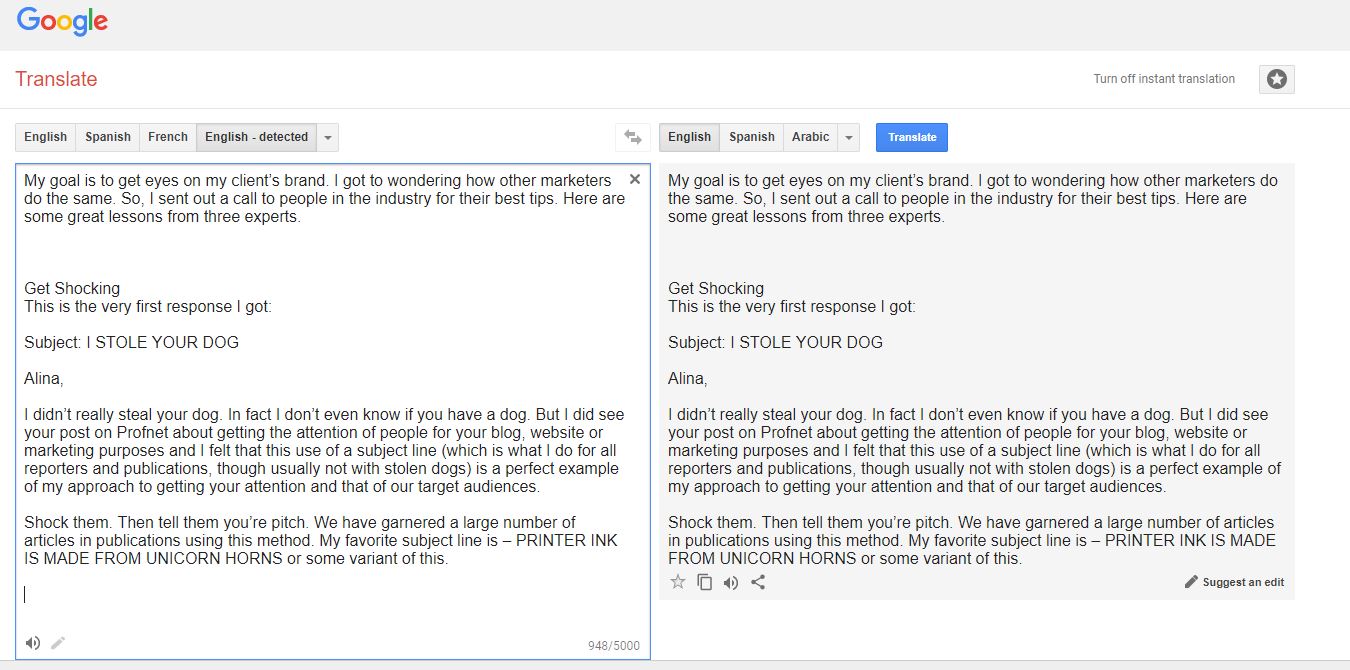
Google Translate will read your piece out loud so you can find the errors. Give it a try and let me know what you think!

Edit Your Writing: How to Use Commas, Quotation Marks and Semicolons
Creating clean, mostly error-free content is important to freelance writers. Copy full of errors look unprofessional and can really turn off potential customers. You don't want to be lumped in with noobs! Edit!
Creating clean, mostly error-free content is important to freelance writers. Copy full of errors look unprofessional and can really turn off potential customers. You don't want to be lumped in with noobs! Edit!
Emails, blogs and social media encourage speed over accuracy, lulling many into the feeling that close is good enough. If you plan on being a successful freelance writer, though, almost isn't good enough. Here are some tips to help you get closer to perfection.
When to Use Commas
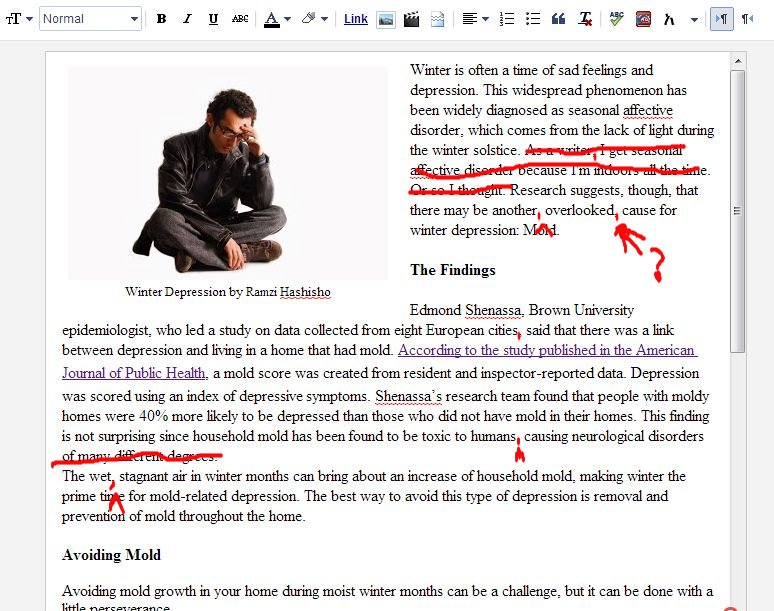
Get it right, or scare people away.
One of the most common problems even more skilled writers run into is how to use commas properly. A comma is defined as a punctuation mark used to indicate the separation of ideas or elements or a pause in a sentence.
The biggest misuse of commas is often overuse. When in doubt, use a comma when there is an audible pause while saying the sentence out loud.
For example:
Jan, can you write the story, please?
This sentence has definite pauses when said aloud. Proper use of commas also keeps the meaning of a sentence clear.
For example:
Wrong - Jan loves to draw fish and write.
Jan likes to draw fish?
Right - Jan loves to draw, fish and write.
Notice that a comma wasn’t used after the word “fish.” It has become common to leave off the comma before “and” in a series, especially if you are writing for magazines or websites.
The last use of a comma is with a direct name or title.
For example:
The writer and artist, Jan, is my old friend.
Or
Would you draw me a picture, Jan?
Or
Jan Lang, Ph.D., is the author of some impressive articles.

punctuation edit
How to Mix Quotation Marks and Punctuation
Using punctuation with quotation marks isn’t the mystery some think it is. In fact, there are only two major rules to remember:
Always use punctuation inside the quotation marks.
For example:
“The article is finished. It only took a week to do.”
And
Jan said, “It only took a week.”
Also, always use a comma before or after a quote is introduced.
For example:
Jan said, “The article is finished.”
And
“The article is finished,” cried Jan.
“Said” in the first sentence tells you that a quote is coming so it is followed by a comma.
In the second sentence, “cried Jan” tells you who just made the quote. In this case, there is a comma before “cried.” Remember, the punctuation is always found inside the quotation marks.

editing quotes
When to Use a Semicolon
Semicolons are an unloved punctuation, mostly because it is misunderstood. If used correctly, though, semicolons are an easy way to spice up a writer’s prose, or at least show an editor that the writer is competent.
The rule to follow is: If there are two sentences that are complete thoughts and don’t have a conjunction, you can use a semicolon to join them.
For example:
Jan’s article is interesting; it is full of great quotes.
Sure, you could put a period between these two statements, but it sounds so much better with a semicolon. Basically, a semicolon shows a close relationship between two sentences and a pause just a little shorter than a period, but longer than a comma.
Now that your copy is treated with respect, romance will be on the way. Your customers will undoubtedly fall in love with the work and you can ride off into the sunset with a check in-hand.

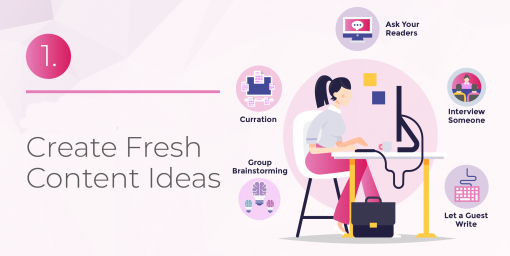
22 Ways to Create Fresh Blog and Article Ideas
Have you tried brainstorming and mind mapping and still need some creative content ideas for your blog or articles? Here are 22 ideas to get you out of your writer's block rut.
Have you tried brainstorming and mind mapping and still need some creative content ideas for your blog or articles? Here are 22 ideas to get you out of your writer's block rut.

Like this infographic? Get more content marketing tips from Copyblogger.

Fluffy Content is Bad Customer Service
Are you giving your clients and readers bad customer service by creating content that doesn't have enough meat? Here’s how to avoid fluffy writing.
I know I harp on this a lot, but I am going to say it again: Don't put fluff in your articles! I’m called the No-Fluff Writer for a reason. It’s because I like to get to the point and give readers what they are looking for without any extras.

Content fluff is bad customer service.
Fluff is content that really isn't saying anything helpful. It's basically used to fluff up the word count to appease the SEO Google gods, or a demanding client. Are you giving your clients and readers bad customer service by creating content that doesn't have enough meat?
Think about it while I tell you a little story.
Fluff and Angry Customers
The other day I was on Facebook and I saw a post by a popular women's magazine. I liked the title and preview linked in the post, so I clicked and read the article. IT. WAS. BAD.
The article was supposed to be about laundry secrets you just must learn ASAP. The article, though, gave washed up (no pun intended), old advice that anyone within their target audience would already know. A few old tips and done. Nothing meaty and useful to the reader.
I was curious to see what others thought of the article, so I clicked back to Facebook and looked at the comments on the post. Almost every single comment was about how basic the article was and how the title was very misleading.
Over the next week or so, I started checking the comments on other articles. The articles that I felt didn't live up to their title or gave simple information that most people already know had so many negative comments. What really shocked me was the multiple offenders. These publications continually drew in readers with flashy titles, then served up mediocre articles that left their readers yawning, confused, or even worse, angry.

Don't make your customers mad with crappy content.
Angry readers matter, my friends. Many of those ticked-off readers that I came across voted with their clicks. In the comments, they stated that they were unfollowing the website and/or canceling their subscriptions.
You know it didn't stop there, right? Those angry people probably told their friends, which probably lead to more bad feelings toward's the website and the brand.
How to Stop the Fluff that Leads to Bad Customer Service
Articles or blog posts aren't just a great way to bring in views to your site or your client's site. They are, in a way, a customer service. Sure, you aren't talking directly to potential customers to complete or help with a transaction, but you are talking to your customers. You're providing a service with your content.
If you don't spend time crafting a great piece that will be interesting to your readers and delivers on the promise made in the title, then you're giving them poor customer service. I don't need to tell you that poor customer service makes you lose customers. You know that already.

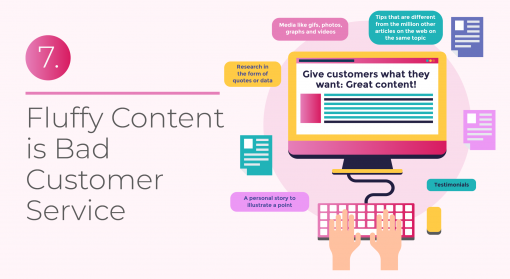
Give customers what they want: great content!
Here's the elements of a meaty article:
Research in the form of quotes or data
Tips that are different from the million other articles on the web on the same topic
A personal story to illustrate a point
Testimonials
Media like gifs, photos, graphs and videos
If you can't come up with ideas for new, interesting content, take a look at this article for tips. There is no reason for posting fluff. Just don't do it. Give your customers what they want.

20+ Free Ways to Get Photos and Multimedia Content for Blog Posts and Articles
There are plenty of websites out there that help you make your own GIFs, maps, charts, memes and more for free, in just a few minutes. There are also plenty of sites that let you use their multimedia content on your site.
Here are 20 of my favorites:

Search engines love when you use more than just text in your website content. Plus, media makes your content much more appealing to visitors, which is even more important. You don't want people to come to your posts, see nothing but boring text and click away!
Think creating multimedia content takes too much time? Don't worry. There are plenty of websites out there that help you make your own GIFs, maps, charts, memes and more for free, in just a few minutes. There are also plenty of sites that let you use their multimedia content on your site.
Here are 20 of my favorites:
Creative Commons for Creative Common photos
YouTube for embeddable videos
Easel.ly for infographics
PhotoPin for Creative Commons photos
DaFont for fonts
Office Sway for presentations
Pond5 for historic media files
Survey Monkey for surveys
NVD3 for charts
Mapbox for maps
OpenClipArt for clip art
GetEmojis for emojis
Pexels for modern, clean photos
PhotoPin finds Creative Commons photos
MapBox for maps
Microsoft Sway online visual creator for newsletters and more
Pexel Videos for free stock videos
Pikwizard.com is a free stock photo website
Also, here's a nifty way to make YouTube videos into GIFs:
Do you have any sites that you really like? Don't be shy! Share those suckers!

What is SEO: A Step-by-Step Guide for Writers
SEO is a big deal for writers that want to make money writing articles and blogs online. Without SEO skills you won't keep up with your competition. You've probably seen job ads looking for writers that know SEO. If you don't know what those three letters mean, don't worry. I'm here to help!
What is SEO?
SEO is an abbreviation for search engine optimization, which, in a nutshell, means anything that helps a search engine find an article and rank it on the first page of search results. Go to Google and search for your favorite topic. See the first result? That article has excellent SEO. Some sites hire companies like whitehat-seo.co.uk to build their site rank, but most rely on writers like us.
So, how do you get these magical results? Well, only so much of it is in the hands of the writer. A lot of SEO has to do with the website's reputation. I'm going to cover what you, as a writer, needs to know about it to make your articles rank.
What is seo
Research Keywords
The first thing you do before you write an article is to research. Now, as an expert on your niche, you should have a pretty good idea about what people want to read. There's more to it than that, though. Keywords are a big way search engines know what your article is about and how to rank it in search.
To research keywords, go to Google Keyword Planner> Go to Keyword Planner > Discover new keywords. Then, type in a word or phrase that describes what you want to write about and click, Get Started.
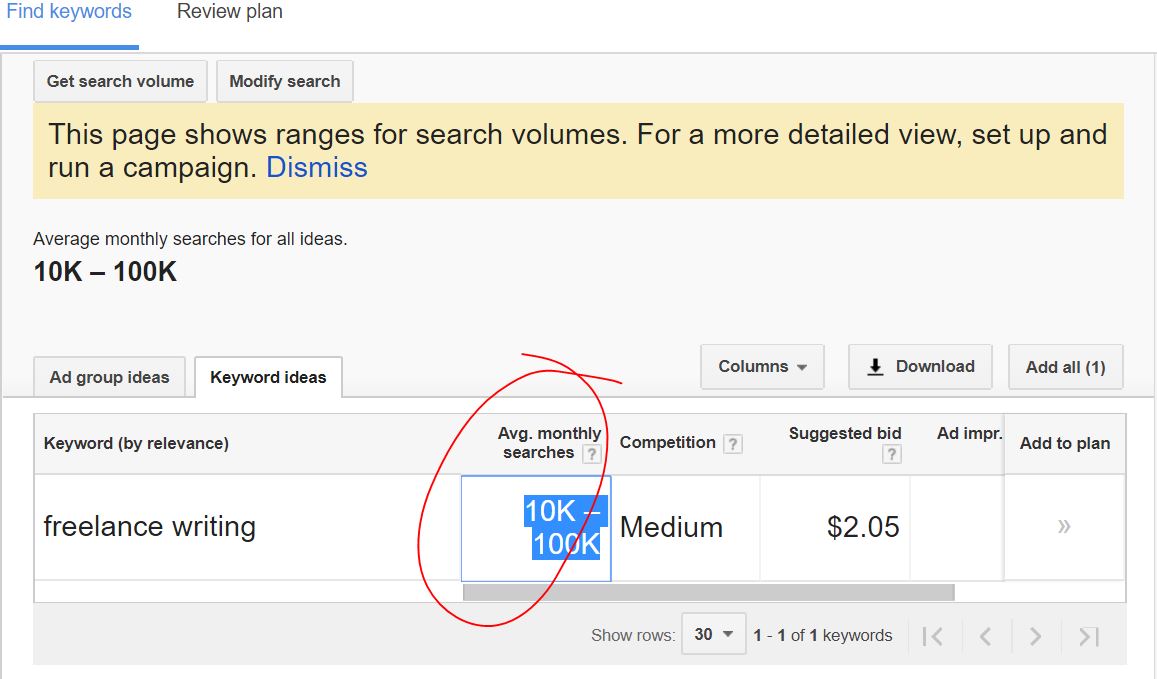
tips for seo keywords
A list of keywords will pop up. Look for keywords and phrases that have 10 to 100 thousand monthly searches. This means that people are actively typing these keywords into Google each month looking for articles on the topic. And in turn, Google actively searches for articles that provides information on these topics.
So your articles should have keywords here and there throughout. Most of the time, keywords will naturally pop up in your writing. You don't really need to think about it too hard.
Just be sure that:
You have a keyword in the title of the article or post and that it is close to the beginning
There is a keyword in the name of the image files you use and in the captions
Keywords are in the headings
There is a least one keyword in the first or second sentence of the post
DO NOT litter your article or post with keywords, though. Other than the areas I've highlighted, let them come naturally. If you spam an article with the same words over and over you'll get a penalty, which will make your post rank lower in searches.
SEO-Friendly Headings
Now you know that your posts should have keywords in the headings, but there is one more thing you should know. All of your headings should have H2 or H3 tags in the code. Search engines look at your heading to figure out what your article is about. These tags help search engines know where your headings are.
Don't freak out! You don't need to know coding. Most post editors and word processing software, like Word, have heading options. Just highlight your heading, tap on the H2 or H3 heading option and you're golden. The tag will be automatically added to the code.
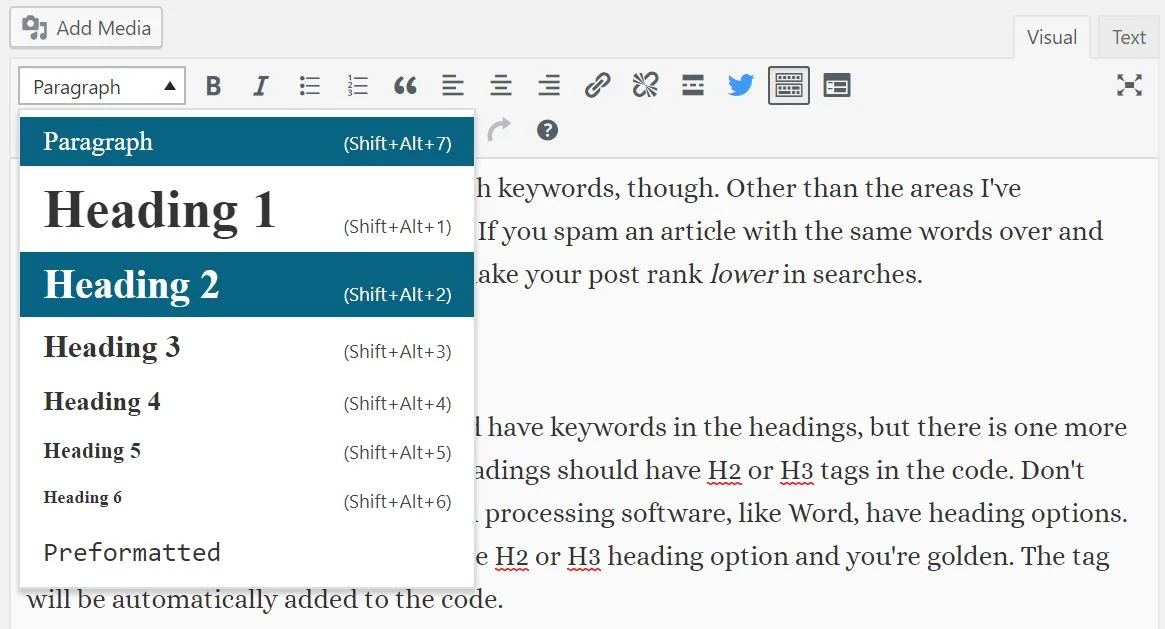
wordpress headings
Add Media
Search engines LOVE media. Media in a post tells the search engines that you are providing added value to the reader.
The rule is to add at least two images to your post for good ranking, but the more the merrier. Some media you can add to a post are:
Embedded YouTube videos
Gifs
Image galleries
Audio recordings
Videos of yourself explaining a concept
Infographics
Memes
Surveys
Maps
Where do you get quality media? Here are some free places I use:
Consider Length
The length of your post or article makes a difference, too. Search engines seem to prefer posts that are 400 words or more. The longer, the better, though. Once again, search engines are looking for value.

Best Article length
If you have a post that is a gallery of images and very little words, don't worry. If there is a lot of media it seems to cancel out the word count requirement.
Quality Links Make SEO Better
Finally, you need to add quality links in your articles. Link to reputable sites throughout your articles.
So reputable websites that search engines love are:
Government sites like the FDA, National Library of Health, or the CDC
Groups like the World Health Organization, American Dental Association or the American Cancer Society
Science and health journals and magazines like JAMA and Scientific American
Trusted health sites like the Mayo Clinic
University websites
Search engines like it when the link is embedded in words, not just a typed out address. Here is an example:
Bad- The site https://moz.com/beginners-guide-to-seo has some good tips for search engine optimization.
Good- The Moz site has some good tips for search engine optimization.
Just highlight the words and click on the link tool in the post editor or word processing software to embed your link.
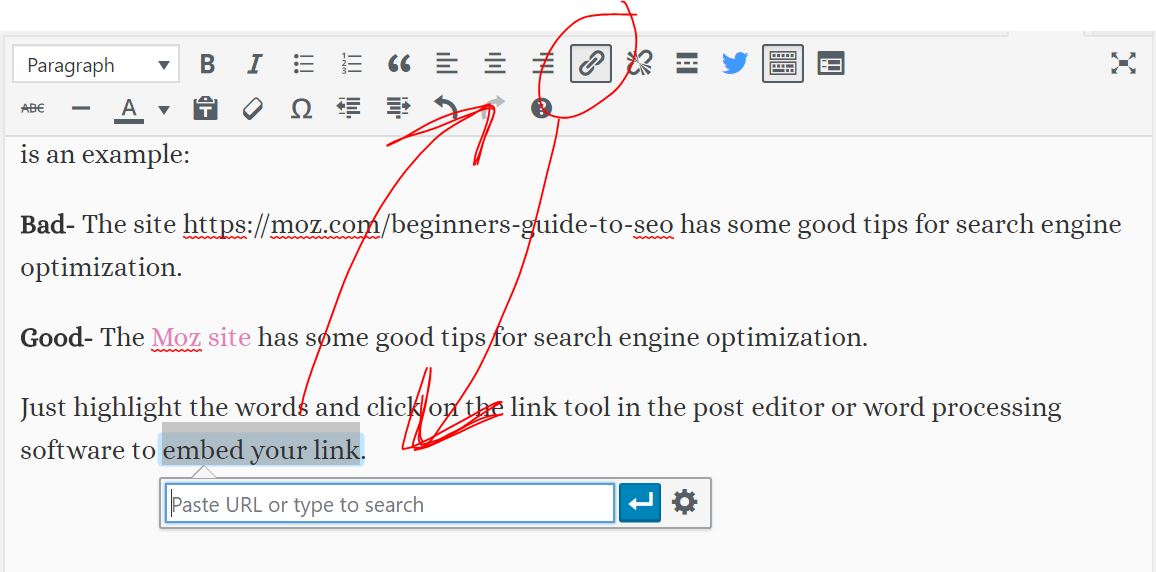
linking for seo
Also, make sure you link to other articles or blogs on your site. Try to put two links to your own content in the first two paragraphs of every piece.
Be a Good Writer
Search engines also rank posts higher if they contain good spelling. This should go without saying, since you're a professional writer and all, but ALWAYS check your spelling.
That's It!
That's basically all writers need to know about SEO. Remember, as long as you're thinking about your reader and providing quality, then most of your worries are taken care of already.
Want to know how to get more clients and become a well-paid writer? Read my book!
The Fluff-Free Freelance Writing Master Course: The only course that gives you concrete, actionable information to building a successful freelance business without any fluff.

7 Ways to Make Your Site Traffic Soar in 2019
If you're looking for more traffic to your website in 2019, get going. It won't happen on its own. Here's what you need to do to make 2019 your blog or website's best year yet.
Update Your Content
With changes in rules, regulations, laws and the way technology is advancing at an amazing pace, something you wrote on your website 6 months ago could be totally out of date and mislead anyone that reads it. You need to reread all of the past articles and blogs and update any of them that fall into this category. Search engines will see the post as still being relevant and that can help with your SEO rankings.
The trend seems to be that long articles attract more attention too. One that is between 2000 and 3000 words gives the impression of being more informative than a 500-word blog and this means that more people go to your site to read it. Of course, don't stretch out articles or blog posts unless you have great information to add. Remember my manta: No fluff!
Optimize Your SEO
It is no secret that SEO is one of the most successful ways to drive traffic to your website, but the way SEO works changes all the time. Some of it has to do with keywords. Search engines try to discover the topic of a piece by looking for keywords in the article. If you use keywords no one is looking for, then your article will rank poorly. On the other hand, if you use too many keywords, your article will also tank.
SEO
They also look for other sites that have linked to the article and how well it is shared on social media. When the information, and it's good, they move you up the rankings. As most people only look at the first couple of pages of search results, the higher you are in the rankings the better.
There is more to it than written content though. As technology has advanced so have the capabilities of the tools used by the search engines. They can now take account of video and image content as well, and can even move you up the rankings if you get a good amount of followers on social media.
To learn more about SEO, check out my step-by-step article.
Use Ads to Move Up the Rankings
Most times, when you put something into your search engine, the top few results will say ‘ad’ at the side. This is because businesses have paid to be in one of the top spots. This can be well worth the money invested because then your page is much more likely to be linked to by viewers, raising your rank.
This is just one way the likes of resources such as Google Ads can help to increase the traffic to your website and with Adwords scripts collection you will have an automated service that will control your Google Ads data. That way, you can do more and reach more people with less effort.
Make the Most of Social Media
Social media is a must for all businesses. It is a vital way of getting your brand known and of sending more traffic to your website.
You should post every day, at least, but do not make all your posts promotional. If you do, users will start to scroll past your posts without bothering to read them. One promotional post out of five is a good rule. Some people post 20 percent promotional content and 80 percent other content. Your mix will depend on your target audience.
Don't just use memes, photos and text posts. Videos are sometimes the best way to attract attention to your brand, and if they contain some humor they are likely to be shared many times.
Always respond to any comments in a positive manner, as this will help to build trust in your business. Nobody wants to deal with rudeness.
Also, put a link to your site on all your posts, and then you will get people go to it more often. Here's an example of how I do that on Instagram. When they get to your website, it should be engaging immediately. You only have 3 or 4 seconds to grab their attention and if your website does not do that, they will move elsewhere.
Email Marketing
Email marketing fell out of favor for a while but now it is back. It is a great way to stay connected with existing customers or to make connections with new ones. Each email has to be of interest or solve a problem for your audience, and it should always have a link to your website included.
There are online resources that will send out thousands of these for you at very little cost. You set the email up, add new email addresses, and they do the rest.
Run a Contest
Running a contest is a great way to attract new traffic. You just have to make linking to your site as one of the rules of entry. Another rule is they must enter with their email address so you can add this to your mailing list.

Consumers of all ages love something for nothing and if the prize is something they would like they will not only enter themselves, they will share it so their friends and family can enter as well. It seems from surveys that the favorite prizes have something to do with travel or something digital. The cost of putting someone up in a hotel for a few nights is nothing compared to the amount of new traffic these competitions can bring to your website.
Optimize for Mobile First
Around 80 percent of internet use is done on mobile devices. This percentage is likely to grow, as smartphones have become little more than handheld computers. There is very little you cannot do on a smartphone now and so it makes sense to optimize your site to suit them before anything else.
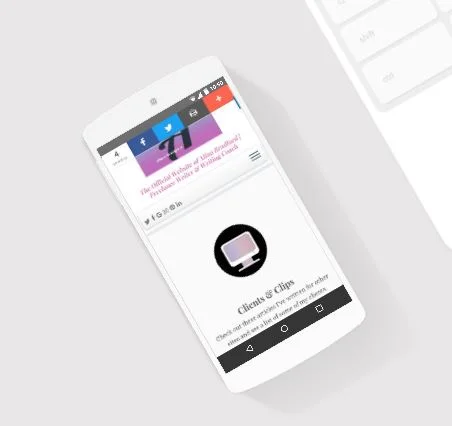
mobile optimization
Make Sure Your Business Deserves the Attention
It is no use in increasing your website traffic if once viewers get there the quality of the product or service is not up to standard. You have to ensure that your business deserves all the extra attention you are attracting and that it can cope with the extra sales when those viewers convert to customers.
Above all else, you have to give them a good buying experience if you want them to become loyal customers for the future. Keeping customers is as important as finding new ones, less time consuming than finding new ones and much cheaper than finding new ones. Look after the customers you already have, implement some of the suggestions above and your business will flourish.

Making Your Blog More Professional
When it comes to the world of blogging everyone and their dog has a blog, but only very few make it into the big bucks. Many people can earn an okay living, working with brands, getting paid for writing content and links. And that is great, but what about making sure that when you are creating things for your blog, they are eye-catching and useful? It isn’t just about what you say it is also about how you present it. If you have a black webpage with tiny yellow typeface no one is going to stick around to see how to make a million bucks, are they? No. When it comes to the design of a blog, it should be clean, professional, and mobile-friendly. But, what else? Let’s take a look.
Font
Use a clear font, and once you have found the one that works for you, you should be using it across all of your content. If you struggle to find what you like in terms of the font, then take a peek at the typeface app to help you select the perfect font, and then create assets to use across your channels.
Clutter
Get rid of the clutter. While you might be looking to make your blog your primary source of income, having a lot of inline ads, pop-ups and other flashy items are likely to put your reader off. You can buy (or write the code for) a theme that will have dedicated spaced for ads. They will maximize your income without cluttering up your content. If in doubt? Put them in the sidebar.
Images
Use full-width images. Having beautifully written content, filled with emotion or information will go to waste if your images are fixed width and small. The flow of the material, pretty much any content, will be much better when you use full-width images. It is much more aesthetically pleasing. Uniformity is beautiful.
Fold
You need to utilize above the fold. If you have a really large header, and then some adverts, you are forcing people to scroll down to read your content. It isn’t always a bad thing but think about how often you scroll down. Any content above the fold needs to be the hook, you need to tell people WHY they need to read the rest of the post. What does scrolling down give them?
Tests
Test it all out at least once a week. The code for some themes changes, plugins change, and everything updates. If you aren’t checking in on the content, you might find that people are having problems you weren’t aware of. When you perform a check use the menu to navigate through the blog, try scrolling down and see at what point your pop-ups arrive. All of this will benefit or inhibit your readers. The user experience is essential.
A well-presented blog will be a springboard to more. You might like to think of it as a continually updating CV where people can see your style, your writing, your ability to design and your understanding of SEO.

FlexJobs’ Survey Finds Some Fascinating Facts About Freelancers
Boulder, CO, Dec 4, 2018 -- Today FlexJobs released new insights from its November 2018 survey, which gathered responses from nearly 1,000 freelancers about key topics related to their freelance career, lifestyle and workstyle. Based on this survey, the profile of the average worker who freelances as their sole source of income is a female Gen Xer working in the writing, marketing, editing, and creative career fields, primarily for small companies and individuals, juggling 2-3 gigs at a time. She freelances by choice, has been freelancing for at least three years although has also worked at a traditional company, and envisions continuing her freelance career for the long-term.
“Some might think the freelance economy is growing because workers can’t find traditional jobs, but recent studies clearly indicate that workers are freelancing more and more out of choice -- they are proactively opting out of the traditional workforce,” said Sara Sutton, founder and CEO of FlexJobs. “This growing interest in and passion for the freelance economy is yet another indication that the 9-5 office arrangement isn’t compatible with much of the workforce’s lifestyle. In fact, only six percent say their freelance lifestyle wouldn’t be a big deal for them to give up, citing critical reasons such as maintaining work-life balance and having ownership over their flexible schedule,” Sutton concluded.
Interesting Freelancing Facts
Interesting highlights from workers that freelance as their sole source of income include:
More members of gen Xers (35%) and the baby boomer generation (33%) are freelancing as their sole source of income than millennials (22%)
The majority choose to freelance rather than have a traditional office job (63%)
Only 19% work more than 40 hours a week (the average American works 44 hours per week)
They work primarily for small companies (55%) and individuals (52%)
40% have 2-3 active gigs at one time; 23% focus on one gig at a time and 6% juggle more than 6 at a time
They find their clients primarily through networking (63%) and job sites (47%). 37% use social media
83% do most of their work at home, not at a coffee shop or co-working space
82% don’t use a use an outside service for bookkeeping purposes, such as to collect payments or track invoices
Only one-third have an official website to support their freelance business
Online courses (65%) and on the job (59%) are the primary ways they develop their professional skills
One quarter make more money as a freelancer than they did working a traditional job and 21% make similar amounts of money
Even though 52% make less money as a freelancer than they did working a traditional job, 68% are less stressed
Approximately half are saving for retirement (49%) and 69% have health insurance
Just 5% worry a lot that being a freelancer will hurt their career progression
Their biggest challenges are finding clients (69%) and predictable income flow (69%)
Freelancers without children are choosing to freelance rather than have a traditional job at a higher rate (48%) than freelancers with children 18 and under (38%)
People without children aren’t as worried that being a freelancer will hurt their career progression or prospects as freelancers with children. When asked if they worry a lot about this, 73% of freelancers without kids said not really vs only 59% of freelancers with kids who said they were not really worried.
Visit https://www.flexjobs.com/blog/post/freelance-survey-results-plus-companies-hiring-freelancers/ for the full report.
Places that Hire Freelancers
To help freelancers interested in finding freelance jobs, FlexJobs has also compiled the Top 30 Companies Hiring Freelance Jobs in 2018. Robert Half International, K12, and Facebook are among those hiring a high volume of freelancers this year. The list is based on an analysis of freelance job listings from over 50,000 companies in the FlexJobs database between Jan. 1, 2018 - Oct 31, 2018.
About FlexJobs
FlexJobs is committed to helping people find a better way to work. As the leading online service for professionals seeking remote, flexible schedule, part-time, and freelance jobs, FlexJobs offers opportunities in over 50 career categories, ranging from entry-level and executive to freelance and full-time. FlexJobs also sets itself apart by providing job seekers with a better, safer, and more efficient way to find professional and legitimate flexible jobs. Having helped over 3 million people in their job searches, FlexJobs has appeared in CNN, CNBC, Time, Forbes, the Wall Street Journal, Fast Company, and hundreds of other trusted media outlets. To further assist people in bettering their lives through flexible and remote work, FlexJobs' founder and CEO, Sara Sutton, has also launched two additional partner sites, Remote.co and 1 Million for Work Flexibility, to help provide education and awareness about the viability and benefits of remote working and work flexibility. Sutton is also the creator of The TRaD* Works Forum (*Telecommuting, Remote, & Distributed), dedicated to helping companies leverage the benefits of telecommuting, remote, and distributed teams.

25 Super Fun Gifts for Writers in 2018
Gifts for writers that they'll actually want and that I actually use in my own home office.
Gifts for writers that they'll actually want and that I actually use in my own home office.
I know shopping for writers can be difficult. We are a peculiar breed. So, I came up with an unusual idea. I looked around my office and compiled a list of all my favorite things. Then, I made an Amazon storefront where you can find all of the items, together, to make shopping a lot easier.
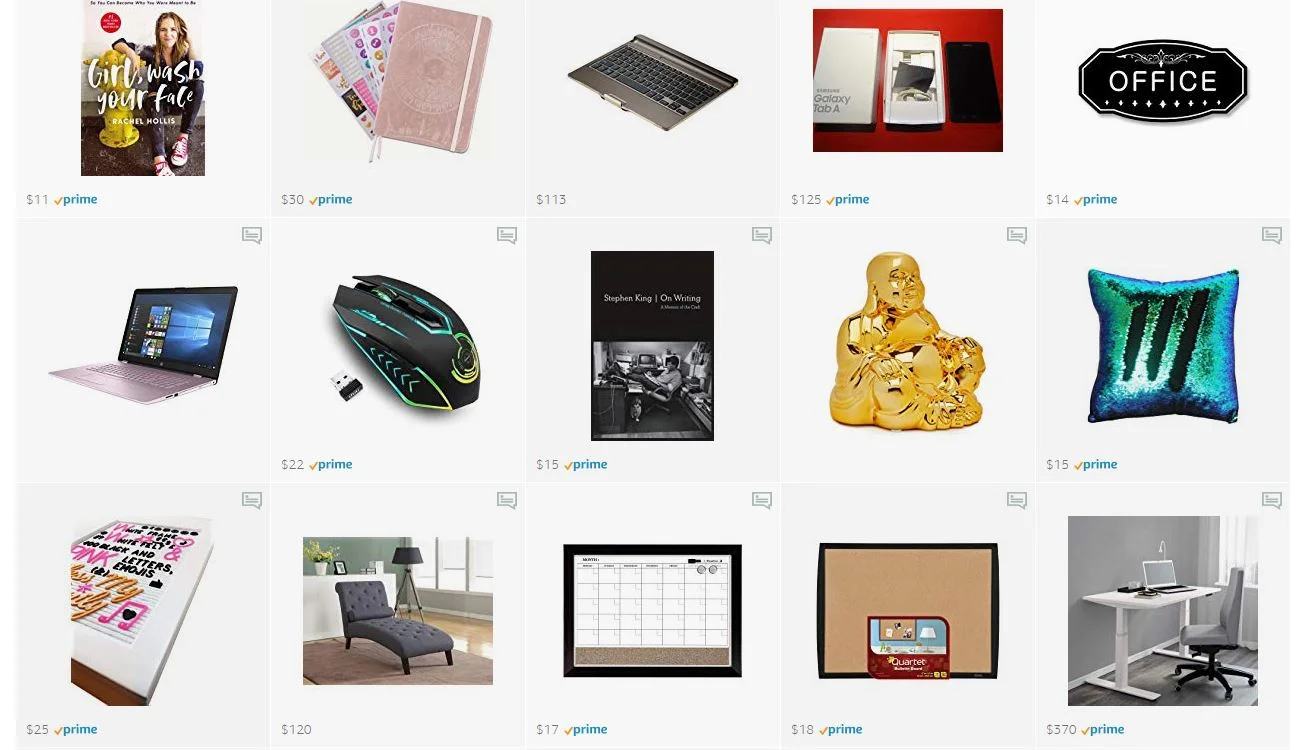
Yes, this is an affiliate link, but everything in my storefront is something I love and use as a writer. I also included little notes on each product to let you know which features I find particularly useful.
Plus, I added items that are super affordable and ones that are a little more luxurious so you can find the perfect gift that fits your budget.
Pro Tip: Don't be afraid to give a writer pens, markers and notebooks. Every writer I know is thrilled with this type of gift, even if they have dozens already!
Ready to check these gift ideas out? Here's the link:
Don't forget! A perfect gift for the freelance writer in your life, or yourself, is my book The Fluff-Free Freelance Writing Master Course Workbook.

Promotional Writing: Do's & Don'ts
Promotional writing is one of the most common forms of writing, but also one of the most difficult to do well. Unlike any other kind, promotional writing has to strike a balance -- you have to sell, but not too much. You have to be informative, but not to a point you render the item or service you are promoting irrelevant.

Achieving this balance is undeniably challenging, and one that many writers struggle with every time they try. However, while promotional writing is tricky, it’s also undoubtedly rewarding. If you can master the art of promotional writing, you can leverage this to your benefit; you could create and monetize a blog in order to generate a reliable income stream, or even look into copywriting for businesses. In order to help you achieve these goals, below, we’ve put together a list of “do’s” and “don’ts” that form the backbone of all good promotional writing…
Do… give people a reason to read
The key to promotional writing is to… not write promotionally.
Confused?
This statement may sound like nonsense, but there’s some real truth behind it: good promotional writing shouldn’t immediately be identifiable as promotional writing. Try to write as you normally would, rather than focusing on “converting” - readers can tell when they’re being sold to, so subtlety is always the best choice.
Don’t… oversell
If you’re promoting a product in order to earn revenue via affiliate marketing, then you’re going to want to write positively about that product - but don’t overdo it. There’s a difference between “positive and enthusiastic” and “laying it on too thick” - emphasize the good points you want to talk about, don’t write paragraph after paragraph about small, unimportant features or how a product or service changed your life. Again, subtlety is the key.
Do… make it useful and/or entertaining
When you write a promotional piece, ask yourself why someone would read it. If the only reason is “because they would learn more about this product or service I’m promoting”, then that’s a problem. All promotional writing should also be fun to read to read, or useful to the reader outside of the promotional information.
Don’t… fail to disclose
If you are writing copy directly for a company - as in, the company are paying you directly for the piece - then you don’t need to worry about disclosure.
However, if you are writing for the purpose of generating income through affiliate links, then you do need to disclose this. The laws regarding how you should disclose vary from country to country, so double-check for your specific area and ensure you follow the recommended disclosure policy accordingly.
Promotional writing can be one of the best ways of earning an income from your work, but can be notoriously difficult to get right. If you keep the above “do’s” and “don’ts” in mind, and keep practicing and refining your technique, you should find that you are able to master promotional writing once and for all.

Your Voice Can Change The World... But Who Can Hear It?
Blogging is a wonderful thing. It has been a huge and influential step in the democratization of our media. It has empowered many to shake off the shackles of wage slavery and go into business for themselves, turning their blogs into a steady source of income. What’s more, a blog can be an extremely potent marketing tool for the nascent entrepreneur. It can humanize their brand by giving them a voice and allow them to share their insights, experience and advice. This not only builds value in their brand but engenders trust in prospects, helping to facilitate conversions. For freelancers it can promote awareness of the services they offer and showcase their talents to prospective clients.
A blog can raise awareness of an important issue. It can help to promote a charitable cause. It can give a voice to the voiceless and enlightenment to the unenlightened. But in order for your blog to achieve it’s true potential, the right sets of eyes need to get in front of it. Here are some time honored ways in which bloggers of all shapes and sizes can ensure that their voice is heard by those who need to hear it the most.

eyes on your blog
Get to know your SEO
If you run a small business for which you blog, it’s likely that you’re familiar (at least in principle) with Search Engine Optimization. This means ensuring that your blog appears as highly on search engine rankings as possible to reach the people who are asking the questions to which you and / or your business provide answers. If you’re blogging to promote your small business or your freelance services, it’s recommended that you liaise with an SEO agency to help you to maximise your impact. However, if you don’t have the resources to do this, there are still a number of ways in which you can improve your SEO such as;
Install a plugin like Yoast that will help you to make your writing more SEO friendly.
Research your keywords to ensure that they make for maximum engagement.
Try to get trusted high authority domains like local businesses and newspapers to backlink to you.
Embed internal links throughout your content.
Join the community
Whatever your chosen niche, whether you’re writing for promotion or passion, it’s highly likely that your blog is aimed at a certain subculture of people who will have their own communities on social media platforms. Join these communities and be a reciprocal member. This means not just using the community to promote your own content, but also helping to promote that which others have created.
Develop a strategy
Many bloggers and businesses alike fail to get the most out of their blogs because they produce content on an ad hoc basis with no strategy behind it. This can prevent them from capitalizing on important opportunities like trending topics. Whatever your reasons for blogging, make sure that you have a clear content strategy that capitalizes on changes in user interest e.g. seasonally themed posts or posts that coincide with key events in your chosen industry.
Your voice has the potential to change the world. It’s just a case of making sure that the right people hear it.

How to Build Saleable Content in 10 Steps
If you want to be a successful freelance writer, you need to create content (articles, blog posts, etc.) that's quality. Here's how I do it and you can, too.
If you want to be a successful freelance writer, you need to create content (articles, blog posts, etc.) that's quality. Here's how I do it and you can, too.

how to write content
Here's more help for coming up with fantastic content ideas:
Need Creativity? Brainstorm by Sleeping
22 Ways to Create Fresh Content Ideas
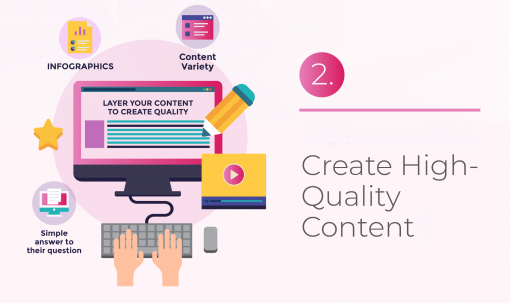
Here's some in-depth plans for creating quality:
30 day blogging challenge
Here's the link to my challenge:
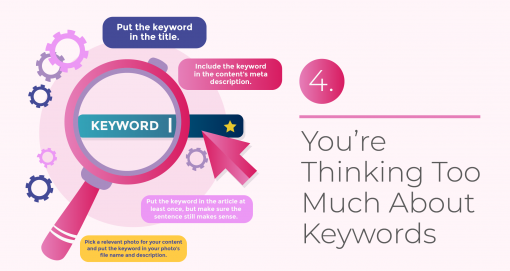
SEO tips
You can check out more keyword tips here:
SEO
Don't know much about SEO? Here are two guides for writers:
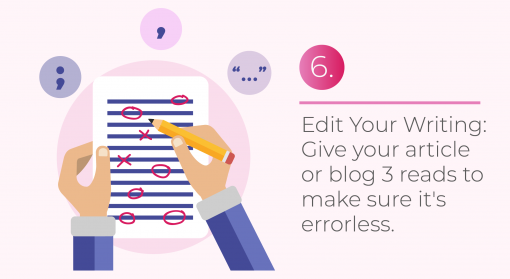
editing tips for articles
Get more editing tips, here:
Edit Your Writing: How to Use Commas, Quotation Marks and Semicolons
How to create quality content
Is your content fluffy? Read this article to find out:
your writing voice
Here's some help for finding your voice as a writer:
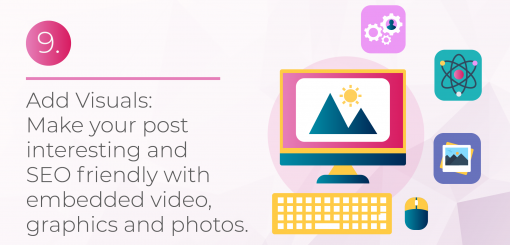
media for articles
These sites will supply you with tons of free visuals:
generic content original articles
Here are some final tips to prevent generic content:
Fight Generic Content: How to Create Interesting Posts
Want more ways to become a successful freelance writer? Read my book:

Is Your Website Hurting Your Brand In More than One Way?
Having a website is a good way of building your brand as a person and a professional. However, if you don’t get it right, you might be hurting your online image, and do more harm than good. Below you'll find a few tips on how to fix your poorly performing website and make sure that you are able to strengthen your brand, get the word out about your services, and cash in at the end.
Having a website is a good way of building your brand as a person and a professional. However, if you don’t get it right, you might be hurting your online image, and do more harm than good. Below you'll find a few tips on how to fix your poorly performing website and make sure that you are able to strengthen your brand, get the word out about your services, and cash in at the end.

Poor Design
The first thing visitors will notice when landing on your site is the design of your pages. If you're using a standard or a cheap old template, it might be time to get rid of it. Always check how your site looks on different screens, as chances are that some of the fonts will not be displayed correctly. This means that you will lose up to 50 percent of your visitors and your site will suffer from high bounce rates and low rankings in search engines.
Slow Speed
Another important thing you have to check is the speed of your pages. If it takes more than a second to load a page or a graphic, visitors are more likely to turn back. You might have an issue with your host or server, maybe you will need to reduce the size of images and files you display on your pages. Get in touch with vps europe to find better and faster hosting options for your needs.
Lack of Call to Action
If people don’t know what you want them to do once they land on your site, they will never take action. Make sure that you build an effective sales funnel that will convert online visitors into leads and eventually customers. You will need to automate your online communication and provide enough information for people visiting your site to make a decision whether or not what you offer is for them. This will make your entire marketing more effective.
Spelling Mistakes
If there is one thing that is the pet hate of blog visitors it is spelling mistakes. Most blogging platforms now have a built in spell check and grammar software, but if you are not confident that they will fix all the issues, you might sign up for Grammarly or Ginger and get rid of the mistakes that can annoy some of your readers.
Lack of Engagement
If you want to make your visitors love you and connect with your brand on a personal level, you might want to add a personal touch. This can be an anecdote a behind-the-scene interview, or a case study that will let people in and make them feel as if they knew you forever. Talk to your audience instead of simply publishing content, and you will get more interaction on your pages.
If you have an ugly, outdated, or low quality website, you can damage your brand and reputation for years to come. Fix the issues, check the page loading speed, and make sure that you deal with the grammar and spelling errors on the go. Feel free to share your website in the comments!

Is Your Back Killing You? Here Are 5 Tips That Can Help
He offers a few tips for those whose jobs require them to sit, sit and sit some more:
The work day ends, but the back pain doesn’t. Sitting all day at a computer takes a toll on our backs, yet for a large percentage of Americans (like us freelance writers!), sitting in front of a computer sums up their job description.

And that work-related back pain that starts out minor can soon become severe, causing problems in all areas of your life.
“The longer you have a back problem, the more damage it will create, the more it will resist getting better, and the more time it will take to heal,” says Bradford Butler (love that first name!), a chiropractor and author of The Blueprint for Back Pain Relief: The Essential Guide to Nonsurgical Solutions (www.drbradfordbutler.com). “So, the best course is to prevent back problems from happening to begin with.”
He offers a few tips for those whose jobs require them to sit, sit and sit some more:
Watch how you sit. Most people are putting pressure on their backs, necks and shoulders because they don’t work in an ergonomically correct position, Butler says. Here’s how to achieve the optimal position: Sit with your body no more than an arm’s length from the computer and mouse, and don’t lean your head and neck forward. You should be able to rest your hand comfortably on the mouse with the elbow at the same height as the mouse pad. The monitor should be 2 or 3 inches above eye level.
Choose the right chair. Ideally, you want a chair with lumbar support. “If there is no lumbar support, you can place a pillow behind your lower spine,” Butler says. Chairs that can tilt back also take pressure off the base of the spine and help prevent back pain. But if back pain has already started, Butler suggests placing ice between the lumbar support and the back for 20 minutes to reduce inflammation.
This is the chair I (Alina) use in my home office, in case you were wondering:

office chair for bad backs
Don’t cradle your phone. Have you ever pinned your phone between your shoulder and your ear so you can type while you talk? Butler has a one-word piece of advice: Don’t. “The intense strain from holding the phone that way for more than a couple of minutes can have a lasting effect on your posture and add to your back and neck pain,” he says.
Take a break. For about five minutes every hour, get up and move around. Take a walk, stretch or do anything that takes you away from the computer and lets your body escape all the sitting and staring you’ve been doing, Butler says.
Unload some baggage. Do you carry to work a bag or briefcase that’s so heavy even an Olympic weightlifter would feel the strain? If it weighs more than 10 percent of your body weight, then it’s putting too much of a strain on your back, Butler says. He suggests you lighten the load or get a different bag, preferably one with a long strap so it can be carried across your chest like a messenger bag. That can reduce the diagonal load on your back.
“It’s important to understand that your spine was designed to move,” Butler says. “If you are sitting for a good part of your day, you are effectively doing the opposite of what keeps your spine healthy.
“The old saying ‘an ounce of prevention is worth a pound of cure’ couldn’t be truer, especially when it comes to your back. Prevention is a mindset. You probably already do it in other areas of your life. When it comes to your back, you just need some new thinking and new habits.”
About Bradford Butler
Bradford Butler, a chiropractor and author of The Blueprint for Back Pain Relief: The Essential Guide to Nonsurgical Solutions (www.drbradfordbutler.com), is owner and director of Oakland Spine and Physical Therapy, which has three locations in northern New Jersey. Dr. Butler, a graduate of the New York Chiropractic College, has twice been named one of America’s top chiropractors by Consumer Research Council of America and his offices have received the exclusive NJ TopDoc Award for eight consecutive years.